
Credit Balances & Quota Management
WhiteStart operates on a centralized enterprise wallet system. A single organizational credit balance powers all outbound marketing broadcasts, automated conversational workflows, authentication OTPs, and customer support communications across every integrated channel.
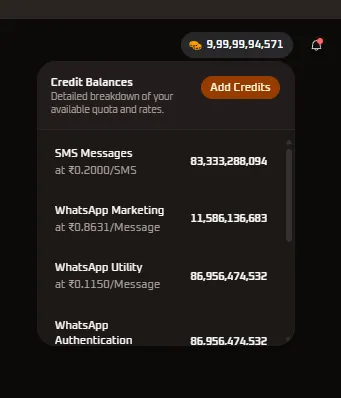
The top navigation bar features a persistent Credit Balances widget that provides real-time visibility into available funds, channel consumption rates, and projected message quotas.
Credit Wallet Overview
Section titled “Credit Wallet Overview”In the WhiteStart workspace, credits serve as the universal currency for communication consumption. Rather than maintaining separate, fragmented prepaid balances for SMS, WhatsApp, RCS, Email, and Voice, all usage is deducted from a unified pool.
Header Widget Display
Section titled “Header Widget Display”- Live Balance Badge: Positioned in the top navigation bar with a coin icon and real-time numeric balance (for example,
9,99,99,94,571credits). - Dropdown Trigger: Clicking the badge opens the Credit Balances popover window without navigating away from your active work screen.
- Add Credits Button: Prominent orange call-to-action button inside the dropdown providing direct access to the credit purchase and top-up checkout workflow.
Channel Rate Cards & Quota Conversion
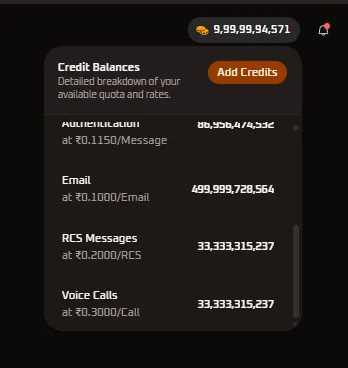
Section titled “Channel Rate Cards & Quota Conversion”The Credit Balances dropdown dynamically calculates exactly how many messages or calls your current balance allows across every active channel. Rates are calculated based on your workspace tier and carrier agreements.
Active Rate & Quota Directory
Section titled “Active Rate & Quota Directory”| Communication Channel | Rate per Unit | Available Quota (Units) | Billing Metric | Operational Description |
|---|---|---|---|---|
| SMS Messages | ₹0.2000 / SMS | 83,333,288,094 | Per SMS segment | Standard single SMS segment (160 GSM characters / 70 Unicode). DLT entity and template registration required. |
| WhatsApp Marketing | ₹0.8631 / Message | 11,586,136,683 | Per 24-hour conversation | Outbound promotional broadcasts, seasonal offers, and product announcements approved under Meta’s Marketing category. |
| WhatsApp Utility | ₹0.1150 / Message | 86,956,474,532 | Per 24-hour conversation | Transactional notifications including order confirmations, dispatch alerts, billing receipts, and account updates. |
| WhatsApp Authentication | ₹0.1150 / Message | 86,956,474,532 | Per delivery session | Time-sensitive One-Time Passwords (OTP) and multi-factor authentication tokens. |
| ₹0.1000 / Email | 499,999,728,564 | Per recipient dispatch | Direct SMTP / transactional email delivery with custom domain DKIM and SPF verification. | |
| RCS Messages | ₹0.2000 / RCS | 33,333,315,237 | Per delivered RCS event | Verified business profile rich messaging featuring hero images, carousels, and suggested action chips. |
| Voice Calls | ₹0.3000 / Call | 33,333,315,237 | Per connected minute | Outbound IVR campaigns, automated voice reminders, and text-to-speech voice broadcasts. |
Mathematical Quota Calculation
Section titled “Mathematical Quota Calculation”The available quota for each channel is computed automatically using the following formula:
Available Channel Quota = Total Available Wallet Balance / Rate per Channel UnitCalculation Example
Section titled “Calculation Example”With an active wallet balance of ₹16,666,657.62 equivalent in credits:
- SMS Quota:
16,666,657.62 / 0.2000 = 83,333,288 SMS segments - WhatsApp Utility Quota:
16,666,657.62 / 0.1150 = 144,927,457 utility sessions - Email Quota:
16,666,657.62 / 0.1000 = 166,666,576 emails
As team members send messages or broadcast campaigns dispatch, available units decrease proportionally across all channels in real time.
Credit Consumption Lifecycle
Section titled “Credit Consumption Lifecycle”WhiteStart safeguards campaigns against partial dispatches or overdrafting through a multi-stage credit verification process:
1. Pre-Campaign Validation
Section titled “1. Pre-Campaign Validation”Before launching a mass broadcast in Campaigns, the system calculates the exact required credits (Target Audience Count × Channel Unit Rate). If required credits exceed available balance, campaign launch is blocked, and an alert prompts the user to add credits.
2. Balance Reservation
Section titled “2. Balance Reservation”Upon campaign scheduling or launch approval, the required credit sum is placed in a Reserved state to prevent concurrent team broadcasts from exhausting the same pool.
3. Gateway Dispatch & Settlement
Section titled “3. Gateway Dispatch & Settlement”Credits are debited as messages reach carrier gateways:
- Successful Delivery: The reserved credits are permanently settled into workspace consumption history.
- Permanent Delivery Failure (Hard Bounce / Invalid Number): The gateway reports failed status, and the unused credits are automatically released back to the active balance.
Adding Credits & Managing Workspace Wallets
Section titled “Adding Credits & Managing Workspace Wallets”Organizations can replenish their credit balances at any time:
- Click the Credit Balances widget in the top navigation bar.
- Click the orange Add Credits button in the upper-right corner of the dropdown.
- Select from pre-configured credit packages or enter a custom recharge amount.
- Complete payment via credit card, corporate net banking, or UPI.
- Credits reflect immediately in your organization balance, accompanied by a downloadable tax invoice.
Related Documentation
Section titled “Related Documentation”- Organization Settings & Credits: Detailed audit logs of credit usage, consumption trends, and top-up transaction history.
- Billing & Invoices: Manage corporate GSTIN, legal billing addresses, and download monthly tax receipts.
- Upgrade to Pro: Review tier-based discounts on channel rates and enterprise volume pricing.