
User Authentication & Account Creation
WhiteStart provides a secure, streamlined authentication gateway that supports both traditional credential-based access and Google OAuth Single Sign-On (SSO). The authentication interface serves as the first step of the onboarding journey, enabling team members to establish new user accounts, verify organizational identities, and access workspaces securely.
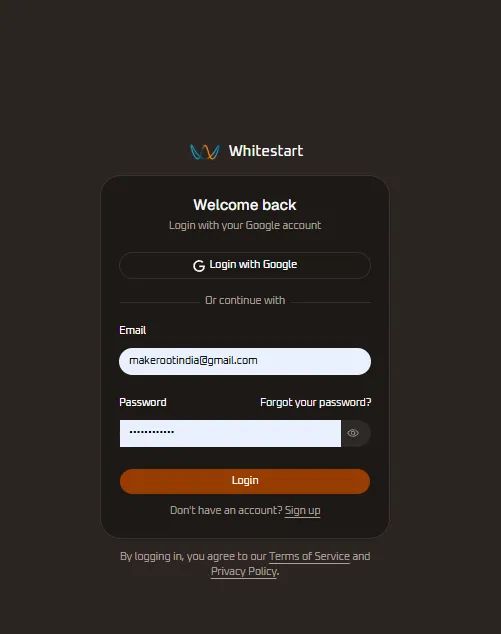
Overview
Section titled “Overview”The authentication layer governs identity verification and access permissions across all WhiteStart modules. Whether you are an account administrator setting up an enterprise workspace or a team member joining via an invitation link, authentication establishes your user session and connects you to authorized organizations.
Key Authentication Features
Section titled “Key Authentication Features”- Multi-Method Login: Authenticate using email and password credentials or one-click Google OAuth SSO.
- Consent Verification: Built-in compliance checkboxes authorizing transactional and operational notifications.
- Self-Service Password Recovery: Secure password reset workflows for recovering forgotten credentials.
- Session Token Protection: Cryptographically signed JSON Web Tokens (JWT) and secure HTTP-only cookies safeguarding user sessions.
Account Registration (Sign Up)
Section titled “Account Registration (Sign Up)”New users joining WhiteStart can create an account using the registration portal:
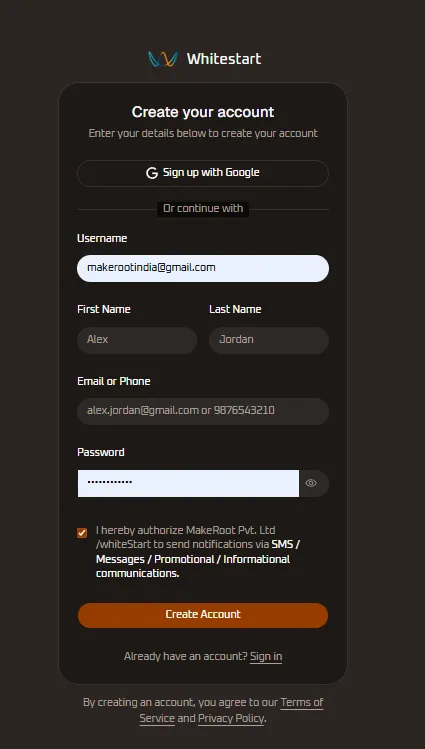
Registration Form Fields Reference
Section titled “Registration Form Fields Reference”| Field Name | Input Type | Validation Rules | Description |
|---|---|---|---|
| Username | Text / Email | Valid email or alphanumeric string | Unique account identifier used across platform services. |
| First Name | Text | 1 to 50 alphabetical characters | User given name rendered in greetings and assignment queues. |
| Last Name | Text | 1 to 50 alphabetical characters | User surname or organizational designation. |
| Email or Phone | Text | RFC 5322 email syntax or E.164 phone number | Primary contact channel for verification codes and account alerts. |
| Password | Password | Minimum 8 characters, mixed case, numbers, and symbols | Secure account credential with visibility toggle control. |
| Consent Checkbox | Checkbox | Mandatory acceptance | Authorizes MakeRoot Pvt. Ltd / WhiteStart to send operational and promotional messages. |
Step-by-Step Registration Procedure
Section titled “Step-by-Step Registration Procedure”- Navigate to the WhiteStart registration page.
- Select Sign up with Google for automated credential sync, or enter your details manually into the form fields.
- Provide your Username, First Name, and Last Name.
- Enter your primary Email or Phone Number.
- Input a secure Password meeting system complexity guidelines. Click the eye icon to verify input accuracy.
- Check the authorization checkbox: “I hereby authorize MakeRoot Pvt. Ltd / WhiteStart to send notifications via SMS / Messages / Promotional / Informational communications.”
- Click the orange Create Account button.
- Upon successful validation, the system provisions your user profile and routes you to the My Organizations directory or the Setup Wizard.
User Login
Section titled “User Login”Existing users can authenticate into their active workspace from the login console:
Authentication Portal -> Enter Email & Password -> Click Login- Enter your registered Email address (
[email protected]). - Enter your account Password.
- If you do not recall your credential, click Forgot your password? to trigger a secure reset link dispatched to your registered email.
- Click the orange Login button.
- The system validates credentials against cryptographic hashes and establishes an active authenticated session.
Google Single Sign-On (OAuth SSO)
Section titled “Google Single Sign-On (OAuth SSO)”WhiteStart integrates directly with Google Identity Services, allowing users to sign in without managing separate passwords:

Google OAuth Authentication Flow
Section titled “Google OAuth Authentication Flow”- On either the Registration or Login screen, click Sign up with Google or Login with Google.
- A secure Google account chooser modal opens (
accounts.google.com). - Select your desired Google Workspace or Gmail account (e.g.,
[email protected]), or select Use another account. - Google validates identity tokens and passes verified profile metadata (name, email address, and avatar image) back to WhiteStart.
- WhiteStart correlates the Google profile with your workspace memberships, bypassing manual password entry.
Session Security & Compliance
Section titled “Session Security & Compliance”Cryptographic Session Tokens
Section titled “Cryptographic Session Tokens”Upon successful authentication, WhiteStart issues an encrypted JSON Web Token (JWT) paired with an HTTP-only, secure cookie. Tokens maintain short lifespans and refresh automatically during active user interactions.
Terms of Service & Privacy Policy
Section titled “Terms of Service & Privacy Policy”Every authentication interface explicitly links to WhiteStart’s legal agreements. Registering or logging in confirms acceptance of platform terms, data processing agreements, and privacy commitments.
Next Onboarding Steps
Section titled “Next Onboarding Steps”Once authenticated, users proceed to:
- Organizations & Workspaces: Select an existing tenant workspace or create a new organization.
- Setup Wizard & Integrations: Configure communication channels, CRM tools, and messaging providers.