
Billing & Subscription
The Billing & Subscription console centralizes platform subscription management, legal corporate billing entities, messaging credit expenditures, and downloadable GST-compliant tax invoices.
Overview
Section titled “Overview”Maintaining accurate billing profiles and tracking payment histories is critical for accounting compliance, tax reconciliation, and uninterrupted service. The Billing dashboard gives administrators total visibility into active plan renewals, legal taxation credentials (such as PAN and GSTIN), and itemized transaction receipts.
Accessing the Billing Console
Section titled “Accessing the Billing Console”Main Sidebar -> Bottom-Left Profile Badge -> Billing- Click on the User Profile Badge in the lower-left corner of the sidebar.
- In the context popover, select Billing.
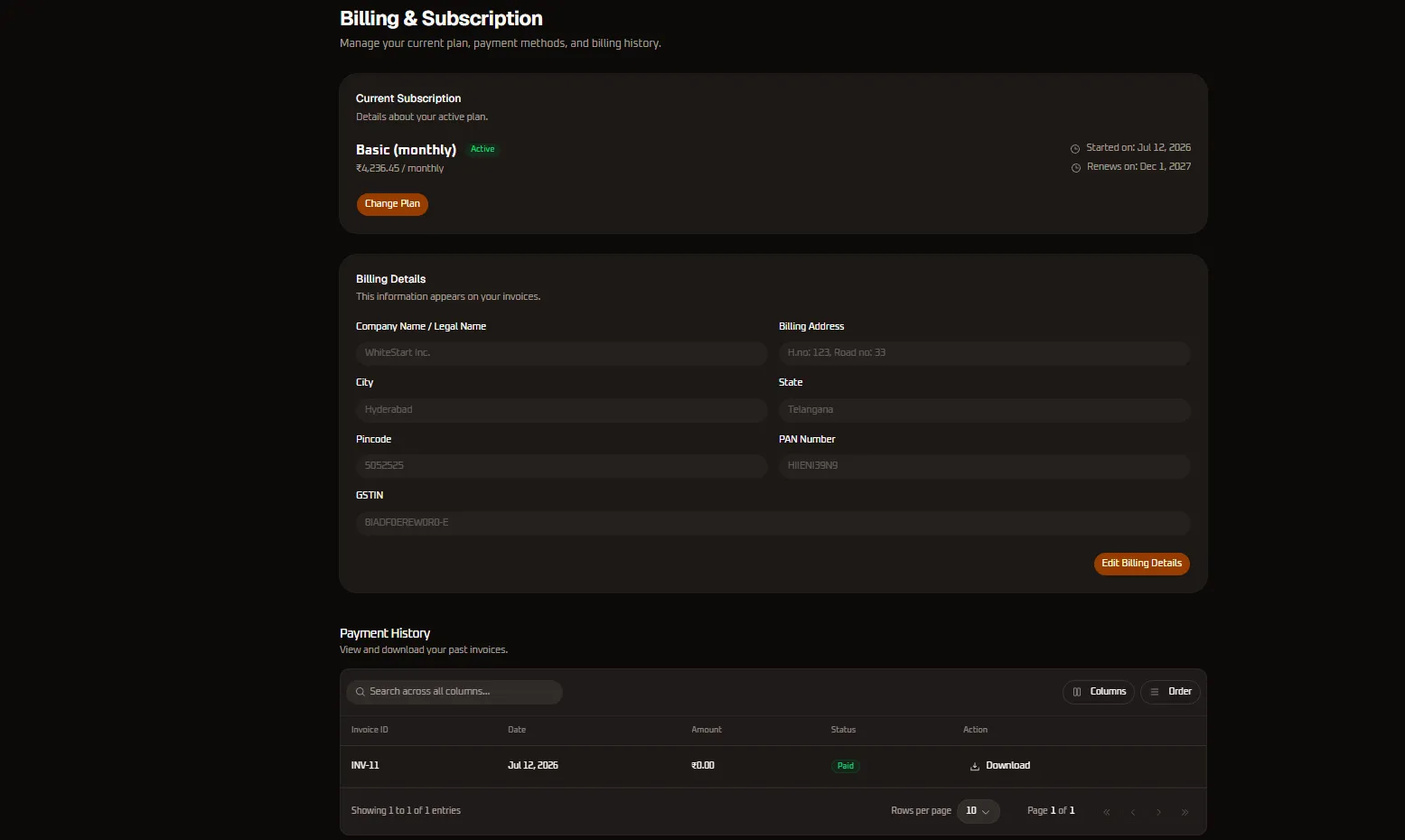
- The Billing & Subscription screen loads, organized into three functional sections: Current Subscription, Billing Details, and Payment History.
Configuration Sections Reference
Section titled “Configuration Sections Reference”1. Current Subscription Card
Section titled “1. Current Subscription Card”Displays live operational metrics for your active workspace contract:
- Plan Tier Name: Identifies the active tier (e.g.,
Basic (monthly)). - Plan Status Badge: Displays a green
Activetag confirming account validity and active resource quotas. - Recurring Cost Breakdown: Shows the net base subscription fee (
₹4,236.45 / monthlynet of taxes). Adding 18% GST (₹762.55) brings the total billed amount to₹4,999 / month. - Lifecycle Timestamps:
Started on: Jul 12, 2026: The original provisioning date of the current subscription cycle.Renews on: Dec 1, 2027: The scheduled date for automated recurring billing renewal.
- Change Plan Workflow:
- Clicking the orange Change Plan button opens the subscription migration portal.
- Upgrading Plans: If upgrading from monthly to annual or to an enterprise tier mid-cycle, WhiteStart automatically calculates the prorated difference for remaining days and issues an immediate adjustment invoice.
- Downgrading Plans: When scheduling a downgrade, your current tier features remain fully accessible until the current prepaid period expires, after which the account transitions to the new plan tier.
2. Billing Details Card
Section titled “2. Billing Details Card”The Billing Details card houses registered corporate credentials printed on all official billing receipts, tax invoices, and payment statements:
| Field Name | Example Value | Legal & Regulatory Purpose |
|---|---|---|
| Company Name / Legal Name | WhiteStart Inc. |
Official corporate entity name registered with the Registrar of Companies (ROC). Must match corporate bank accounts. |
| Billing Address | H.no: 123, Road no: 33 |
Physical registered corporate headquarters or business office. |
| City | Hyderabad |
Municipal taxation jurisdiction. |
| State | Telangana |
Determines tax allocation. Transactions within the same state attract CGST (9%) + SGST (9%), while interstate transactions attract IGST (18%). |
| Pincode | 505252 |
Postal routing code verified against postal authority databases. |
| PAN Number | HIIENI39N9 |
10-character Permanent Account Number mandatory for business expenditure claims and corporate tax filings in India. |
| GSTIN | 8IADFOEREWORO-E |
15-character Goods and Services Tax Identification Number required to claim Input Tax Credit (ITC) on software services under SAC 998313. |
Modifying Billing Details Workflow
Section titled “Modifying Billing Details Workflow”- Click the Edit Billing Details orange button in the bottom-right corner of the card.
- The card unlocks into editable input fields.
- Update legal company names, addresses, or tax identification numbers.
- Click Save Changes to commit updates.
- Important Invoicing Rule: Modifying your billing details applies immediately to all future generated invoices. Previously finalized and issued invoices remain permanently locked for accounting integrity.
3. Payment History & Invoices
Section titled “3. Payment History & Invoices”The Payment History card features a high-performance data table logging all financial transactions, credit pack purchases, and monthly subscription charges:
Toolbar Controls
Section titled “Toolbar Controls”- Search Input: Type into
Search across all columns...to filter transactions instantly by invoice code, date string, or total billing amount. - Columns Selector (
Columns): Toggle the visibility of specific table columns to customize views or prepare exports. - Order Filter (
Order): Sort records chronologically (newest to oldest) or by monetary values.
Table Attributes Reference
Section titled “Table Attributes Reference”| Column Header | Example | Purpose & Behavior |
|---|---|---|
| Invoice ID | INV-11 |
Unique sequential identifier assigned to the billing receipt in compliance with tax invoicing regulations. |
| Date | Jul 12, 2026 |
Date and timestamp when the transaction was completed. |
| Amount | ₹0.00 |
Net amount settled for the subscription period or credit top-up. Displays ₹0.00 for promotional trial grants or initial setup waivers. |
| Status | Paid |
Transaction settlement status badge: Green Paid, Amber Pending, or Red Failed. |
| Action | Download |
Clickable link to download an official GST-compliant PDF invoice with digital signature. |
Pagination Controls
Section titled “Pagination Controls”- Rows per page: Dropdown selector to display
10,25,50, or100records per view. - Page Navigation: Displays current page status (
Page 1 of 1) with first, previous, next, and last pagination arrows.
PDF Tax Invoice Structure
Section titled “PDF Tax Invoice Structure”Invoices downloaded via the Download link contain comprehensive accounting data required for corporate audits and tax filings:
- Header Section: WhiteStart corporate registration numbers, registered headquarters, GSTIN, PAN, and official contact information.
- Billed To Section: Your legal company name, billing address, state code, PAN, and GSTIN exactly as entered in the Billing Details card.
- Invoice Metadata: Sequential Tax Invoice Number, Invoice Date, Place of Supply, and Payment Reference ID (UTR / Gateway Transaction ID).
- Line Item Particulars:
- Service Description: SaaS Subscription Tier / Messaging Credit Pack.
- Service Accounting Code (SAC):
998313(Information technology software consulting and support services). - Taxable Value: Net transaction amount prior to taxes.
- Tax Apportionment: Itemized breakdown of Central GST (CGST @ 9%), State GST (SGST @ 9%), or Integrated GST (IGST @ 18%).
- Total Value: Gross invoice value in both numerical figures and words.
- Authentication: Cryptographically signed digital certificate verifying authenticity.
Messaging & AI Credit Wallet Overview
Section titled “Messaging & AI Credit Wallet Overview”While base platform access is covered by your subscription plan, communication channels and AI processing consume usage credits from your organization’s unified wallet:
- WhatsApp Business API: Billed based on Meta conversation categories (Marketing, Utility, Authentication, and Service).
- SMS Messaging: Billed per 160-character message segment based on regulatory DLT route configurations.
- RCS Messaging: Billed based on rich card delivery and verified enterprise messaging protocols.
- Outbound Dialer (OBD): Billed per connected voice call minute or pulse.
- AI Agents & Copilots: Deducted per token generated during automated response synthesis and smart categorization.
Recommended Auto-Recharge Setup
Section titled “Recommended Auto-Recharge Setup”To avoid automated campaign interruptions or paused chatbot responses, configure automated wallet top-up thresholds. When credit reserves fall below your designated safety limit (e.g., ₹1,000), the payment gateway automatically processes a recharge using your default payment method.
Financial Compliance & Auditing Guidelines
Section titled “Financial Compliance & Auditing Guidelines”Input Tax Credit (ITC) Reconciliation
Section titled “Input Tax Credit (ITC) Reconciliation”WhiteStart automatically files monthly GSTR-1 returns reflecting all issued B2B invoices. Ensure your organization’s GSTIN is verified so that credits appear seamlessly in your monthly GSTR-2B statements for complete tax credit offset.
Failed Payment Grace Period
Section titled “Failed Payment Grace Period”If an automated renewal payment fails (such as an expired corporate credit card), WhiteStart provides a 5-day grace period during which workspace services remain fully active. Email alerts are dispatched to the billing administrator with a direct link to settle the outstanding invoice.
Invoice Archival
Section titled “Invoice Archival”Corporate compliance standards require retaining commercial invoices for a minimum of 6 to 8 financial years. Download monthly PDF invoices and store them within your organization’s centralized enterprise resource planning (ERP) or accounting software (such as Tally, Zoho Books, or QuickBooks).