
Organization Billing & Tax Information
Manage your organization’s legal, address, and tax information for billing and invoices in WhiteStart.
How to Navigate to This Page
Section titled “How to Navigate to This Page”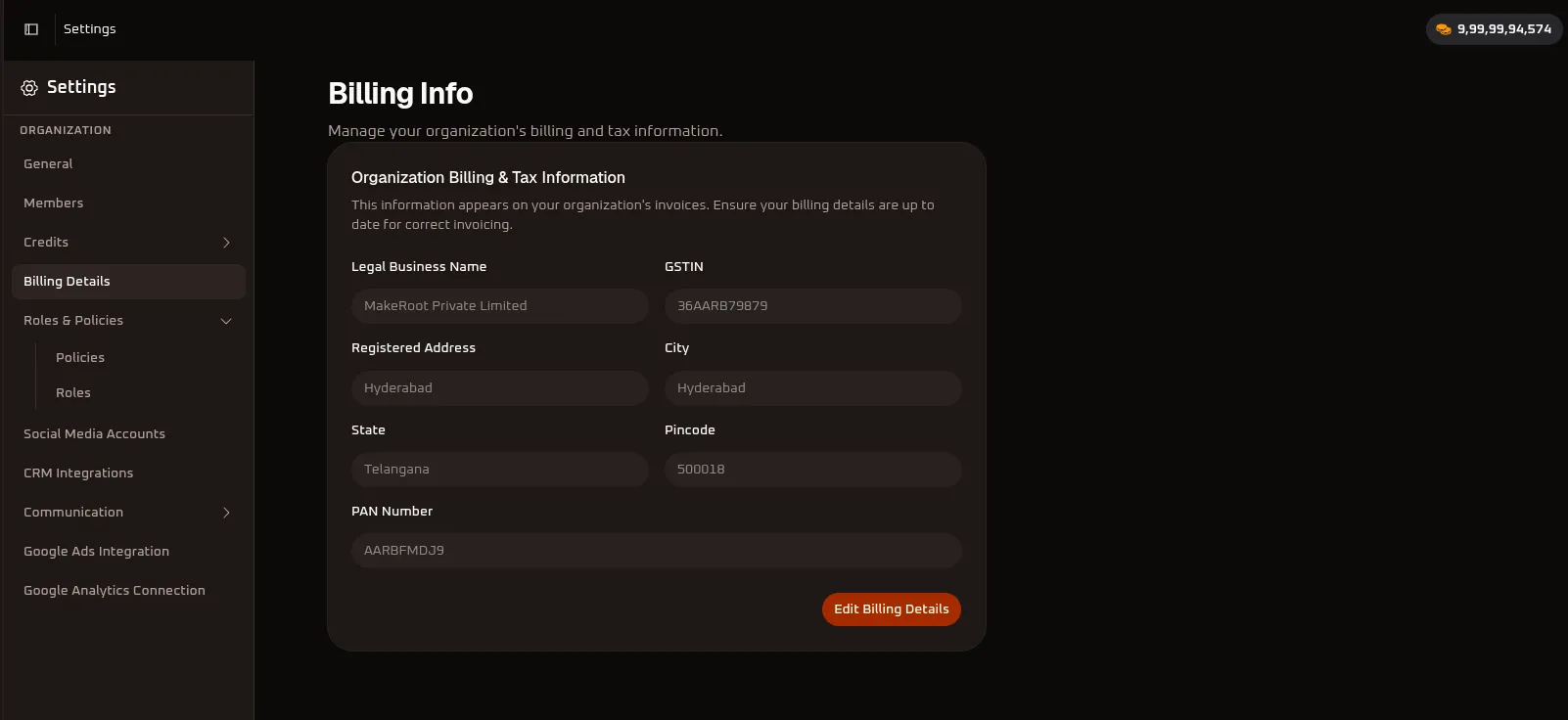
- In the left-hand main navigation bar, click on Settings (
⚙️). - In the secondary menu under the ORGANIZATION section, click on Billing Details.
- The Billing Info page will open.
Settings (⚙️) ➔ ORGANIZATION ➔ Billing DetailsRequired Fields & Descriptions
Section titled “Required Fields & Descriptions”| Field Name | Mandatory? | What It Is | Why It Is Required |
|---|---|---|---|
| Legal Business Name | Yes | Your company’s legally registered name (e.g., MakeRoot Private Limited). |
Required so invoices are legally addressed to your registered business entity rather than an individual. |
| GSTIN | No (Optional) | Your 15-digit Goods and Services Tax Identification Number (e.g., 36AARB79879). |
Required if your business is registered for GST and wants to claim Input Tax Credit (ITC). If left blank, invoices are treated as B2C without GST credit. |
| Registered Address | Yes | The official registered office or physical address of your business. | Mandatory on legal tax invoices to establish the location of the recipient entity. |
| City | Yes | The city where your business is registered (e.g., Hyderabad). |
Required for postal and geographic tax records. |
| State | Yes | The state where your business operates (e.g., Telangana). |
Mandatory for tax calculation. It determines whether CGST + SGST (intra-state) or IGST (inter-state) applies to your purchases. |
| Pincode | Yes | The postal code of your registered address (e.g., 500018). |
Ensures proper geographic validation on tax invoices. |
| PAN Number | No (Optional) | Your business Permanent Account Number (e.g., AARBFMDJ9). |
Used for tax reporting and TDS compliance verification where applicable. |
How This Information Helps in Billing
Section titled “How This Information Helps in Billing”- Compliant Tax Invoices: All WhiteStart subscription renewals, recharge plans, and credit purchases automatically generate invoices using these exact details.
- Claiming Input Tax Credit (ITC): Adding your valid GSTIN and registered State ensures that GST paid on WhiteStart services can be claimed as input credit during your monthly/quarterly tax filings.
- Correct Tax Calculation: Your State tells the billing system whether to apply inter-state tax (IGST) or intra-state tax (CGST + SGST).
- Official Accounting & Audits: Having your official Legal Business Name, PAN, and Registered Address ensures your financial statements, expense records, and audit documentation match your company bank account.
How to Update Your Billing Details
Section titled “How to Update Your Billing Details”- Go to Settings ➔ Billing Details.
- Click the Edit Billing Details button.
- Fill in or update your business name, address, and tax IDs.
- Click Save Changes.
Note: Any updates will apply to all future invoices and credit purchases.
Next Steps & Related Documentation
Section titled “Next Steps & Related Documentation”- Account Setup of Organization: Configure workspace branding, organization name, and general settings.
- Account Details & Profile Settings: Manage individual team member profiles, passwords, and 2FA.
- Connecting Channels & Integrations: Connect WhatsApp, telecom providers, social channels, and third-party CRMs.
- Dashboard Overview: Return to the organization overview and metrics dashboard.
- WhiteStart Introduction: Return to the Get Started index.