
Roles & Policies
Access Control & Security Policies
Section titled “Access Control & Security Policies”WhiteStart uses Role-Based Access Control (RBAC) to ensure team members have appropriate permissions for their specific workflows. Access governance is built on two primary components:
- Policies: Granular permission sets that define exact actions (View, Create, Edit, Delete) allowed within each platform module.
- Roles: Functional job containers that group one or more policies together and are directly assigned to team members.
1. Accessing Roles & Policies
Section titled “1. Accessing Roles & Policies”Main Sidebar ➔ Settings (⚙️) ➔ ORGANIZATION ➔ Roles & Policies- In the primary left-hand navigation sidebar, click on Settings (
⚙️) located near the bottom. - In the secondary settings navigation menu under the ORGANIZATION section, click Roles & Policies.
- The workspace will load with dedicated management sections for Policies and Roles.
2. Layout Structure & Core Architecture
Section titled “2. Layout Structure & Core Architecture”WhiteStart’s access control architecture separates permission definitions from role assignments:
+─────────────────────────────────────────────────────────────────────────────+| ROLE-BASED ACCESS CONTROL (RBAC) || || [ POLICIES SECTION ] [ ROLES SECTION ] || Granular Permission Rules Job Function Containers || • Module Permissions (CRM, Campaigns, Social) • Assigned Team Members || • Actions: View / Create / Edit / Delete • Attached Policy Sets || • [+ Create Policy] • [+ Create Role] |+─────────────────────────────────────────────────────────────────────────────+3. Managing Policies
Section titled “3. Managing Policies”The Policies section provides a centralized overview of all permission sets available in your organization:
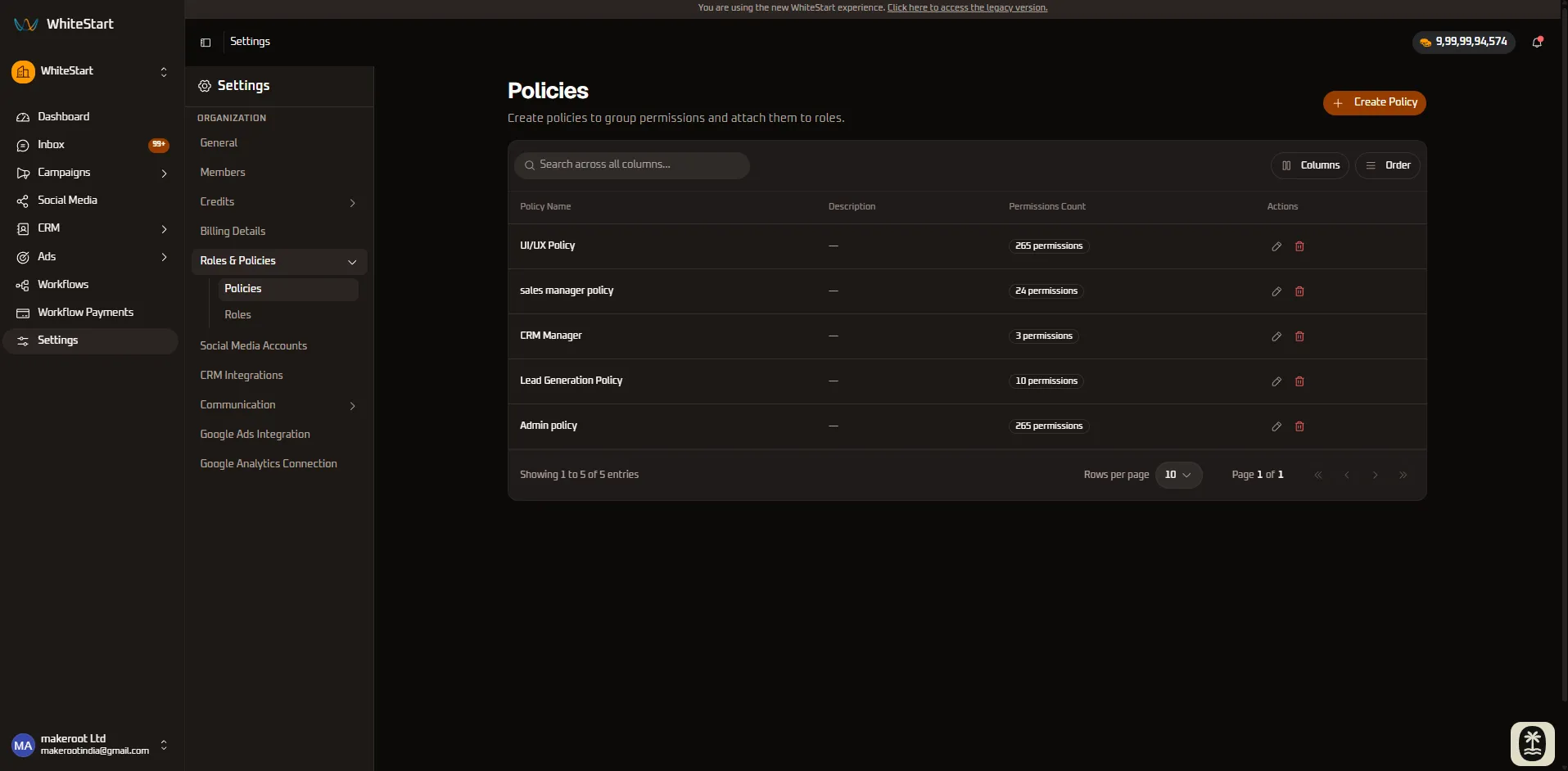
What You Can Do in Policies:
Section titled “What You Can Do in Policies:”- Inspect Policy Directory: View all default system policies and custom-created policies.
- Review Descriptions: Read descriptive summaries outlining what access each policy provides.
- Action Menu (
•••): Access options to edit permission matrices or delete obsolete custom policies.
Creating Custom Policies
Section titled “Creating Custom Policies”When default policies do not match your exact security requirements, administrators can build custom policies from scratch:
- Click the orange + Create Policy button at the top right of the Policies directory.
- In the Create New Policy modal, configure the policy parameters and permissions:
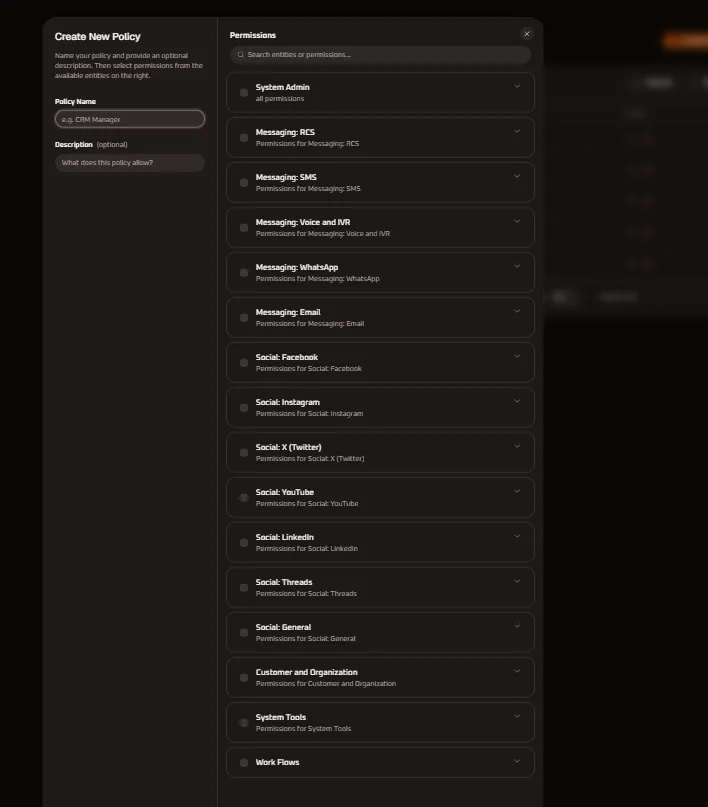
Policy Metadata Fields:
Section titled “Policy Metadata Fields:”- Policy Name: Enter a concise, functional identifier (e.g.,
CRM Manager,RCS Specialist,Social Media Lead, orAutomation Engineer). - Description (Optional): Provide a brief operational summary detailing what this policy authorizes (e.g., “Grants read and write permissions to live agent chat sessions and customer records” or “Authorizes LinkedIn company updates, sponsored boosting, and campaign ad analytics”).
+─────────────────────────────────────────────────────────────────────────────+| CREATE NEW POLICY |+──────────────────────────────────────┬──────────────────────────────────────+| [ LEFT PANEL: METADATA ] | [ RIGHT PANEL: ENTITY PERMISSIONS ] || | || Policy Name | [Q Search entities or permissions...] || [ e.g. CRM Manager ] | || | [ ] System Admin [v] || Description (optional) | all permissions || [ What does this policy allow? ] | [ ] Messaging: RCS [v] || | Permissions for Messaging: RCS || | [ ] Messaging: SMS [v] || | Permissions for Messaging: SMS || | [ ] Messaging: Voice and IVR [v] || | Permissions for Voice and IVR || | [ ] Messaging: WhatsApp [v] || | Permissions for WhatsApp || | [ ] Messaging: Email [v] || | Permissions for Messaging: Email || | [ ] Social: Facebook [v] || | Permissions for Facebook || | [ ] Social: Instagram [v] || | Permissions for Instagram || | [ ] Social: X (Twitter) [v] || | Permissions for Social: X... || | [ ] Social: YouTube [v] || | Permissions for Social: YouTube || | [ ] Social: LinkedIn [v] || | Permissions for Social: LinkedIn || | [ ] Social: Threads [v] || | Permissions for Social: Threads || | [ ] Social: General [v] || | Permissions for Social: General || | [ ] Customer and Organization [v] || | Permissions for Customer & Org || | [ ] System Tools [v] || | Permissions for System Tools || | [ ] Work Flows [v] || | Permissions for Work Flows |+──────────────────────────────────────┴──────────────────────────────────────+| [ Cancel ] [ Create Policy ] |+─────────────────────────────────────────────────────────────────────────────+Granular Entity Permissions: Complete Module Directory
Section titled “Granular Entity Permissions: Complete Module Directory”On the right-hand panel of the policy builder, permissions are structured into 16 collapsible entity groups. They are presented below in the exact sequence of the platform interface:
- System Admin — Organization metadata, customer schemas, and live agent chat session lifecycles.
- Messaging: RCS — Rich Communication Services broadcasts, carrier gateway accounts (JioCX, SmartPing, Sparc), and rich templates.
- Messaging: SMS — Bulk and transactional SMS campaigns, telecom gateways (JioCX, MSG91, SmartPing), and DLT templates.
- Messaging: Voice and IVR — Outbound dialer campaigns, interactive DTMF IVR trees, carrier voice SIP trunks, and audio libraries.
- Messaging: WhatsApp — Meta Cloud API WhatsApp Business Accounts (WABA), utility/marketing broadcasts, Live Inbox, HSM templates, and native Flows.
- Messaging: Email — Outbound SMTP connections, newsletter broadcasts, drag-and-drop HTML templates, and document attachments.
- Social: Facebook — Facebook Page publishing automation, boosted post promotions, Meta Ads performance reporting, Lead Ads CRM mappings, and Messenger chats.
- Social: Instagram — Instagram Professional account publishing, Reel insights, sponsored boost rules, and 1-on-1 Instagram Direct Messages.
- Social: X (Twitter) — Automated tweet publishing, thread sequencing, promoted tweet promotions, and developer OAuth 2.0 app authorization sessions.
- Social: YouTube — YouTube channel video upload automation, Community tab posting, video promotions, and YouTube Ad retention metrics.
- Social: LinkedIn — Corporate LinkedIn Company Pages, personal profiles, B2B sponsored updates, and Campaign Manager analytics.
- Social: Threads — Meta Threads profile integration, automated microblog publishing, thread scheduling, and boosted post promotions.
- Social: General — Unified cross-channel post composer, post media attachments, centralized brand media asset repository, connected ad accounts, and social channel OAuth bindings.
- Customer and Organization — CRM contact directory, custom field definitions, CSV imports, tenant administration, team members, invitations, RBAC roles/policies, billing plans, subscriptions, ledger transactions, credit wallets, CRM table preferences, Google Sheets sync, and customer notes.
- System Tools — Lead capture form builder, dynamic form fields, system broadcast notifications, generative AI copy studio, conversational bot sessions, and automated event triggers.
- Work Flows — Visual automation journey canvas, conditional decision branches, delay timers, and immutable workflow versioning.
Permission Search & Group Selection:
Section titled “Permission Search & Group Selection:”- Search Entities or Permissions: Use the search input (
Search entities or permissions...) to filter privileges in real time across all categories. - Batch Selection: Checking the top-level parent checkbox selects or deselects every permission in that category at once.
- Granular Accordion: Click the chevron arrow (
˅/˄) to expand any group and toggle specific capabilities individually.
1. System Admin Permission Specifications
Section titled “1. System Admin Permission Specifications”The System Admin entity group controls core workspace administration, CRM entity schemas, and Live Inbox agent chat session lifecycles:
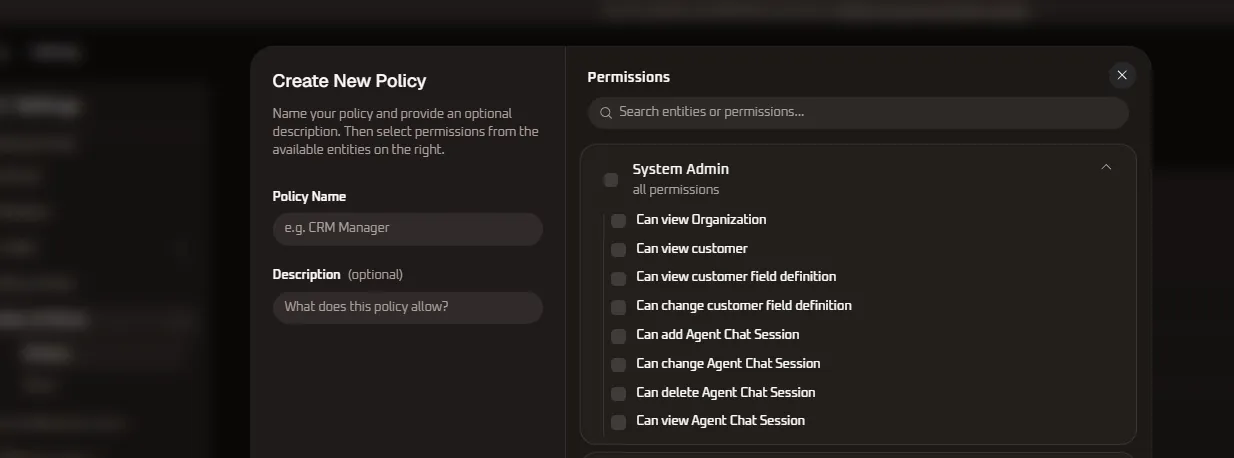
| Permission Name | Privilege Level | Functional Operational Scope |
|---|---|---|
| Can view Organization | Read-Only | Allows inspecting organization profile metadata, created date, and tenant identity. |
| Can view customer | Read-Only | Grants visibility into customer profiles, contact directories, and CRM histories. |
| Can view customer field definition | Read-Only | Authorizes viewing custom field schemas, lead attributes, and form definition lists. |
| Can change customer field definition | Administrative | Authorizes adding, modifying, and updating custom customer field definitions. |
| Can add Agent Chat Session | Operational | Enables agents to initiate and open new customer chat sessions in Live Inbox. |
| Can change Agent Chat Session | Operational | Grants authority to modify, transfer, or reassign active agent chat conversations. |
| Can delete Agent Chat Session | Destructive | High-level privilege allowing permanent deletion of agent chat records and transcripts. |
| Can view Agent Chat Session | Audit / Read-Only | Authorizes monitoring, reviewing, and auditing active or past agent chat sessions. |
2. Messaging: RCS Permission Specifications
Section titled “2. Messaging: RCS Permission Specifications”The Messaging: RCS entity group governs Rich Communication Services channel operations, carrier gateway provisioning (JioCX, SmartPing, Sparc), rich card template lifecycles, and outbound marketing campaigns:
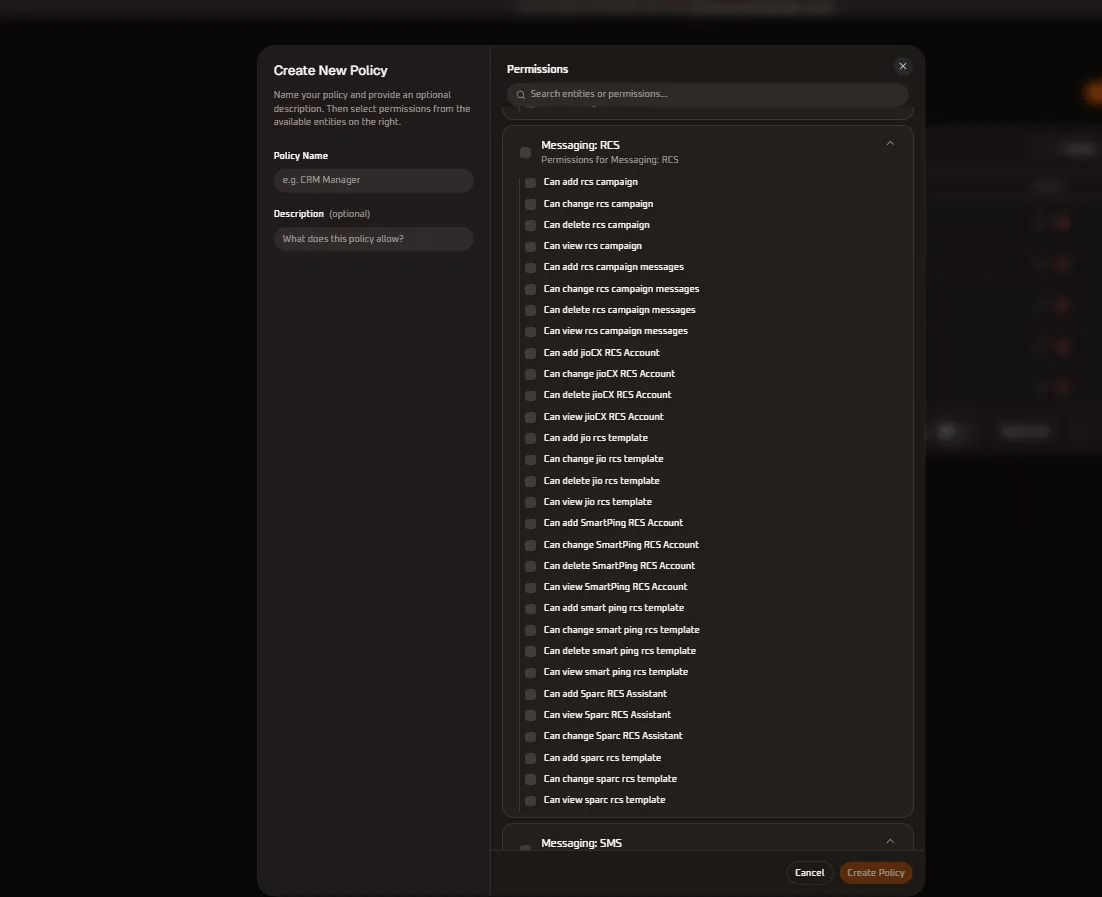
| Permission Name | Sub-Entity / Module | Privilege Level | Functional Operational Scope |
|---|---|---|---|
| Can add rcs campaign | RCS Campaigns | Operational / Create | Authorizes composing, scheduling, and launching new outbound RCS broadcast marketing and alert campaigns. |
| Can change rcs campaign | RCS Campaigns | Operational / Edit | Enables modifying campaign metadata, scheduling parameters, recipient segments, and delivery throttling. |
| Can delete rcs campaign | RCS Campaigns | Destructive / Delete | High-level privilege allowing cancellation and permanent deletion of queued, active, or archived RCS campaigns. |
| Can view rcs campaign | RCS Campaigns | Read-Only | Authorizes inspecting campaign dashboards, broadcast status indicators, recipient reach, and analytics reports. |
| Can add rcs campaign messages | Campaign Content | Operational / Create | Authorizes creating rich interactive message cards, carousels, and payload variants within an RCS campaign. |
| Can change rcs campaign messages | Campaign Content | Operational / Edit | Enables editing rich text copy, button action chips, media URLs, and suggested quick-reply actions. |
| Can delete rcs campaign messages | Campaign Content | Destructive / Delete | Authorizes removing individual message items, carousel cards, or payload drafts from a campaign. |
| Can view rcs campaign messages | Campaign Content | Read-Only | Allows inspecting preview payloads, rich media assets, button action configurations, and message transcripts. |
| Can add jioCX RCS Account | JioCX Gateway | Gateway Admin | Enables registering and authenticating a new JioCX RCS carrier business account with API credentials. |
| Can change jioCX RCS Account | JioCX Gateway | Gateway Admin | Authorizes modifying JioCX bot identifiers, agent credentials, webhook callback URLs, and connection settings. |
| Can delete jioCX RCS Account | JioCX Gateway | Destructive / Gateway | High-privilege action to disconnect and permanently delete a configured JioCX carrier gateway integration. |
| Can view jioCX RCS Account | JioCX Gateway | Read-Only | Authorizes inspecting connected JioCX bot accounts, carrier verification statuses, and connection health metrics. |
| Can add jio rcs template | JioCX Templates | Content Admin | Authorizes drafting and submitting new rich card and carousel message templates to JioCX for carrier approval. |
| Can change jio rcs template | JioCX Templates | Content Admin | Authorizes updating template text, button action chips, and resubmitting templates to JioCX for re-validation. |
| Can delete jio rcs template | JioCX Templates | Destructive / Content | Authorizes decommissioning and permanently deleting approved or draft JioCX RCS message templates. |
| Can view jio rcs template | JioCX Templates | Read-Only | Grants read-only visibility into the JioCX template library, review status flags, and variable bindings. |
| Can add SmartPing RCS Account | SmartPing Gateway | Gateway Admin | Enables provisioning and authenticating a new SmartPing RCS carrier account using API tokens. |
| Can change SmartPing RCS Account | SmartPing Gateway | Gateway Admin | Authorizes modifying SmartPing carrier endpoints, authentication headers, sender credentials, or webhooks. |
| Can delete SmartPing RCS Account | SmartPing Gateway | Destructive / Gateway | High-privilege action to disconnect and remove an active SmartPing RCS carrier integration. |
| Can view SmartPing RCS Account | SmartPing Gateway | Read-Only | Grants read-only visibility into connected SmartPing accounts, balance allocations, and service uptime. |
| Can add smart ping rcs template | SmartPing Templates | Content Admin | Authorizes composing and registering new rich media card and button templates for SmartPing gateway review. |
| Can change smart ping rcs template | SmartPing Templates | Content Admin | Authorizes updating button actions, call-to-action chips, and payload parameters for SmartPing templates. |
| Can delete smart ping rcs template | SmartPing Templates | Destructive / Content | Authorizes decommissioning and removing approved or rejected SmartPing RCS message templates. |
| Can view smart ping rcs template | SmartPing Templates | Read-Only | Grants browsing access to the SmartPing template repository, carrier approval logs, and variable schema. |
| Can add Sparc RCS Assistant | Sparc Bot | Bot Admin | Authorizes creating and provisioning a new Sparc conversational AI assistant bot for RCS. |
| Can view Sparc RCS Assistant | Sparc Bot | Read-Only | Authorizes auditing bot configurations, Sparc assistant profiles, dialog flow parameters, and activity logs. |
| Can change Sparc RCS Assistant | Sparc Bot | Bot Admin | Authorizes modifying Sparc bot intent handlers, fallback routing rules, prompt configurations, and triggers. |
| Can add sparc rcs template | Sparc Templates | Content Admin | Authorizes composing and submitting rich interactive response templates designed for the Sparc bot gateway. |
| Can change sparc rcs template | Sparc Templates | Content Admin | Authorizes editing existing Sparc RCS templates, interactive cards, suggested chip carousels, and deep links. |
| Can view sparc rcs template | Sparc Templates | Read-Only | Grants read-only access to browse the Sparc RCS template catalog and active conversational triggers. |
3. Messaging: SMS Permission Specifications
Section titled “3. Messaging: SMS Permission Specifications”The Messaging: SMS entity group provides granular control over Short Message Service broadcast campaigns, telecom gateway integrations (JioCX, MSG91, SmartPing), and DLT-registered message templates:
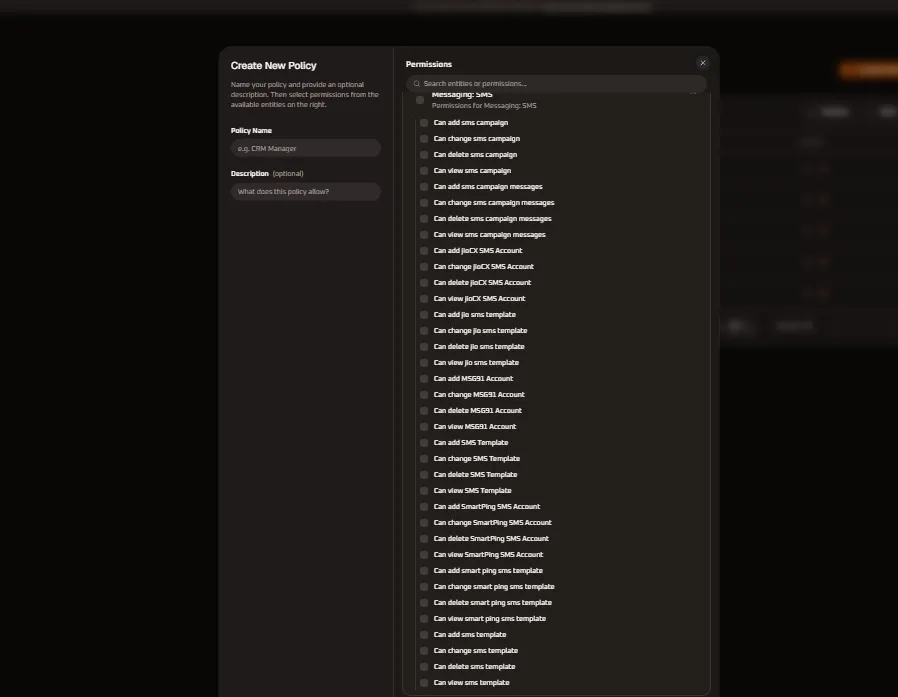
| Permission Name | Sub-Entity / Module | Privilege Level | Functional Operational Scope |
|---|---|---|---|
| Can add sms campaign | SMS Campaigns | Operational / Create | Authorizes composing, scheduling, and launching new bulk or transactional SMS broadcast campaigns. |
| Can change sms campaign | SMS Campaigns | Operational / Edit | Enables editing campaign schedules, delivery throttling, sender ID selection, and recipient segments. |
| Can delete sms campaign | SMS Campaigns | Destructive / Delete | High-level privilege to cancel and permanently delete scheduled, running, or archived SMS campaigns. |
| Can view sms campaign | SMS Campaigns | Read-Only | Grants read-only visibility into SMS campaign directories, delivery logs, sent counts, and failure rates. |
| Can add sms campaign messages | Campaign Content | Operational / Create | Authorizes composing SMS text messages, attaching dynamic CRM merge tags, and appending shortlinks. |
| Can change sms campaign messages | Campaign Content | Operational / Edit | Allows modifying queued message copy, dynamic variables, and fallback URLs before dispatch. |
| Can delete sms campaign messages | Campaign Content | Destructive / Delete | Authorizes removing individual queued messages or draft variations from an SMS campaign. |
| Can view sms campaign messages | Campaign Content | Read-Only | Authorizes inspecting SMS message drafts, previewing character counts, and viewing rendered merge variables. |
| Can add JioCX SMS Account | JioCX Gateway | Gateway Admin | Enables connecting and authenticating a new JioCX enterprise SMS gateway account. |
| Can change JioCX SMS Account | JioCX Gateway | Gateway Admin | Authorizes updating JioCX API credentials, header bindings, entity IDs, or delivery callback URLs. |
| Can delete JioCX SMS Account | JioCX Gateway | Destructive / Gateway | High-privilege action to disconnect and permanently delete a configured JioCX carrier SMS account. |
| Can view JioCX SMS Account | JioCX Gateway | Read-Only | Authorizes viewing connected JioCX SMS credentials, gateway uptime status, and credit balances. |
| Can add jio sms template | JioCX Templates | DLT / Content Admin | Authorizes registering new DLT-approved transactional or promotional SMS templates with JioCX. |
| Can change jio sms template | JioCX Templates | DLT / Content Admin | Allows updating registered template text variables, header associations, and resubmitting for DLT review. |
| Can delete jio sms template | JioCX Templates | Destructive / Content | Authorizes deleting obsolete or rejected JioCX SMS message templates from the platform catalog. |
| Can view jio sms template | JioCX Templates | Read-Only | Grants read-only visibility into JioCX registered template text, approved sender headers, and DLT template IDs. |
| Can add MSG91 Account | MSG91 Gateway | Gateway Admin | Enables configuring and authenticating an MSG91 SMS gateway integration with auth keys. |
| Can change MSG91 Account | MSG91 Gateway | Gateway Admin | Authorizes updating MSG91 sender IDs, routing routes (transactional/promotional/OTP), and webhook endpoints. |
| Can delete MSG91 Account | MSG91 Gateway | Destructive / Gateway | High-privilege action to disconnect and remove an active MSG91 SMS gateway integration. |
| Can view MSG91 Account | MSG91 Gateway | Read-Only | Grants read-only visibility into MSG91 integration health, delivery status feeds, and account configuration. |
| Can add SMS Template | Gateway Templates | Content Admin | Authorizes drafting and submitting standard multi-carrier SMS message templates. |
| Can change SMS Template | Gateway Templates | Content Admin | Enables editing existing SMS template bodies, fallback copy, and dynamic personalization tags. |
| Can delete SMS Template | Gateway Templates | Destructive / Content | Authorizes deleting deprecated or unused standard SMS templates from the organization library. |
| Can view SMS Template | Gateway Templates | Read-Only | Grants viewing access to the standard SMS template catalog, variable mappings, and character counters. |
| Can add SmartPing SMS Account | SmartPing Gateway | Gateway Admin | Enables registering and linking a SmartPing carrier SMS account using API credentials. |
| Can change SmartPing SMS Account | SmartPing Gateway | Gateway Admin | Authorizes updating SmartPing gateway credentials, telemarketer headers, and delivery webhooks. |
| Can delete SmartPing SMS Account | SmartPing Gateway | Destructive / Gateway | Destructive action to remove an active SmartPing carrier SMS integration from the workspace. |
| Can view SmartPing SMS Account | SmartPing Gateway | Read-Only | Authorizes viewing SmartPing connection metrics, account operational status, and carrier routing. |
| Can add smart ping sms template | SmartPing Templates | DLT / Content Admin | Authorizes composing and registering carrier DLT-compliant SMS templates for SmartPing routing. |
| Can change smart ping sms template | SmartPing Templates | DLT / Content Admin | Enables modifying SmartPing registered template content, variable fields, and header tags. |
| Can delete smart ping sms template | SmartPing Templates | Destructive / Content | Authorizes deleting expired or rejected SmartPing SMS templates from the catalog. |
| Can view smart ping sms template | SmartPing Templates | Read-Only | Grants read-only visibility into SmartPing templates, DLT registration IDs, and approval statuses. |
| Can add sms template | Global Templates | Content Admin | Authorizes adding global organization-wide SMS message templates across all connected gateways. |
| Can change sms template | Global Templates | Content Admin | Authorizes editing global SMS message templates, dynamic tags, and multi-language variants. |
| Can delete sms template | Global Templates | Destructive / Content | High-privilege action to permanently delete global SMS message templates from the organization repository. |
| Can view sms template | Global Templates | Read-Only | Grants read-only visibility to inspect global SMS templates and template metadata. |
4. Messaging: Voice and IVR Permission Specifications
Section titled “4. Messaging: Voice and IVR Permission Specifications”The Messaging: Voice and IVR entity group governs automated outbound dialing (OBD), multi-level interactive voice response (IVR) call flows, audio prompt templates, and carrier voice gateway provisioning (JioCX, SmartPing):
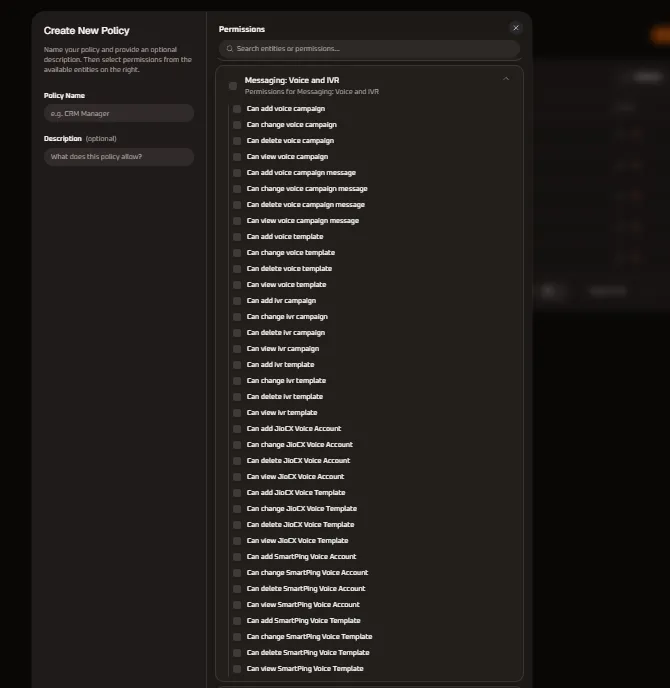
| Permission Name | Sub-Entity / Module | Privilege Level | Functional Operational Scope |
|---|---|---|---|
| Can add voice campaign | Voice Campaigns | Operational / Create | Authorizes drafting, scheduling, and launching new automated outbound voice broadcast campaigns. |
| Can change voice campaign | Voice Campaigns | Operational / Edit | Enables editing campaign schedules, dialing throttling rates, concurrent call limits, and contact segments. |
| Can delete voice campaign | Voice Campaigns | Destructive / Delete | High-level privilege allowing cancellation and permanent deletion of queued, active, or archived voice campaigns. |
| Can view voice campaign | Voice Campaigns | Read-Only | Grants read-only visibility into voice broadcast listings, call completion ratios, and real-time delivery metrics. |
| Can add voice campaign message | Campaign Content | Operational / Create | Authorizes composing voice prompt playlists, text-to-speech audio segments, and campaign call payloads. |
| Can change voice campaign message | Campaign Content | Operational / Edit | Enables modifying queued voice prompt configurations, speech rates, audio files, and fallback messages. |
| Can delete voice campaign message | Campaign Content | Destructive / Delete | Authorizes removing individual audio prompts or message variations from an active voice campaign. |
| Can view voice campaign message | Campaign Content | Read-Only | Allows inspecting audio prompt playlists, text-to-speech scripts, and message configuration details. |
| Can add voice template | Voice Templates | Content Admin | Authorizes uploading and registering global reusable voice broadcast audio prompts and recordings. |
| Can change voice template | Voice Templates | Content Admin | Authorizes updating existing voice prompt audio files, metadata tags, and synthesized speech transcripts. |
| Can delete voice template | Voice Templates | Destructive / Content | High-level privilege to permanently remove voice prompt templates from the organization audio library. |
| Can view voice template | Voice Templates | Read-Only | Grants read-only visibility to preview, play back, and audit registered voice prompt templates. |
| Can add ivr campaign | IVR Campaigns | Operational / Create | Authorizes building and deploying interactive voice response workflows with DTMF keypress menus. |
| Can change ivr campaign | IVR Campaigns | Operational / Edit | Enables modifying active IVR tree routing, digit press rules, agent transfer destinations, and timeout handlers. |
| Can delete ivr campaign | IVR Campaigns | Destructive / Delete | High-level privilege to cancel and delete queued, active, or archived interactive IVR campaigns. |
| Can view ivr campaign | IVR Campaigns | Read-Only | Authorizes monitoring IVR campaign performance, caller keypress drop-offs, and call flow analytics. |
| Can add ivr template | IVR Templates | Content Admin | Authorizes designing and saving reusable IVR menu schemas, prompt trees, and DTMF routing trees. |
| Can change ivr template | IVR Templates | Content Admin | Enables editing IVR menu logic, keypress mappings, voice greetings, and caller transfer rules. |
| Can delete ivr template | IVR Templates | Destructive / Content | Authorizes decommissioning and deleting obsolete IVR menu templates from the organization catalog. |
| Can view ivr template | IVR Templates | Read-Only | Grants read-only access to inspect visual IVR workflow trees, digit mappings, and menu definitions. |
| Can add JioCX Voice Account | JioCX Voice | Gateway Admin | Enables registering and authenticating a new JioCX enterprise SIP trunk / carrier voice gateway account. |
| Can change JioCX Voice Account | JioCX Voice | Gateway Admin | Authorizes updating JioCX voice API keys, caller ID numbers (CLI), SIP channels, and webhook endpoints. |
| Can delete JioCX Voice Account | JioCX Voice | Destructive / Gateway | High-privilege action to disconnect and permanently delete a configured JioCX carrier voice gateway integration. |
| Can view JioCX Voice Account | JioCX Voice | Read-Only | Grants visibility into connected JioCX voice account statuses, concurrent channel allocations, and connection health. |
| Can add JioCX Voice Template | JioCX Templates | Content Admin | Authorizes submitting voice prompt audio and regulatory compliance scripts to JioCX for carrier validation. |
| Can change JioCX Voice Template | JioCX Templates | Content Admin | Authorizes updating audio assets or parameters for JioCX carrier voice templates. |
| Can delete JioCX Voice Template | JioCX Templates | Destructive / Content | Authorizes removing approved or draft voice prompt templates registered under JioCX. |
| Can view JioCX Voice Template | JioCX Templates | Read-Only | Allows inspecting JioCX registered voice templates, carrier approval status flags, and audio specs. |
| Can add SmartPing Voice Account | SmartPing Voice | Gateway Admin | Enables provisioning and authenticating a SmartPing carrier voice and OBD calling account with API tokens. |
| Can change SmartPing Voice Account | SmartPing Voice | Gateway Admin | Authorizes updating SmartPing voice credentials, outbound caller line IDs (CLI), and webhook delivery reporting. |
| Can delete SmartPing Voice Account | SmartPing Voice | Destructive / Gateway | Destructive action to remove an active SmartPing carrier voice integration from the platform. |
| Can view SmartPing Voice Account | SmartPing Voice | Read-Only | Authorizes viewing SmartPing connection metrics, call delivery logs, and gateway uptime. |
| Can add SmartPing Voice Template | SmartPing Templates | Content Admin | Authorizes submitting new outbound dialer voice audio prompts to SmartPing for carrier compliance check. |
| Can change SmartPing Voice Template | SmartPing Templates | Content Admin | Enables modifying SmartPing voice template audio recordings, script copy, and dialing attributes. |
| Can delete SmartPing Voice Template | SmartPing Templates | Destructive / Content | Authorizes decommissioning and removing registered SmartPing voice prompt templates. |
| Can view SmartPing Voice Template | SmartPing Templates | Read-Only | Grants read-only visibility into SmartPing voice templates, compliance registration IDs, and audio formats. |
5. Messaging: WhatsApp Permission Specifications
Section titled “5. Messaging: WhatsApp Permission Specifications”The Messaging: WhatsApp entity group controls official Meta Cloud API WhatsApp Business Accounts (WABA), outbound marketing and utility broadcasts, Live Inbox conversations, approved HSM message templates, interactive native WhatsApp Flows, and automated chatbot decision workflows:
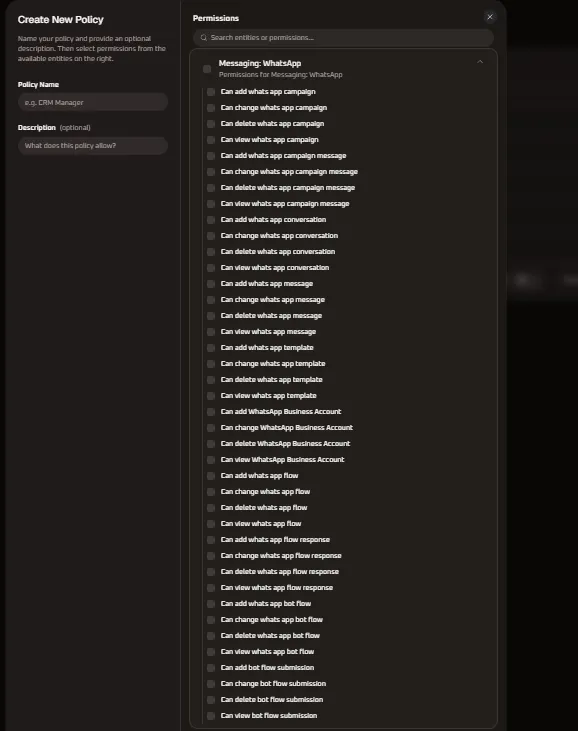
| Permission Name | Sub-Entity / Module | Privilege Level | Functional Operational Scope |
|---|---|---|---|
| Can add whats app campaign | WhatsApp Campaigns | Operational / Create | Authorizes composing, scheduling, and launching outbound WhatsApp marketing and utility broadcast campaigns. |
| Can change whats app campaign | WhatsApp Campaigns | Operational / Edit | Enables editing campaign schedules, audience segments, delivery pacing, and parameter bindings. |
| Can delete whats app campaign | WhatsApp Campaigns | Destructive / Delete | High-level privilege to cancel and permanently delete scheduled, running, or archived WhatsApp campaigns. |
| Can view whats app campaign | WhatsApp Campaigns | Read-Only | Authorizes inspecting WhatsApp campaign dashboards, delivery logs, read receipts, and cost analytics. |
| Can add whats app campaign message | Campaign Content | Operational / Create | Authorizes drafting rich campaign message payloads, media headers (images, videos, PDFs), and interactive CTA buttons. |
| Can change whats app campaign message | Campaign Content | Operational / Edit | Enables modifying draft message content, dynamic merge tags, fallback copy, and button destination URLs. |
| Can delete whats app campaign message | Campaign Content | Destructive / Delete | Authorizes removing individual message payloads or variant drafts from an active WhatsApp campaign. |
| Can view whats app campaign message | Campaign Content | Read-Only | Allows inspecting preview payloads, rich media assets, button action configurations, and variable mappings. |
| Can add whats app conversation | Live Inbox | Operational / Create | Authorizes agents to initiate new 1-on-1 customer chat conversations within the 24-hour customer care window. |
| Can change whats app conversation | Live Inbox | Operational / Edit | Enables reassigning conversation ownership, updating contact labels, adding internal notes, and resolving chats. |
| Can delete whats app conversation | Live Inbox | Destructive / Delete | High-privilege action to permanently purge active or archived WhatsApp chat conversations and histories. |
| Can view whats app conversation | Live Inbox | Read-Only / Audit | Authorizes reviewing active customer inquiries, reading chat transcripts, and auditing agent response times. |
| Can add whats app message | Chat Operations | Operational / Create | Authorizes agents to compose and send direct text replies, media attachments, and quick-reply messages in Live Inbox. |
| Can change whats app message | Chat Operations | Operational / Edit | Authorizes editing unread draft messages, modifying message status tags, or updating delivery routing. |
| Can delete whats app message | Chat Operations | Destructive / Delete | Authorizes deleting individual messages or attachments from a live WhatsApp conversation thread. |
| Can view whats app message | Chat Operations | Read-Only / Audit | Allows inspecting individual customer chat messages, delivery receipts (double ticks), and read timestamps. |
| Can add whats app template | HSM Templates | Content Admin | Authorizes drafting and submitting new utility, marketing, or authentication message templates to Meta for approval. |
| Can change whats app template | HSM Templates | Content Admin | Authorizes updating template text, quick-reply buttons, URL links, and resubmitting templates to Meta for re-validation. |
| Can delete whats app template | HSM Templates | Destructive / Content | Authorizes deleting approved, pending, or rejected WhatsApp message templates from the Meta catalog. |
| Can view whats app template | HSM Templates | Read-Only | Grants browsing access to the organization’s WhatsApp template library, Meta quality ratings, and status flags. |
| Can add WhatsApp Business Account | WABA Gateway | Gateway Admin | Enables connecting and authenticating a new WhatsApp Business Account (WABA) via Meta Embedded Signup or System User Tokens. |
| Can change WhatsApp Business Account | WABA Gateway | Gateway Admin | Authorizes updating WABA profile details (business display name, logo, category, bio, website) and webhook routing. |
| Can delete WhatsApp Business Account | WABA Gateway | Destructive / Gateway | High-privilege destructive action to disconnect and permanently unlink an active WABA phone number from the workspace. |
| Can view WhatsApp Business Account | WABA Gateway | Read-Only | Grants visibility into connected WABA phone numbers, Meta verification tiers, messaging tier limits, and account health. |
| Can add whats app flow | WhatsApp Flows | Flow Builder / Create | Authorizes designing and deploying native WhatsApp interactive structured form screens (Flows) for lead capture and booking. |
| Can change whats app flow | WhatsApp Flows | Flow Builder / Edit | Enables editing screen layouts, input field validation rules, drop-down options, and JSON schema for WhatsApp Flows. |
| Can delete whats app flow | WhatsApp Flows | Destructive / Flow | Authorizes permanently deleting native WhatsApp form flows and interactive screen designs. |
| Can view whats app flow | WhatsApp Flows | Read-Only | Allows previewing interactive Flow screens, data routing architecture, and endpoint configurations. |
| Can add whats app flow response | Data Intake | Data Admin / Create | Authorizes manually creating or importing customer response records received through WhatsApp Flows. |
| Can change whats app flow response | Data Intake | Data Admin / Edit | Enables modifying or correcting captured form submission data, customer notes, and verification statuses. |
| Can delete whats app flow response | Data Intake | Destructive / Data | Authorizes permanently removing collected WhatsApp Flow form submissions and customer intake records. |
| Can view whats app flow response | Data Intake | Read-Only | Authorizes inspecting submitted customer responses, appointment requests, questionnaire answers, and lead details. |
| Can add whats app bot flow | Chatbot Automation | Automation / Create | Authorizes creating conversational chatbot automation trees, keyword triggers, and branching dialog workflows. |
| Can change whats app bot flow | Chatbot Automation | Automation / Edit | Enables updating bot decision nodes, NLP intent matching, fallback routing to live agents, and auto-reply scripts. |
| Can delete whats app bot flow | Chatbot Automation | Destructive / Automation | Authorizes decommissioning and permanently deleting automated chatbot flows. |
| Can view whats app bot flow | Chatbot Automation | Read-Only | Grants read-only visibility into visual bot builder trees, trigger rules, and automation logic. |
| Can add bot flow submission | Bot Data | Data Admin / Create | Authorizes logging and inserting customer interactions collected by automated chatbot decision trees into CRM. |
| Can change bot flow submission | Bot Data | Data Admin / Edit | Enables updating customer data fields and attributes populated through conversational bot flows. |
| Can delete bot flow submission | Bot Data | Destructive / Data | Authorizes removing chatbot session data records and captured lead attributes. |
| Can view bot flow submission | Bot Data | Read-Only | Allows viewing customer inputs, selected options, and automated transaction records generated during bot sessions. |
6. Messaging: Email Permission Specifications
Section titled “6. Messaging: Email Permission Specifications”The Messaging: Email entity group governs dedicated corporate SMTP connections, bulk email marketing campaigns, responsive HTML email template builders, and file attachment collateral:
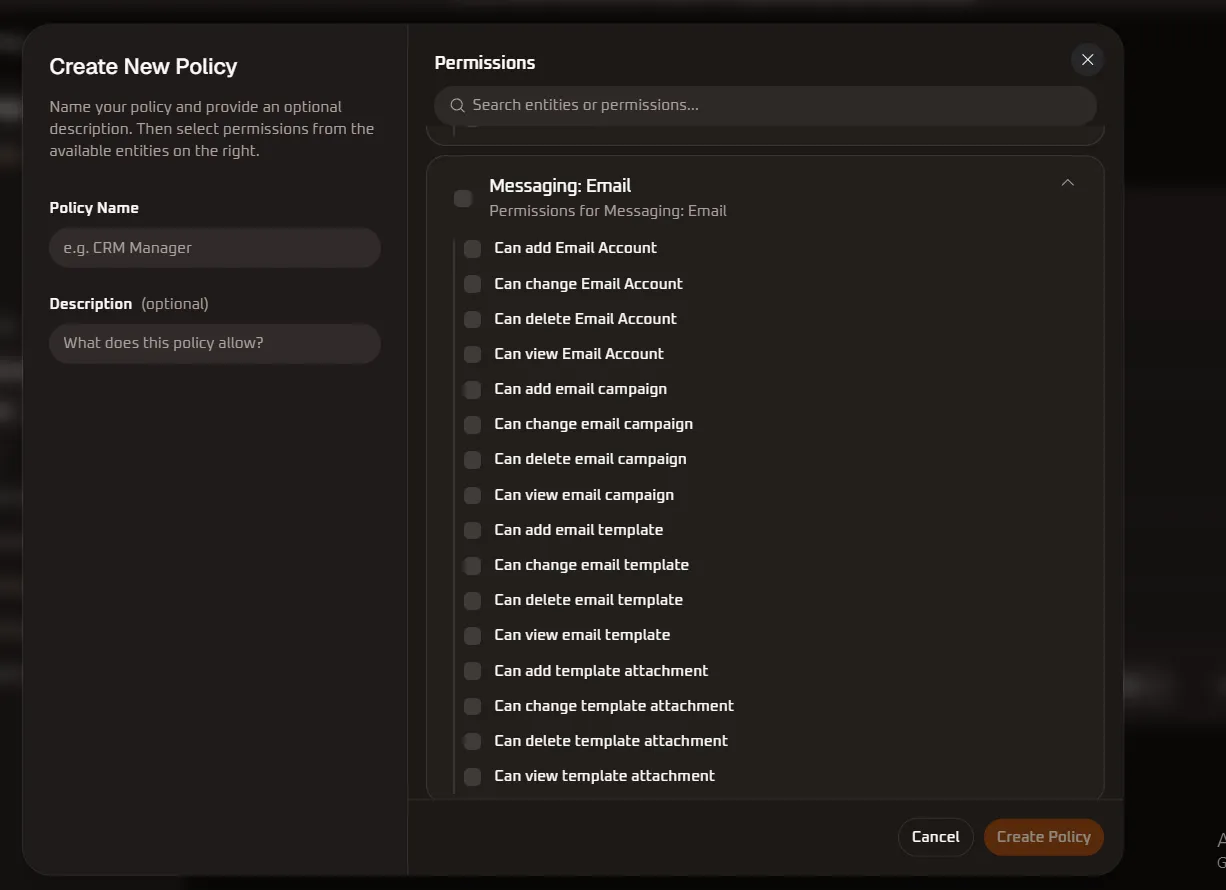
| Permission Name | Sub-Entity / Module | Privilege Level | Functional Operational Scope |
|---|---|---|---|
| Can add Email Account | SMTP & Email Accounts | Gateway Admin / Create | Authorizes connecting and authenticating corporate email accounts or dedicated outbound SMTP servers. |
| Can change Email Account | SMTP & Email Accounts | Gateway Admin / Edit | Enables modifying SMTP host configurations, port settings, sender display names, reply-to addresses, and SSL/TLS encryption. |
| Can delete Email Account | SMTP & Email Accounts | Destructive / Gateway | High-privilege action to disconnect and permanently delete configured corporate email accounts or SMTP relays. |
| Can view Email Account | SMTP & Email Accounts | Read-Only | Authorizes inspecting connected email accounts, sender aliases, domain verification status (DKIM/SPF), and connection health. |
| Can add email campaign | Email Campaigns | Operational / Create | Authorizes composing, scheduling, and launching marketing email newsletters and transactional email broadcasts. |
| Can change email campaign | Email Campaigns | Operational / Edit | Enables editing email campaign schedules, subject lines, preview text, recipient lists, and delivery throttling rates. |
| Can delete email campaign | Email Campaigns | Destructive / Delete | High-level privilege to cancel and permanently delete scheduled, draft, or archived email broadcast campaigns. |
| Can view email campaign | Email Campaigns | Read-Only | Grants read-only visibility into email campaign performance, open rates, click-through rates (CTR), bounce rates, and spam complaints. |
| Can add email template | Email Templates | Content Admin / Create | Authorizes designing and saving reusable responsive HTML email templates using visual drag-and-drop or code editors. |
| Can change email template | Email Templates | Content Admin / Edit | Enables modifying email template layouts, typography, dynamic CRM merge tags, and call-to-action button styling. |
| Can delete email template | Email Templates | Destructive / Content | Authorizes permanently removing approved or draft email templates from the organization template library. |
| Can view email template | Email Templates | Read-Only | Grants browsing access to view, preview in desktop/mobile viewports, and audit the organization email template library. |
| Can add template attachment | Template Attachments | Content Admin / Create | Authorizes uploading and attaching brand assets, product brochures, rate cards, and PDF collateral to email templates. |
| Can change template attachment | Template Attachments | Content Admin / Edit | Enables updating, replacing, or re-linking existing file attachments associated with email templates. |
| Can delete template attachment | Template Attachments | Destructive / Content | Authorizes removing attached files and media documents from email templates to optimize payload size. |
| Can view template attachment | Template Attachments | Read-Only | Authorizes previewing, inspecting file sizes, and verifying MIME types of all documents attached to email templates. |
7. Social: Facebook Permission Specifications
Section titled “7. Social: Facebook Permission Specifications”The Social: Facebook entity group controls Facebook Page post publishing automation, paid post boost campaigns, Facebook Ads performance reporting, Meta Lead Ads CRM form field mappings, and 1-on-1 customer chat interactions in Messenger:
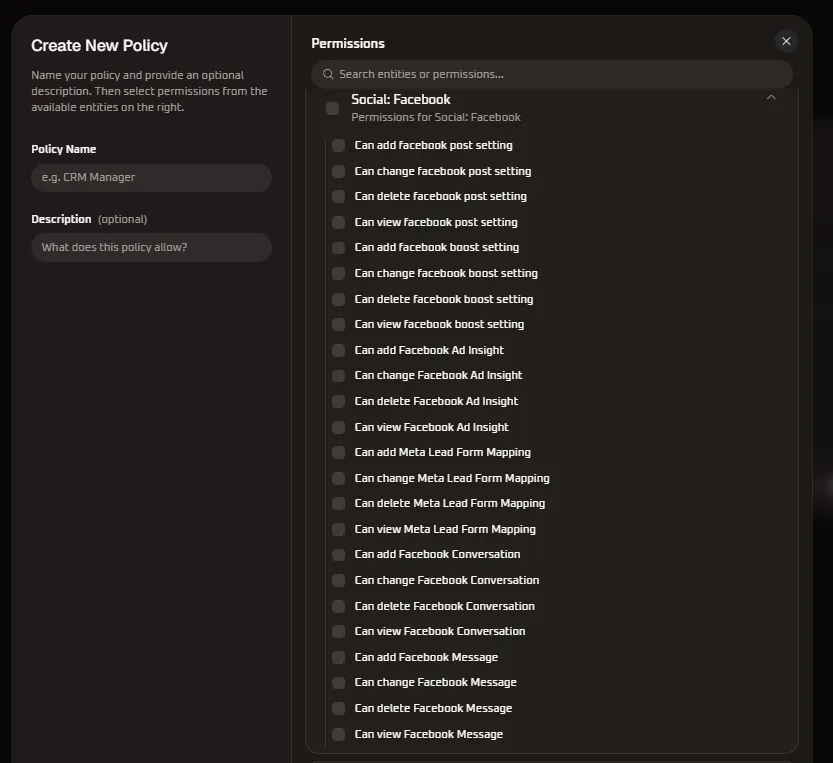
| Permission Name | Sub-Entity / Module | Privilege Level | Functional Operational Scope |
|---|---|---|---|
| Can add facebook post setting | Post Settings | Social Admin / Create | Authorizes connecting Facebook Pages and configuring auto-publishing schedules and cross-posting rules. |
| Can change facebook post setting | Post Settings | Social Admin / Edit | Enables modifying post formatting rules, scheduled publish times, feed targeting, and default hashtag sets. |
| Can delete facebook post setting | Post Settings | Destructive / Social | Authorizes unlinking Facebook page publishing rules and deleting automated post scheduling configurations. |
| Can view facebook post setting | Post Settings | Read-Only | Grants read-only visibility into connected Facebook Pages, post publishing queues, and publishing history logs. |
| Can add facebook boost setting | Post Boost | Ad Admin / Create | Authorizes configuring automated post boosting criteria, ad budget caps, target demographics, and run durations. |
| Can change facebook boost setting | Post Boost | Ad Admin / Edit | Enables updating boost budget allocations, audience targeting criteria, and active boost campaign triggers. |
| Can delete facebook boost setting | Post Boost | Destructive / Ad | Authorizes cancelling and permanently deleting automated post boosting configurations and schedules. |
| Can view facebook boost setting | Post Boost | Read-Only | Allows inspecting active boost settings, spend caps, targeted audience segments, and boost performance metrics. |
| Can add Facebook Ad Insight | Ad Insights | Analytics / Create | Authorizes configuring custom Facebook Ad reporting dashboards, metrics aggregations, and performance widgets. |
| Can change Facebook Ad Insight | Ad Insights | Analytics / Edit | Enables modifying ad insight filtering dimensions, date range parameters, attribution models, and metric views. |
| Can delete Facebook Ad Insight | Ad Insights | Destructive / Analytics | Authorizes deleting custom ad insight reporting templates and saved attribution dashboards. |
| Can view Facebook Ad Insight | Ad Insights | Read-Only | Grants read-only access to Facebook Ads performance analytics, impressions, ROAS, CPC, and conversion metrics. |
| Can add Meta Lead Form Mapping | Meta Lead Ads | CRM Integration / Create | Authorizes connecting Meta Lead Ad forms and mapping form fields directly to WhiteStart CRM contact attributes. |
| Can change Meta Lead Form Mapping | Meta Lead Ads | CRM Integration / Edit | Enables updating field associations, fallback lead owners, automated tag assignments, and routing pipelines. |
| Can delete Meta Lead Form Mapping | Meta Lead Ads | Destructive / Integration | Authorizes removing active Meta Lead Ad form mappings and disconnecting automated CRM lead ingest. |
| Can view Meta Lead Form Mapping | Meta Lead Ads | Read-Only | Authorizes inspecting Meta Lead Ad integration health, mapped form schemas, and real-time lead sync logs. |
| Can add Facebook Conversation | Messenger Inbox | Operational / Create | Authorizes agents to initiate or accept new customer chat sessions originating from Facebook Messenger. |
| Can change Facebook Conversation | Messenger Inbox | Operational / Edit | Enables reassigning Messenger chat threads, updating conversation status tags, adding internal notes, and resolving chats. |
| Can delete Facebook Conversation | Messenger Inbox | Destructive / Delete | High-privilege action allowing permanent deletion of Facebook Messenger conversation threads and customer transcripts. |
| Can view Facebook Conversation | Messenger Inbox | Read-Only / Audit | Authorizes reviewing active customer Messenger inquiries, reading transcripts, and auditing agent response metrics. |
| Can add Facebook Message | Chat Operations | Operational / Create | Authorizes agents to compose and send direct text replies, media attachments, and quick replies in Facebook Messenger. |
| Can change Facebook Message | Chat Operations | Operational / Edit | Enables modifying draft message responses, updating delivery status indicators, or revising agent reply notes. |
| Can delete Facebook Message | Chat Operations | Destructive / Delete | Authorizes deleting individual messages or attachments sent in Facebook Messenger chat conversations. |
| Can view Facebook Message | Chat Operations | Read-Only / Audit | Allows viewing individual incoming and outgoing Messenger messages, delivery timestamps, and read indicators. |
8. Social: Instagram Permission Specifications
Section titled “8. Social: Instagram Permission Specifications”The Social: Instagram entity group controls Instagram Professional account publishing automation, sponsored post boosting rules, Instagram Ad metrics & Reel insights, and 1-on-1 Direct Message (DM) customer conversations in the Live Inbox:
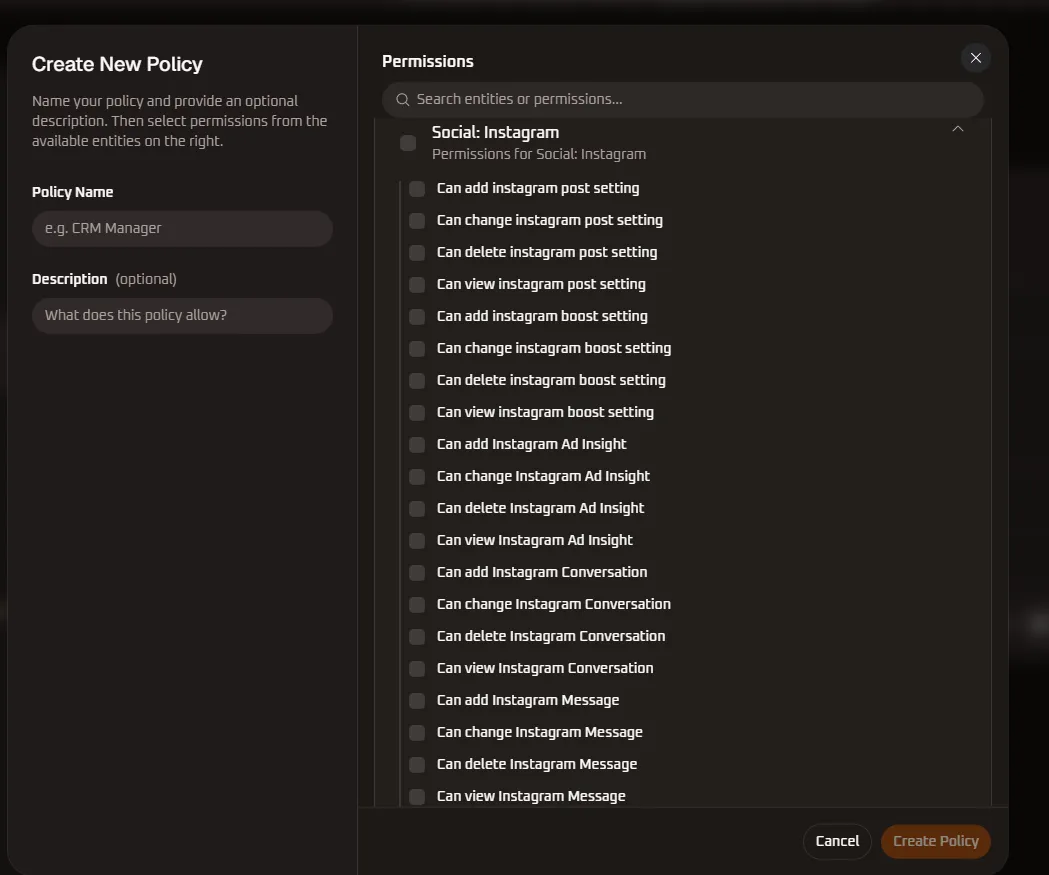
| Permission Name | Sub-Entity / Module | Privilege Level | Functional Operational Scope |
|---|---|---|---|
| Can add instagram post setting | Post Settings | Social Admin / Create | Authorizes connecting Instagram Professional accounts and scheduling automated feed, carousel, and Reel posts. |
| Can change instagram post setting | Post Settings | Social Admin / Edit | Enables modifying caption templates, first-comment hashtag rules, scheduled publish slots, and media aspect ratios. |
| Can delete instagram post setting | Post Settings | Destructive / Social | Authorizes disconnecting Instagram account publishing integrations and clearing scheduled post queues. |
| Can view instagram post setting | Post Settings | Read-Only | Grants read-only visibility into connected Instagram accounts, scheduled media queues, and published post logs. |
| Can add instagram boost setting | Post Boost | Ad Admin / Create | Authorizes establishing automated Instagram post boost rules, daily ad budgets, audience demographics, and placement rules. |
| Can change instagram boost setting | Post Boost | Ad Admin / Edit | Enables modifying boost spending limits, target geography/interest filters, and active promotion run windows. |
| Can delete instagram boost setting | Post Boost | Destructive / Ad | Authorizes cancelling and permanently removing automated Instagram post boost configurations. |
| Can view instagram boost setting | Post Boost | Read-Only | Allows inspecting active boost configurations, current ad spend, reach projections, and conversion milestones. |
| Can add Instagram Ad Insight | Ad Insights | Analytics / Create | Authorizes creating customized Instagram Ad performance tracking views, Reel attribution charts, and metrics widgets. |
| Can change Instagram Ad Insight | Ad Insights | Analytics / Edit | Enables updating Instagram ad analytics filters, date aggregation intervals, Story engagement dimensions, and conversion KPIs. |
| Can delete Instagram Ad Insight | Ad Insights | Destructive / Analytics | Authorizes deleting custom Instagram analytics widgets and saved performance reporting dashboards. |
| Can view Instagram Ad Insight | Ad Insights | Read-Only | Grants read-only access to Instagram ad performance data, impressions, profile visits, clicks, ROAS, and video completion rates. |
| Can add Instagram Conversation | Direct Messages (DM) | Operational / Create | Authorizes agents to accept and open new 1-on-1 customer direct message conversations originating from Instagram. |
| Can change Instagram Conversation | Direct Messages (DM) | Operational / Edit | Enables reassigning DM threads to specific agents, applying customer tags, adding internal notes, and resolving conversations. |
| Can delete Instagram Conversation | Direct Messages (DM) | Destructive / Delete | High-privilege action allowing permanent deletion of Instagram DM conversation threads and customer message histories. |
| Can view Instagram Conversation | Direct Messages (DM) | Read-Only / Audit | Authorizes reviewing active customer DMs, reading message histories, and auditing agent response metrics. |
| Can add Instagram Message | Chat Operations | Operational / Create | Authorizes agents to compose and send direct text replies, media attachments, and interactive quick-replies in Instagram DMs. |
| Can change Instagram Message | Chat Operations | Operational / Edit | Enables revising unsent draft replies, modifying internal message tags, or updating delivery routing statuses. |
| Can delete Instagram Message | Chat Operations | Destructive / Delete | Authorizes deleting individual messages, photos, or video responses sent in Instagram DM conversations. |
| Can view Instagram Message | Chat Operations | Read-Only / Audit | Allows inspecting individual incoming customer inquiries, story mentions, delivery status indicators, and read receipts. |
9. Social: X (Twitter) Permission Specifications
Section titled “9. Social: X (Twitter) Permission Specifications”The Social: X (Twitter) entity group provides granular governance over automated tweet publishing, paid tweet promotions, and developer OAuth 2.0 app authorization sessions:
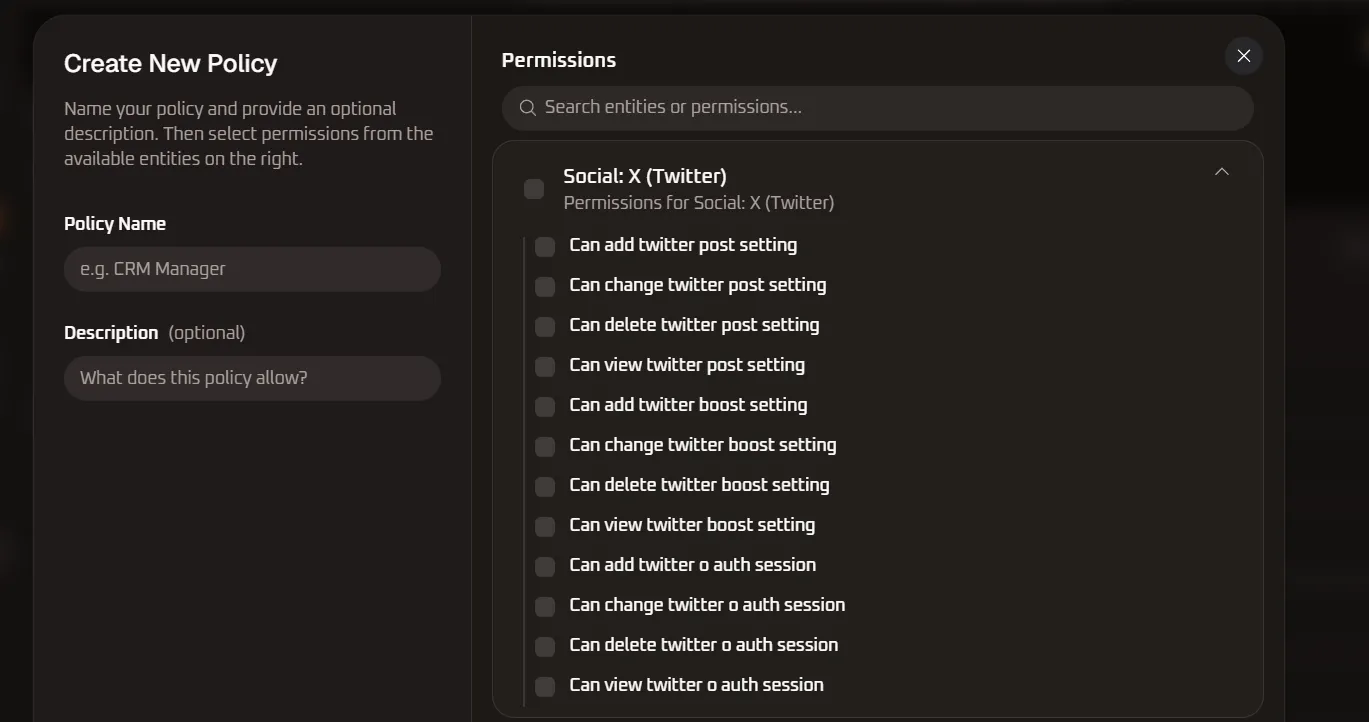
| Permission Name | Sub-Entity / Module | Privilege Level | Functional Operational Scope |
|---|---|---|---|
| Can add twitter post setting | Tweet Publishing | Social Admin / Create | Authorizes connecting X (Twitter) handles and scheduling automated tweets, threads, and media posts. |
| Can change twitter post setting | Tweet Publishing | Social Admin / Edit | Enables modifying tweet character lengths, scheduled publishing timeslots, reply settings, and thread sequencing. |
| Can delete twitter post setting | Tweet Publishing | Destructive / Social | Authorizes disconnecting X (Twitter) publishing rules and purging scheduled tweet queues. |
| Can view twitter post setting | Tweet Publishing | Read-Only | Grants read-only visibility into connected X accounts, scheduled tweet feeds, and historical post analytics. |
| Can add twitter boost setting | Promoted Tweets | Ad Admin / Create | Authorizes creating automated post boost rules, sponsored tweet budgets, target keyword demographics, and run durations. |
| Can change twitter boost setting | Promoted Tweets | Ad Admin / Edit | Enables modifying sponsored tweet budgets, keyword targeting criteria, geographic filters, and active boost schedules. |
| Can delete twitter boost setting | Promoted Tweets | Destructive / Ad | Authorizes cancelling and permanently removing automated tweet boost promotion configurations. |
| Can view twitter boost setting | Promoted Tweets | Read-Only | Allows inspecting active tweet boost rules, ad spend against caps, impression reach, and engagement rates. |
| Can add twitter o auth session | OAuth & Security | OAuth Admin / Create | Authorizes initiating and authenticating new Twitter Developer App OAuth 2.0 connection sessions. |
| Can change twitter o auth session | OAuth & Security | OAuth Admin / Edit | Enables refreshing expired OAuth bearer tokens, updating client IDs, and modifying application API scopes. |
| Can delete twitter o auth session | OAuth & Security | Destructive / Security | High-privilege action to revoke and permanently delete active X (Twitter) OAuth authorization sessions. |
10. Social: YouTube Permission Specifications
Section titled “10. Social: YouTube Permission Specifications”The Social: YouTube entity group manages YouTube Channel video upload automation, Community tab posting settings, automated video promotion / boost campaigns, and YouTube Ad metrics & video retention analytics:
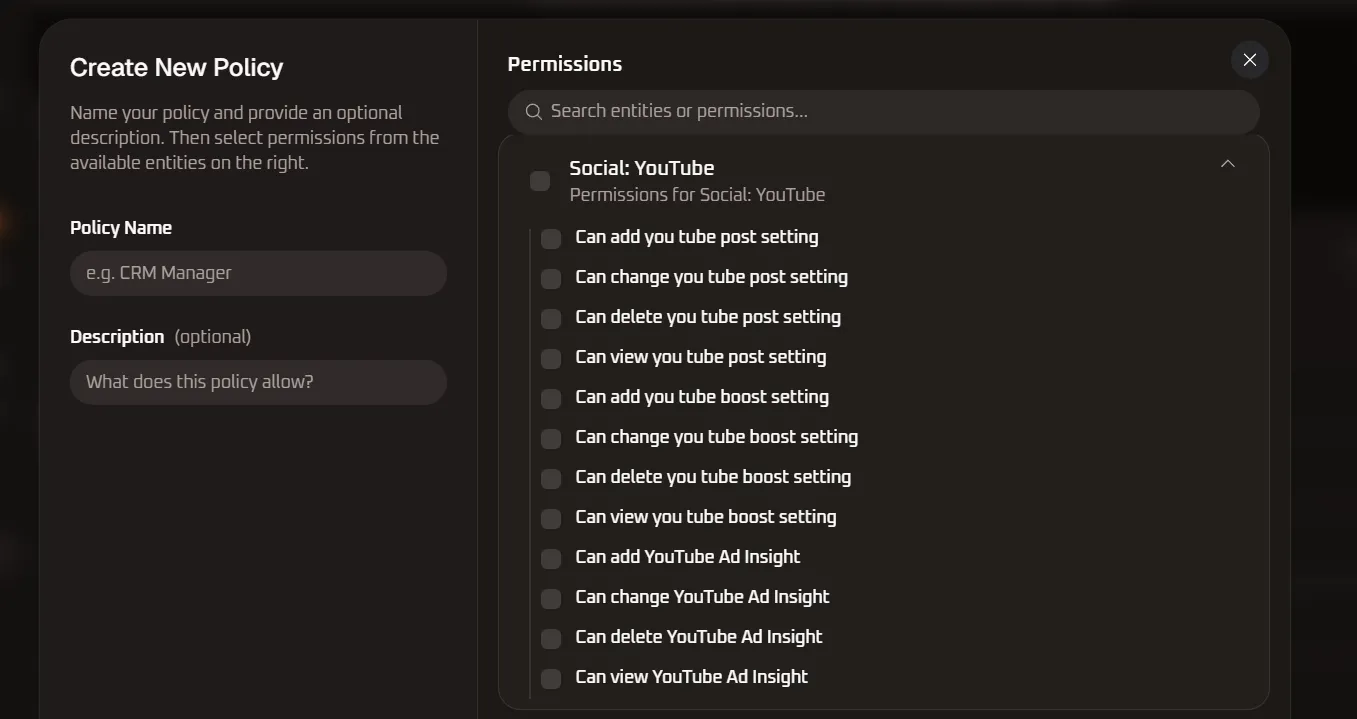
| Permission Name | Sub-Entity / Module | Privilege Level | Functional Operational Scope |
|---|---|---|---|
| Can add you tube post setting | Video Publishing | Social Admin / Create | Authorizes connecting brand YouTube channels and configuring automated video upload and Community tab post settings. |
| Can change you tube post setting | Video Publishing | Social Admin / Edit | Enables modifying default video privacy statuses (Public/Unlisted/Private), category tags, descriptions, and title formatting rules. |
| Can delete you tube post setting | Video Publishing | Destructive / Social | Authorizes disconnecting YouTube channel publishing integrations and deleting automated video publishing rules. |
| Can view you tube post setting | Video Publishing | Read-Only | Grants read-only visibility into connected YouTube channels, automated upload queues, and publishing audit logs. |
| Can add you tube boost setting | Video Promotion | Ad Admin / Create | Authorizes configuring automated YouTube video promotion rules, Google Ads video campaign linkings, and target CPV caps. |
| Can change you tube boost setting | Video Promotion | Ad Admin / Edit | Enables modifying video promotion ad budgets, target audience placements, in-stream format selection, and run durations. |
| Can delete you tube boost setting | Video Promotion | Destructive / Ad | Authorizes cancelling and permanently deleting automated YouTube video promotion and boost configurations. |
| Can view you tube boost setting | Video Promotion | Read-Only | Allows inspecting active video boost configurations, spend allocations, view milestones, and watch time pacing. |
| Can add YouTube Ad Insight | Video Analytics | Analytics / Create | Authorizes configuring custom YouTube video reporting widgets, channel analytics dashboards, and retention funnels. |
| Can change YouTube Ad Insight | Video Analytics | Analytics / Edit | Enables modifying video analytics dimensions, audience retention intervals, geographic reporting filters, and CTR tracking. |
| Can delete YouTube Ad Insight | Video Analytics | Destructive / Analytics | Authorizes deleting custom YouTube analytics reporting widgets and saved video attribution dashboards. |
| Can view YouTube Ad Insight | Video Analytics | Read-Only | Grants read-only access to YouTube video ad performance data, impressions, view counts, average watch time, CPV, and subscriber growth. |
11. Social: LinkedIn Permission Specifications
Section titled “11. Social: LinkedIn Permission Specifications”The Social: LinkedIn entity group governs corporate LinkedIn Company Pages and personal profile post automation, sponsored content / update boosting, target B2B audience demographic parameters, and LinkedIn Campaign Manager ad analytics:
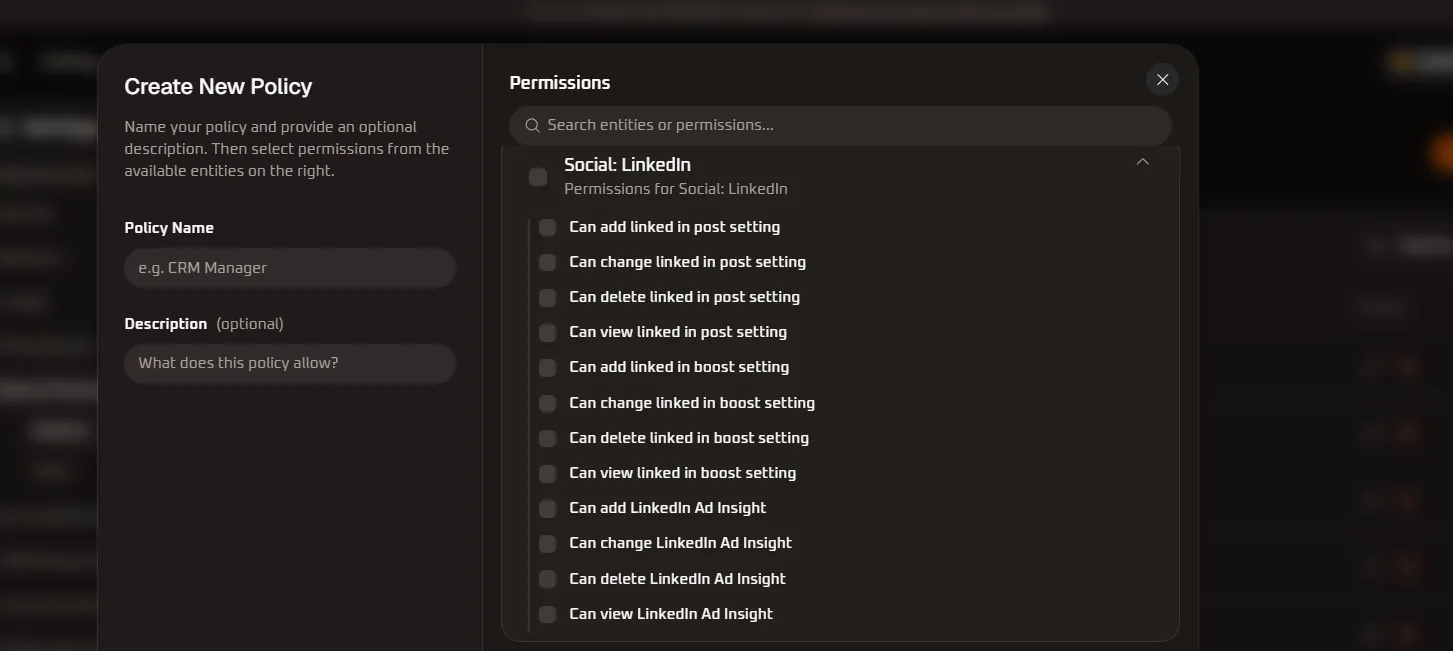
| Permission Name | Sub-Entity / Module | Privilege Level | Functional Operational Scope |
|---|---|---|---|
| Can add linked in post setting | Company Updates | Social Admin / Create | Authorizes connecting LinkedIn Company Pages or individual creator profiles and configuring automated article, text, and rich media publishing. |
| Can change linked in post setting | Company Updates | Social Admin / Edit | Enables editing LinkedIn post draft content, link previews, scheduled publishing slots, targeted visibility settings, and hashtag groups. |
| Can delete linked in post setting | Company Updates | Destructive / Social | Authorizes removing connected LinkedIn accounts and clearing pending company updates from the scheduling queue. |
| Can view linked in post setting | Company Updates | Read-Only | Grants read-only visibility into connected LinkedIn organizations, queued updates, publishing logs, and engagement counts. |
| Can add linked in boost setting | Sponsored Content | Ad Admin / Create | Authorizes creating automated LinkedIn post boosting rules, daily/lifetime spend limits, and target B2B audience criteria (job titles, industries, company headcounts). |
| Can change linked in boost setting | Sponsored Content | Ad Admin / Edit | Enables modifying sponsored content campaign budgets, professional targeting parameters, lead form attachments, and active promotion run windows. |
| Can delete linked in boost setting | Sponsored Content | Destructive / Ad | Authorizes cancelling and permanently deleting scheduled or active LinkedIn post promotion configurations. |
| Can view linked in boost setting | Sponsored Content | Read-Only | Allows inspecting active LinkedIn sponsored update campaigns, ad spend burn rates, impression counts, and click-through rates. |
| Can add LinkedIn Ad Insight | Campaign Analytics | Analytics / Create | Authorizes creating custom LinkedIn Campaign Manager reporting views, lead generation form performance dashboards, and account-based marketing (ABM) widgets. |
| Can change LinkedIn Ad Insight | Campaign Analytics | Analytics / Edit | Enables updating reporting date ranges, metric filters, conversion attribution models, and demographic breakdown criteria. |
| Can delete LinkedIn Ad Insight | Campaign Analytics | Destructive / Analytics | Authorizes removing custom LinkedIn reporting views, attribution widgets, and saved analytics charts. |
| Can view LinkedIn Ad Insight | Campaign Analytics | Read-Only | Grants read-only access to LinkedIn ad campaign analytics, impressions, clicks, CTR, average CPC, lead conversions, and company engagement demographics. |
12. Social: Threads Permission Specifications
Section titled “12. Social: Threads Permission Specifications”The Social: Threads entity group manages Meta Threads profile integration, automated microblog publishing, multi-post thread scheduling, and promoted Threads boost campaigns:
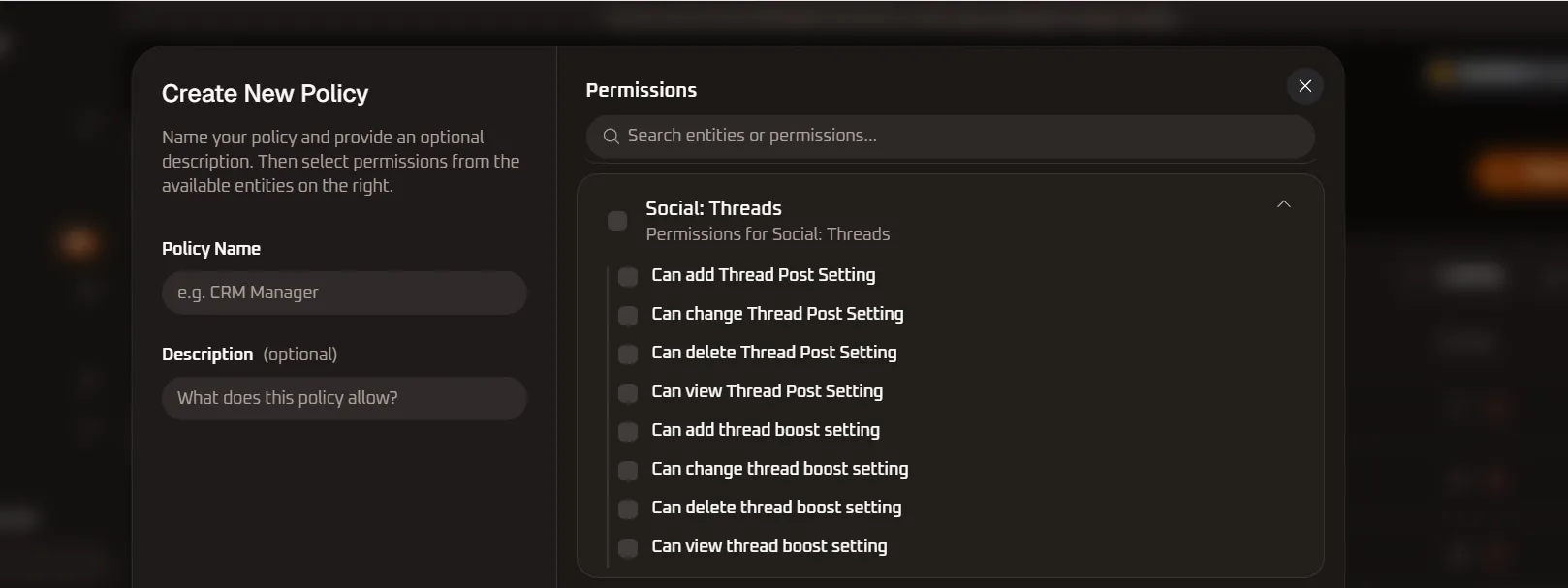
| Permission Name | Sub-Entity / Module | Privilege Level | Functional Operational Scope |
|---|---|---|---|
| Can add Thread Post Setting | Microblog Publishing | Social Admin / Create | Authorizes connecting Meta Threads accounts and configuring automated text publishing, link attachments, and photo/video post schedules. |
| Can change Thread Post Setting | Microblog Publishing | Social Admin / Edit | Enables modifying scheduled Threads posts, text copy, reply permissions (Anyone/Profiles you follow/Mentioned only), and scheduled time slots. |
| Can delete Thread Post Setting | Microblog Publishing | Destructive / Social | Authorizes unlinking connected Threads profiles and permanently deleting scheduled Threads posts from the queue. |
| Can view Thread Post Setting | Microblog Publishing | Read-Only | Grants read-only visibility into connected Threads accounts, upcoming queue feeds, and historical post analytics. |
| Can add thread boost setting | Promoted Threads | Ad Admin / Create | Authorizes configuring automated promotion rules, daily budget caps, audience targeting parameters, and boost durations for Threads posts. |
| Can change thread boost setting | Promoted Threads | Ad Admin / Edit | Enables modifying promotion budgets, audience demographic filters, interest criteria, and active boost flight windows. |
| Can delete thread boost setting | Promoted Threads | Destructive / Ad | Authorizes cancelling and permanently removing automated Threads post boost configurations. |
| Can view thread boost setting | Promoted Threads | Read-Only | Allows inspecting active Threads boost settings, ad spend against caps, impression reach, and engagement metrics. |
13. Social: General Permission Specifications
Section titled “13. Social: General Permission Specifications”The Social: General entity group provides organization-wide governance across the unified content calendar, multi-platform post authoring, post media attachments, the centralized brand media library, connected third-party advertising accounts, and social channel OAuth bindings:
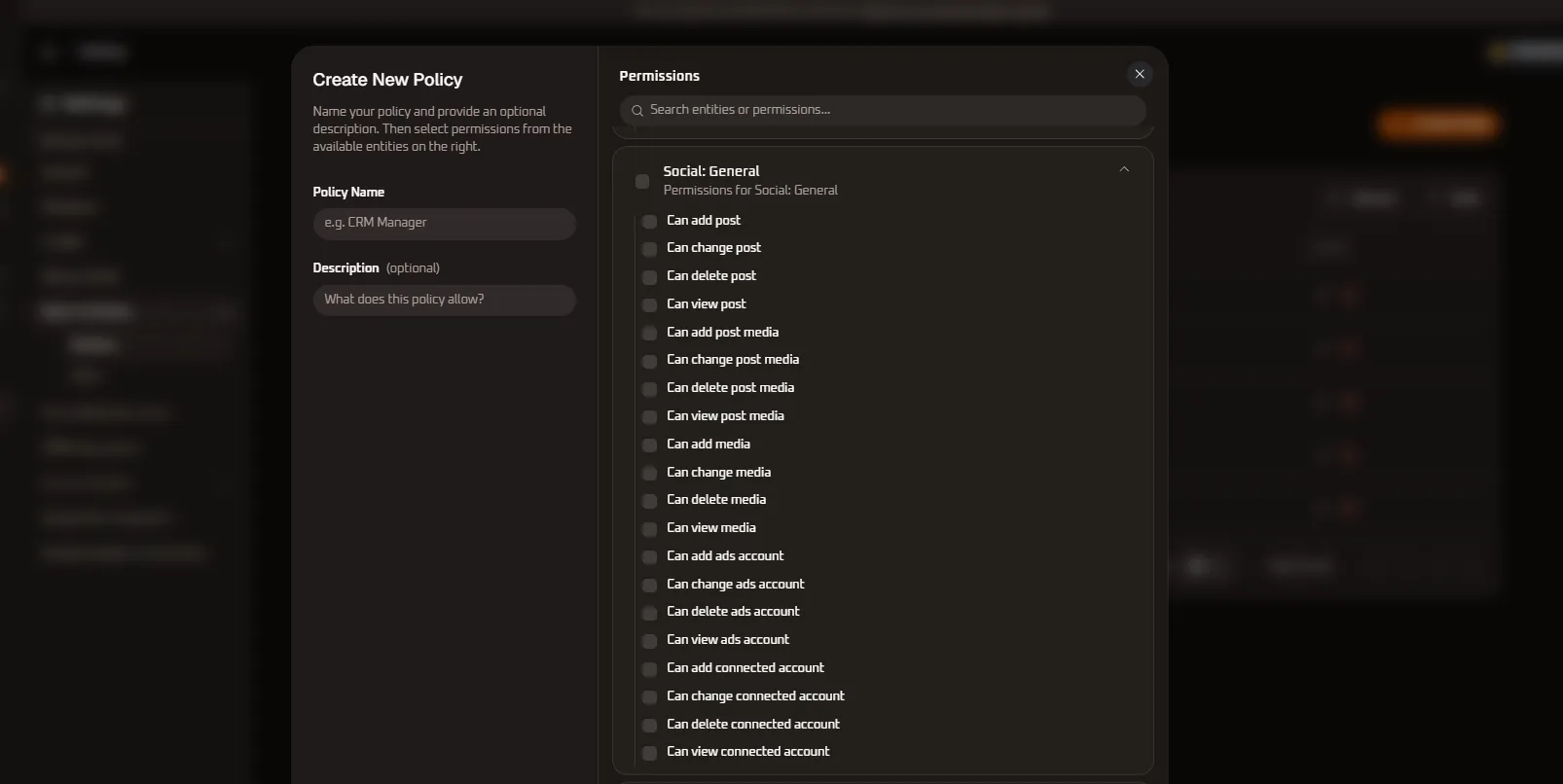
| Permission Name | Sub-Entity / Module | Privilege Level | Functional Operational Scope |
|---|---|---|---|
| Can add post | Unified Post Composer | Content Admin / Create | Authorizes drafting and scheduling simultaneous cross-network social media posts across all linked channels (Facebook, Instagram, X, LinkedIn, Threads, YouTube). |
| Can change post | Unified Post Composer | Content Admin / Edit | Enables editing synchronized post copy, modifying network-specific captions, adjusting delivery timeslots, and reordering multi-slide carousels. |
| Can delete post | Unified Post Composer | Destructive / Content | Authorizes removing unpublished cross-platform post drafts, cancelling scheduled multi-channel broadcasts, or deleting published items. |
| Can view post | Unified Post Composer | Read-Only | Grants read-only access to browse the master social content calendar, publishing queue statuses, and published history records. |
| Can add post media | Post Media Collateral | Media Admin / Create | Authorizes uploading, attaching, and linking high-resolution images, videos, and graphical assets directly to social post compositions. |
| Can change post media | Post Media Collateral | Media Admin / Edit | Enables cropping, replacing, adjusting compression parameters, and updating alternative text (alt text) for media items attached to social posts. |
| Can delete post media | Post Media Collateral | Destructive / Media | Authorizes detaching and permanently removing media assets from social post compositions. |
| Can view post media | Post Media Collateral | Read-Only | Allows inspecting media assets attached to social posts, validating aspect ratios, resolutions, and file payloads. |
| Can add media | Brand Asset Library | Asset Admin / Create | Authorizes uploading global brand logos, stock photography, promotional video reels, and vector graphics into the central WhiteStart media repository. |
| Can change media | Brand Asset Library | Asset Admin / Edit | Enables modifying media asset titles, folder organization structures, categorization tags, and localized descriptive metadata. |
| Can delete media | Brand Asset Library | Destructive / Asset | High-privilege action allowing permanent deletion of brand media assets, images, and video files from the organization asset repository. |
| Can view media | Brand Asset Library | Read-Only | Grants browsing, previewing, and asset download permissions across the centralized organization media library. |
| Can add ads account | Advertising Accounts | Ad Admin / Create | Authorizes connecting and authenticating third-party ad accounts (Meta Ads Manager, Google Ads, LinkedIn Campaign Manager, Twitter Ads) to WhiteStart. |
| Can change ads account | Advertising Accounts | Ad Admin / Edit | Enables updating connected advertising account credentials, assigning billing profiles, and mapping default conversion pixels. |
| Can delete ads account | Advertising Accounts | Destructive / Ad Admin | High-privilege action to disconnect, revoke access to, and remove advertising accounts from the organization workspace. |
| Can view ads account | Advertising Accounts | Read-Only | Grants read-only visibility into connected advertising accounts, authentication statuses, account currency, and sync health metrics. |
| Can add connected account | Social Connections | Social Admin / Create | Authorizes initiating OAuth handshakes and binding new company social media pages, handles, and channels to WhiteStart. |
| Can change connected account | Social Connections | Social Admin / Edit | Enables updating connected account aliases, refreshing expired OAuth bearer tokens, and reassigning account ownership within the workspace. |
| Can delete connected account | Social Connections | Destructive / Social | High-privilege action to disconnect and unlink social media accounts and pages from the organization tenant. |
| Can view connected account | Social Connections | Read-Only | Authorizes inspecting all connected social media accounts, token expiration dates, synchronization logs, and channel health indicators. |
14. Customer and Organization Permission Specifications
Section titled “14. Customer and Organization Permission Specifications”The Customer and Organization entity group is the foundational administrative module of WhiteStart. It governs the complete customer CRM directory, custom field schemas, CSV import ingestion, tenant organization profiles, team membership, user invitations, RBAC roles and policies, billing tiers, subscriptions, financial ledgers, central organization credit wallets, user credit quotas, CRM table preferences, Google Sheets sync mappings, and customer timeline notes:
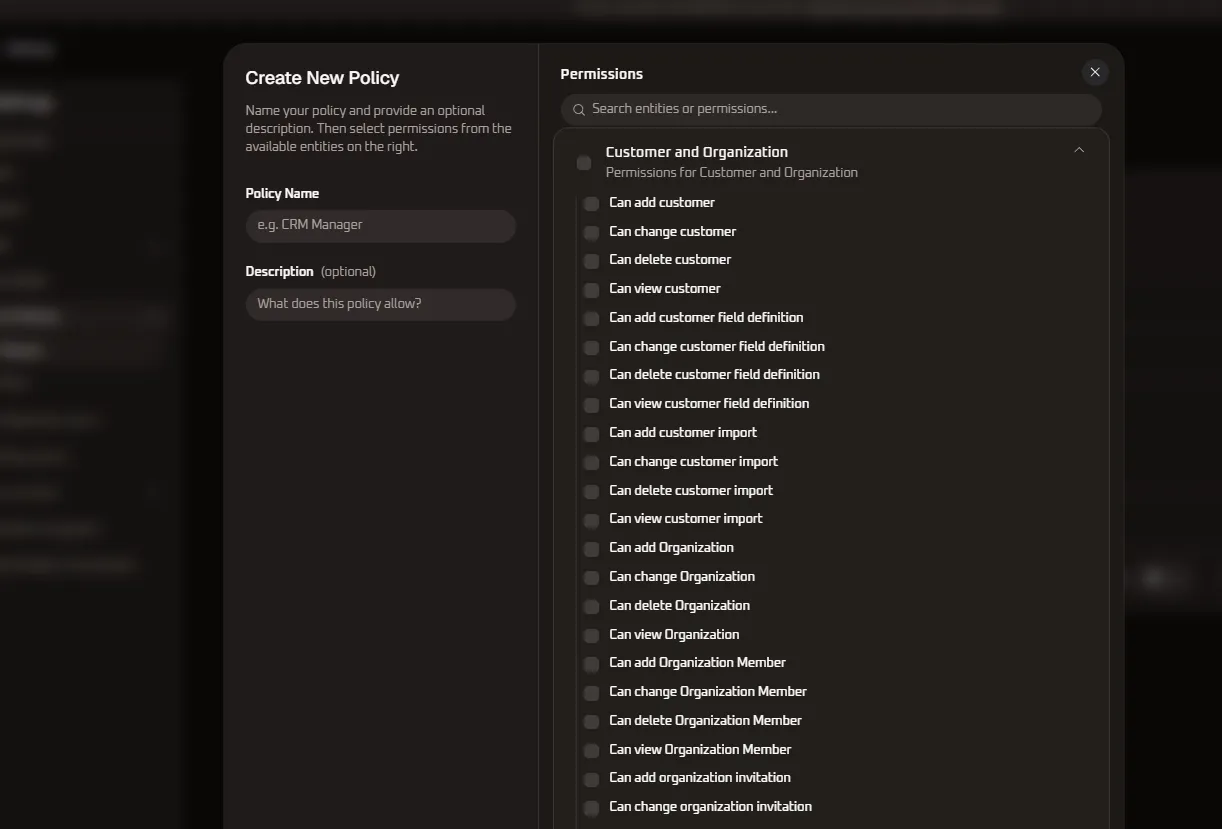
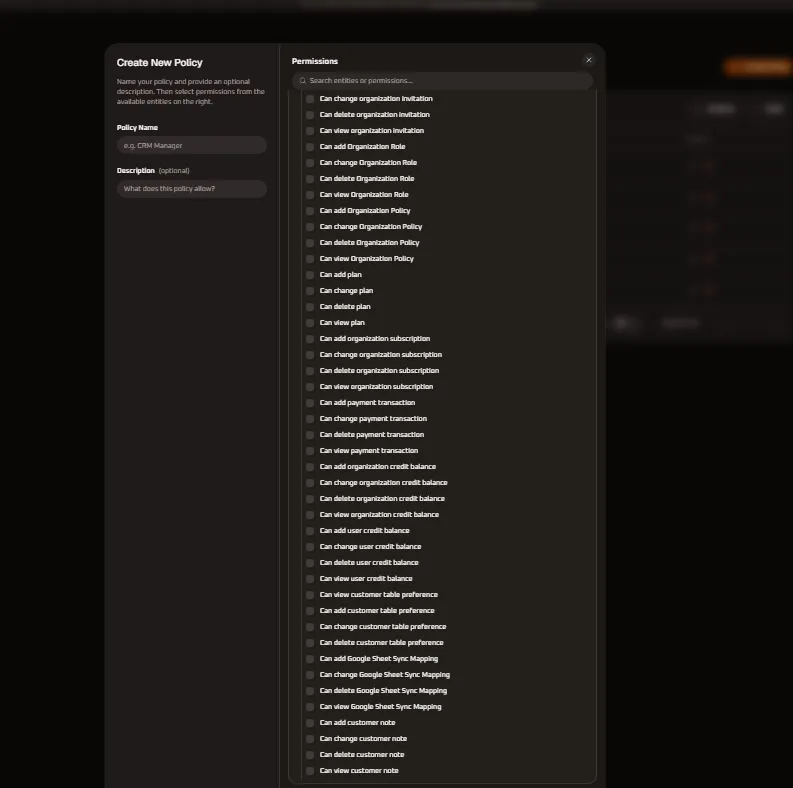
| Permission Name | Sub-Entity / Module | Privilege Level | Functional Operational Scope |
|---|---|---|---|
| Can add customer | Customer Directory | CRM Admin / Create | Authorizes manually creating new customer records, leads, and client contact profiles in WhiteStart CRM. |
| Can change customer | Customer Directory | CRM Admin / Edit | Enables updating contact phone numbers, emails, addresses, lifecycle stages, lead scores, and custom attributes. |
| Can delete customer | Customer Directory | Destructive / CRM | High-privilege action to permanently delete customer contact records and associated communication histories. |
| Can view customer | Customer Directory | Read-Only | Grants read-only visibility into customer contact profiles, communication timelines, purchase histories, and CRM records. |
| Can add customer field definition | Custom Field Schemas | Schema Admin / Create | Authorizes defining new custom contact fields, user attributes, dropdown selections, and metadata schema properties. |
| Can change customer field definition | Custom Field Schemas | Schema Admin / Edit | Enables modifying custom field labels, input types, validation rules, default fallback values, and form visibility flags. |
| Can delete customer field definition | Custom Field Schemas | Destructive / Schema | High-privilege destructive action to permanently remove custom field schemas, purging associated data across all contacts. |
| Can view customer field definition | Custom Field Schemas | Read-Only | Authorizes inspecting active customer field definitions, schema layouts, and attribute configurations. |
| Can add customer import | Contact Ingestion | Data Admin / Create | Authorizes uploading and launching bulk CSV/Excel customer contact import jobs into WhiteStart CRM. |
| Can change customer import | Contact Ingestion | Data Admin / Edit | Enables modifying CSV column mapping configurations, update-or-insert (upsert) rules, and duplicate detection strategies. |
| Can delete customer import | Contact Ingestion | Destructive / Data | Authorizes cancelling running customer contact imports and clearing historical import batch logs. |
| Can view customer import | Contact Ingestion | Read-Only | Grants visibility into customer import history, batch processing progress, successfully ingested records, and parsing error logs. |
| Can add Organization | Tenant Administration | Super Admin / Create | Authorizes provisioning new tenant organizations, business units, or sister organizations within the WhiteStart cluster. |
| Can change Organization | Tenant Administration | Super Admin / Edit | Enables modifying organization corporate details, legal entity name, primary business timezone, currency, and brand logos. |
| Can delete Organization | Tenant Administration | Critical Destructive | Highest-privilege master action allowing complete deletion of the organization tenant, connected accounts, and all stored data. |
| Can view Organization | Tenant Administration | Read-Only | Authorizes inspecting organization profile metadata, tenant registration IDs, creation timestamps, and primary owner details. |
| Can add Organization Member | Team Directory | User Admin / Create | Authorizes adding team members to the organization, assigning initial functional roles, and provisioning workspace seats. |
| Can change Organization Member | Team Directory | User Admin / Edit | Enables updating team member designations, modifying assigned roles, and changing member operational statuses (Active/Suspended). |
| Can delete Organization Member | Team Directory | Destructive / User | High-privilege action allowing removal of team members from the organization and immediate revocation of active sessions. |
| Can view Organization Member | Team Directory | Read-Only | Grants read-only visibility into the organization team directory, member emails, assigned RBAC roles, and login history. |
| Can add organization invitation | User Invitations | User Admin / Create | Authorizes generating and sending email invitation links for prospective colleagues and contractors to join the workspace. |
| Can change organization invitation | User Invitations | User Admin / Edit | Enables updating pending invitations, revising designated role assignments, and extending invitation token expiration windows. |
| Can delete organization invitation | User Invitations | Destructive / User | Authorizes cancelling and revoking pending organization invitations, invalidating outstanding join tokens. |
| Can view organization invitation | User Invitations | Read-Only | Allows inspecting outstanding, accepted, or expired team member invitations and invitation timestamps. |
| Can add Organization Role | RBAC Roles | Security Admin / Create | Authorizes defining new role containers and assembling permission policy bundles for functional team positions. |
| Can change Organization Role | RBAC Roles | Security Admin / Edit | Enables modifying role titles and attaching or detaching permission policies to reconfigure member capabilities. |
| Can delete Organization Role | RBAC Roles | Destructive / Security | Authorizes permanently deleting custom organizational roles from the RBAC directory. |
| Can view Organization Role | RBAC Roles | Read-Only | Grants read-only visibility into defined roles, attached permission policies, and assigned member counts. |
| Can add Organization Policy | RBAC Policies | Security Admin / Create | Authorizes building and registering new custom granular security permission policies. |
| Can change Organization Policy | RBAC Policies | Security Admin / Edit | Enables updating permission matrices and toggling granular module capabilities within existing policies. |
| Can delete Organization Policy | RBAC Policies | Destructive / Security | Authorizes permanently deleting custom organizational policies from the security catalog. |
| Can view Organization Policy | RBAC Policies | Read-Only | Grants read-only access to browse the policy catalog, permission sets, and operational policy descriptions. |
| Can add plan | Billing & Pricing | Billing Admin / Create | Authorizes defining new subscription packages, tier features, pricing models, and service quotas. |
| Can change plan | Billing & Pricing | Billing Admin / Edit | Enables updating plan pricing parameters, included feature allocations, overage rates, and renewal cycles. |
| Can delete plan | Billing & Pricing | Destructive / Billing | Authorizes decommissioning and permanently removing subscription plan definitions from the catalog. |
| Can view plan | Billing & Pricing | Read-Only | Allows viewing available subscription plans, tier feature specifications, and pricing schedules. |
| Can add organization subscription | Subscriptions | Billing Admin / Create | Authorizes initiating and activating organizational subscription plans and recurring billing profiles. |
| Can change organization subscription | Subscriptions | Billing Admin / Edit | Enables upgrading, downgrading, or altering active subscription tiers, seat counts, and payment schedules. |
| Can delete organization subscription | Subscriptions | Destructive / Billing | High-privilege action to cancel and terminate active organizational subscriptions. |
| Can view organization subscription | Subscriptions | Read-Only | Authorizes inspecting current subscription status, renewal dates, tier limits, seat consumption, and billing intervals. |
| Can add payment transaction | Financial Ledger | Finance Admin / Create | Authorizes recording manual payment receipts, offline bank wire transfers, and billing adjustments. |
| Can change payment transaction | Financial Ledger | Finance Admin / Edit | Enables updating payment transaction notes, reference IDs, and transaction status codes in the billing ledger. |
| Can delete payment transaction | Financial Ledger | Destructive / Finance | Authorizes voiding or deleting erroneous or disputed payment transaction records from the ledger. |
| Can view payment transaction | Financial Ledger | Read-Only | Grants access to view billing invoices, payment transaction histories, payment method records, and receipt summaries. |
| Can add organization credit balance | Credit Governance | Finance Admin / Create | Authorizes depositing and provisioning credits into the central organization balance wallet for messaging and telephony. |
| Can change organization credit balance | Credit Governance | Finance Admin / Edit | Enables adjusting credit limits, minimum warning thresholds, and automated top-up triggers for the organization wallet. |
| Can delete organization credit balance | Credit Governance | Destructive / Finance | High-privilege action to deduct, zero out, or reset organizational credit wallet balances. |
| Can view organization credit balance | Credit Governance | Read-Only | Allows viewing real-time organization credit balances, channel burn rates, and top-up transaction logs. |
| Can add user credit balance | User Credits | Finance Admin / Create | Authorizes allocating dedicated credit allowances to individual team members or specific operational departments. |
| Can change user credit balance | User Credits | Finance Admin / Edit | Enables modifying individual user credit quotas, monthly refill allocations, and spending caps. |
| Can delete user credit balance | User Credits | Destructive / Finance | Authorizes removing dedicated user credit allocations, returning remaining funds to the central organization pool. |
| Can view user credit balance | User Credits | Read-Only | Authorizes inspecting user credit balances, individual consumption metrics, and member transaction histories. |
| Can view customer table preference | CRM View Settings | User Preference / Read | Authorizes reading saved CRM table column display orders, pinned fields, and default filter presets. |
| Can add customer table preference | CRM View Settings | User Preference / Create | Enables creating personalized customer table view layouts, custom column sets, and default sort orders. |
| Can change customer table preference | CRM View Settings | User Preference / Edit | Allows modifying existing customer table view configurations and column visibility settings. |
| Can delete customer table preference | CRM View Settings | Destructive / Preference | Authorizes resetting customer table column preferences to default system configurations. |
| Can add Google Sheet Sync Mapping | Sheet Integration | Integration Admin / Create | Authorizes establishing bidirectional sync mappings between Google Sheets spreadsheets and WhiteStart CRM contact lists. |
| Can change Google Sheet Sync Mapping | Sheet Integration | Integration Admin / Edit | Enables modifying Google Sheet column-to-contact attribute bindings, sync directionality, and automatic polling intervals. |
| Can delete Google Sheet Sync Mapping | Sheet Integration | Destructive / Integration | Authorizes deleting Google Sheet synchronization connections and removing sync hooks. |
| Can view Google Sheet Sync Mapping | Sheet Integration | Read-Only | Grants visibility into active Google Sheet sync mappings, sync health metrics, processed rows, and last-sync timestamps. |
| Can add customer note | CRM Customer Notes | Operational / Create | Authorizes creating internal operational notes, call summaries, and customer interaction memos on contact timelines. |
| Can change customer note | CRM Customer Notes | Operational / Edit | Enables updating existing customer notes, revising interaction details, and adding follow-up tags. |
| Can delete customer note | CRM Customer Notes | Destructive / CRM | Authorizes deleting customer notes and conversation memos from the customer timeline. |
| Can view customer note | CRM Customer Notes | Read-Only | Grants visibility into customer timeline notes, internal teammate memos, and historical audit entries. |
15. System Tools Permission Specifications
Section titled “15. System Tools Permission Specifications”The System Tools entity group governs interactive lead capture form builders, dynamic input elements, platform-wide user notifications, generative AI copy studio tools, and conversational bot runtime engines and triggers:
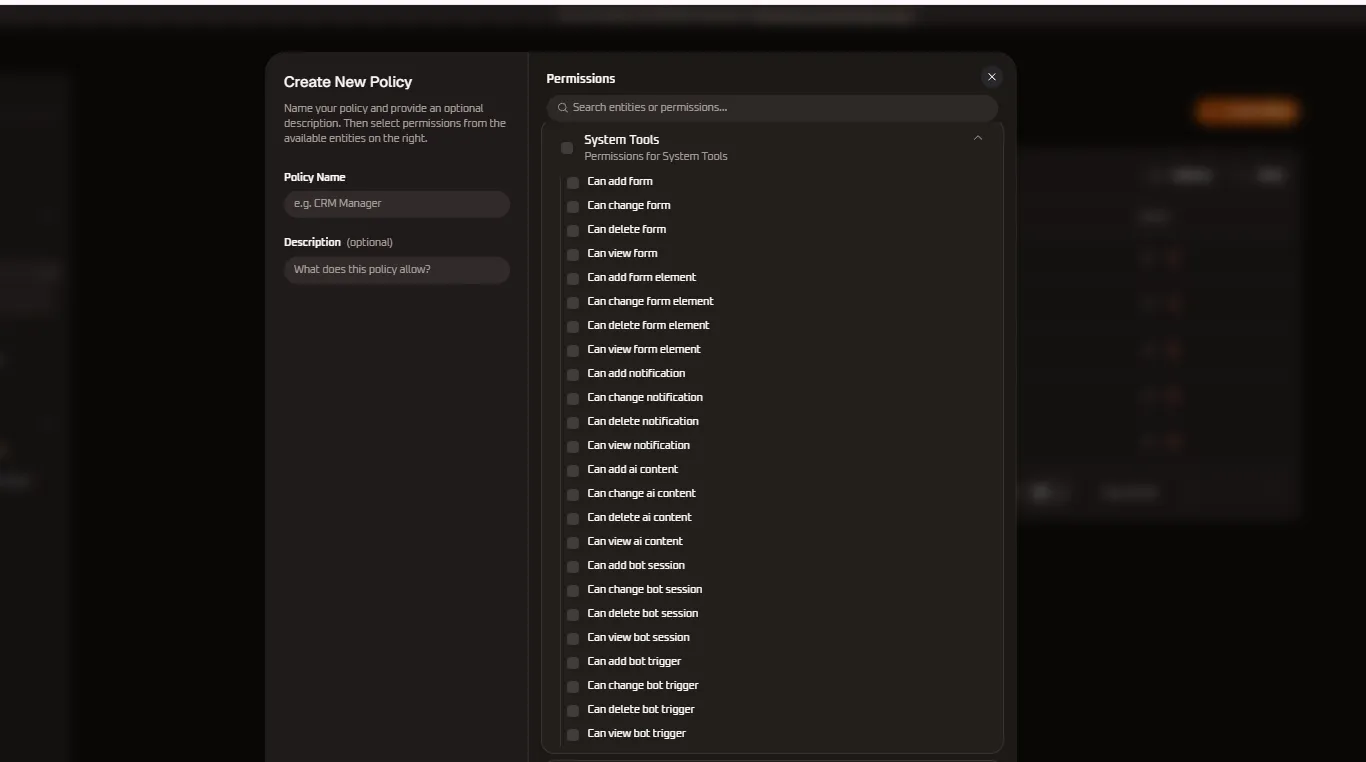
| Permission Name | Sub-Entity / Module | Privilege Level | Functional Operational Scope |
|---|---|---|---|
| Can add form | Form Builder | Content Admin / Create | Authorizes creating dynamic lead capture forms, intake surveys, registration screens, and embedded website widgets. |
| Can change form | Form Builder | Content Admin / Edit | Enables modifying form visual themes, submission actions, redirect URLs, spam prevention (CAPTCHA), and tracking webhooks. |
| Can delete form | Form Builder | Destructive / Content | Authorizes decommissioning and permanently deleting custom lead generation forms and embedded widgets. |
| Can view form | Form Builder | Read-Only | Grants read-only access to browse active and draft forms, submission counts, view-to-lead conversion ratios, and form URLs. |
| Can add form element | Form Fields | Content Admin / Create | Authorizes adding form fields, text inputs, dropdown menus, multi-select checkboxes, date pickers, and file upload elements. |
| Can change form element | Form Fields | Content Admin / Edit | Enables editing field labels, placeholder text, required validation rules, regex patterns, and conditional visibility logic. |
| Can delete form element | Form Fields | Destructive / Content | Authorizes removing individual fields or input blocks from an existing form layout. |
| Can view form element | Form Fields | Read-Only | Allows inspecting form element schemas, field property configurations, and CRM field mapping bindings. |
| Can add notification | Notification Center | System Admin / Create | Authorizes broadcasting platform-wide system announcements, operational notices, and in-app banners to team members. |
| Can change notification | Notification Center | System Admin / Edit | Enables updating alert text copy, recipient group criteria, severity levels (Info/Warning/Urgent), and display schedules. |
| Can delete notification | Notification Center | Destructive / Alert | Authorizes dismissing or permanently deleting broadcast notifications from the system notification feed. |
| Can view notification | Notification Center | Read-Only | Grants access to view incoming system notifications, security alerts, and platform maintenance messages. |
| Can add ai content | AI Content Studio | AI Admin / Create | Authorizes using generative AI models to compose marketing ad copy, email drafts, message templates, and AI visual assets. |
| Can change ai content | AI Content Studio | AI Admin / Edit | Enables refining AI-generated copy, adjusting tone-of-voice prompts, modifying system prompt instructions, and editing drafts. |
| Can delete ai content | AI Content Studio | Destructive / AI | Authorizes deleting stored AI content drafts, model prompts, and cached generative responses. |
| Can view ai content | AI Content Studio | Read-Only | Grants browsing access to view generated AI copy, prompt logs, model hyperparameters, and generation token usage. |
| Can add bot session | Bot Engine | Bot Admin / Create | Authorizes creating and initializing conversational bot runtime instances, testing sessions, and sandbox simulators. |
| Can change bot session | Bot Engine | Bot Admin / Edit | Enables modifying active bot runtime variables, session context memory, routing parameters, and simulated user attributes. |
| Can delete bot session | Bot Engine | Destructive / Bot | Authorizes terminating and clearing active bot runtime sessions and diagnostic execution logs. |
| Can view bot session | Bot Engine | Read-Only | Allows inspecting live bot sessions, dialog turn histories, intent matching scores, and execution traces. |
| Can add bot trigger | Bot Triggers | Bot Admin / Create | Authorizes creating automated triggers that initiate bot conversational flows based on inbound messages, webhook events, or tags. |
| Can change bot trigger | Bot Triggers | Bot Admin / Edit | Enables modifying trigger keyword rules, webhook payload matchers, channel event associations, and priority ordering. |
| Can delete bot trigger | Bot Triggers | Destructive / Bot | Authorizes disabling and permanently deleting conversational bot trigger rules. |
| Can view bot trigger | Bot Triggers | Read-Only | Grants read-only visibility into active bot trigger rules, match conditions, channel scopes, and trigger firing statistics. |
16. Work Flows Permission Specifications
Section titled “16. Work Flows Permission Specifications”The Work Flows entity group governs WhiteStart’s visual automation engine, enabling multi-step marketing automation journeys, automated lead routing, cross-channel triggers, and immutable version control:
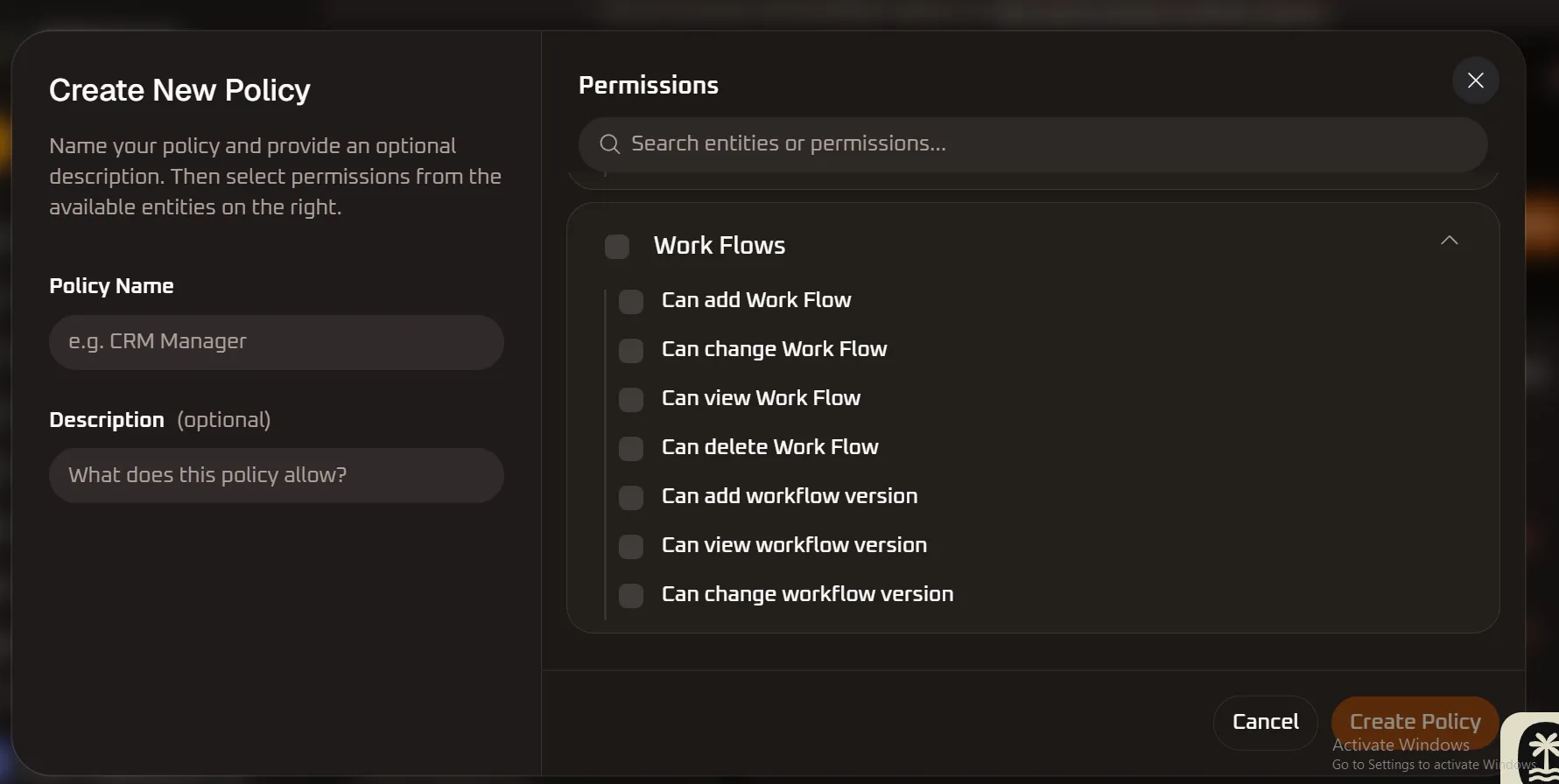
| Permission Name | Sub-Entity / Module | Privilege Level | Functional Operational Scope |
|---|---|---|---|
| Can add Work Flow | Automation Canvas | Automation / Create | Authorizes designing and deploying new end-to-end multi-step marketing and operational automation workflows. |
| Can change Work Flow | Automation Canvas | Automation / Edit | Enables modifying workflow nodes, conditional IF/THEN branching logic, delay timers, and channel action dispatches. |
| Can view Work Flow | Automation Canvas | Read-Only | Grants read-only visibility into visual workflow trees, execution statistics, contact flow enrollment, and workflow logs. |
| Can delete Work Flow | Automation Canvas | Destructive / Automation | High-privilege action allowing permanent deletion of automated workflows, cancelling all currently enqueued contact executions. |
| Can add workflow version | Version Control | Automation / Create | Authorizes publishing new version snapshots and revision drafts of an active automation workflow. |
| Can view workflow version | Version Control | Read-Only | Allows inspecting historical workflow versions, change logs, rollback comparison trees, and past execution diagrams. |
| Can change workflow version | Version Control | Automation / Edit | Enables rolling back to previous workflow versions, renaming revisions, and committing draft changes into active production. |
Editing Policy Permissions
Section titled “Editing Policy Permissions”Clicking edit on any existing policy opens the granular permissions matrix:
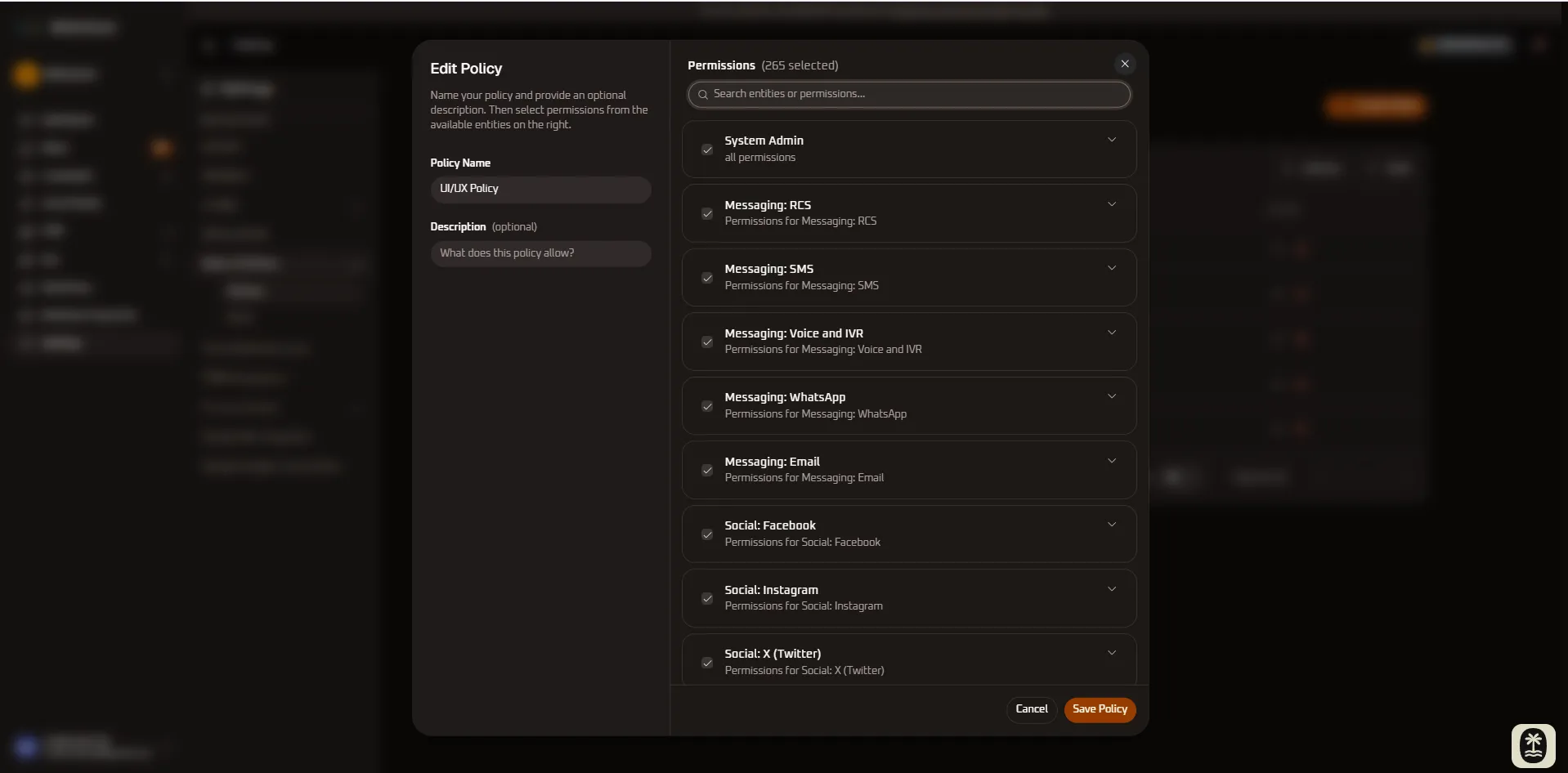
The permission matrix allows fine-grained security control across every platform area:
- Module Access: Toggle entire modules on or off (e.g., Campaigns, CRM, Workflows, Communication, Billing, Settings).
- Granular Actions: For each active module, configure specific permitted actions:
- View: Grants read-only visibility into records, dashboards, and reports.
- Create: Allows drafting new campaigns, importing contacts, or building workflows.
- Edit: Allows updating existing records, modifying templates, and changing configurations.
- Delete: Grants high-privilege authority to permanently remove records, contacts, or assets.
4. Managing Roles
Section titled “4. Managing Roles”Once policies are defined, navigate to the Roles section to assemble them into job-specific containers:
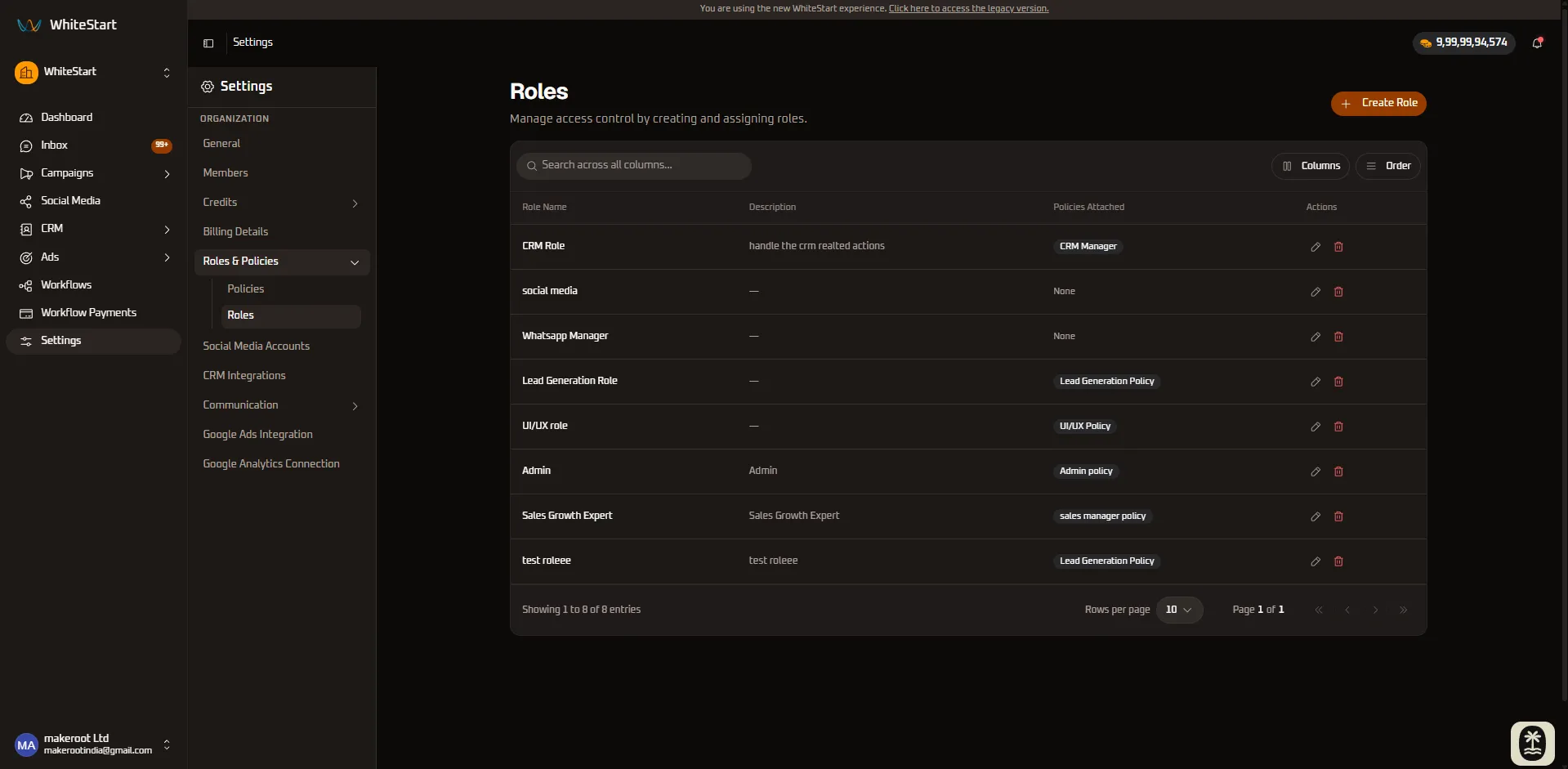
What You Can Do in Roles:
Section titled “What You Can Do in Roles:”- View Active Roles: Review all default roles (e.g., Admin, CRM Role, Whatsapp Manager) and custom roles.
- Track Member Counts: See exactly how many team members are currently assigned to each role.
- Action Menu (
•••): Edit attached policies, assign team members, or remove custom roles.
Creating New Roles
Section titled “Creating New Roles”To accommodate specific job functions or cross-functional teams:
- Click the orange + Create Role button.
- In the role creation modal:
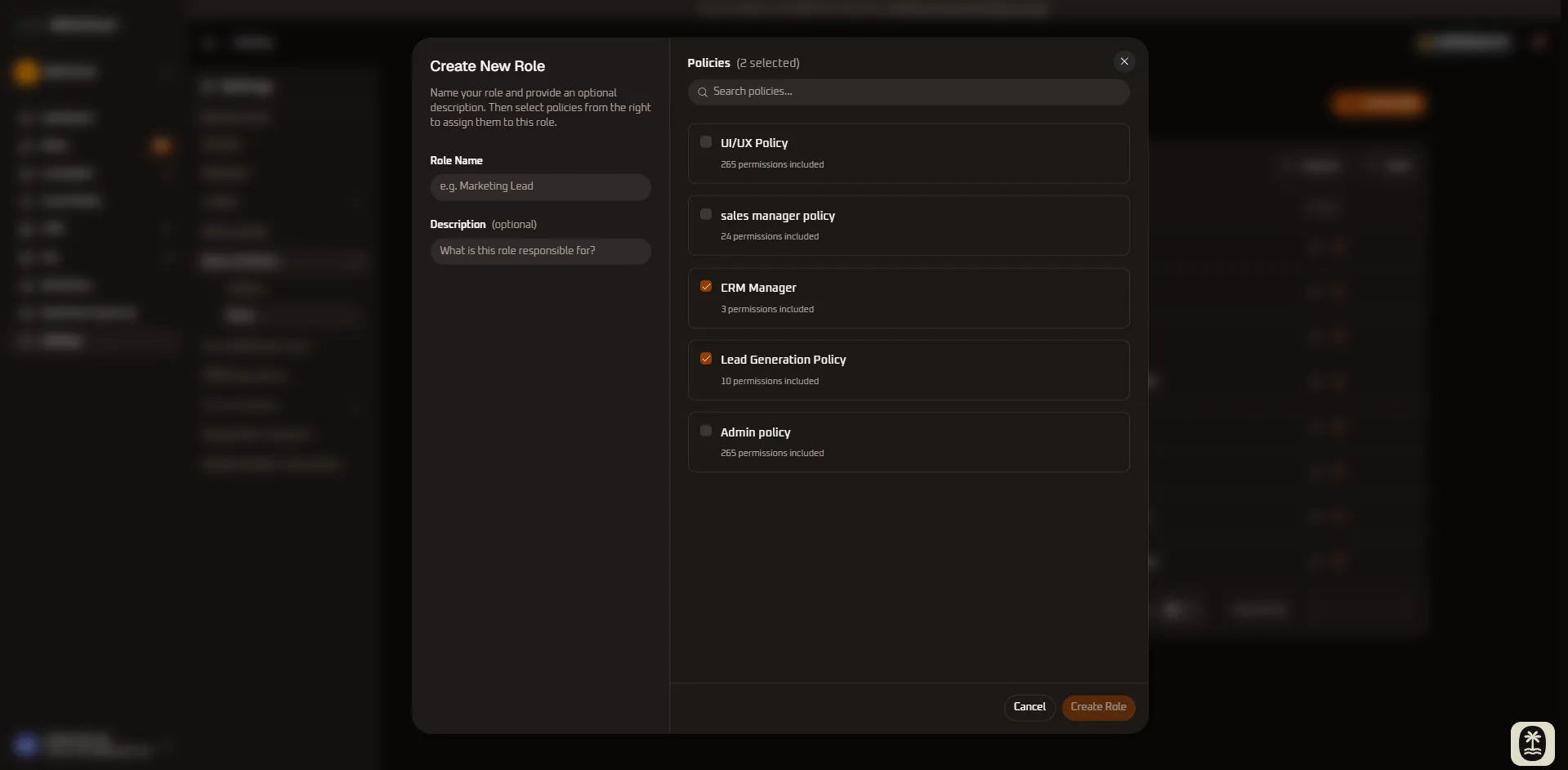
- Role Name: Enter a functional designation (e.g., Social Media Coordinator, Sales Growth Specialist).
- Attach Policies: Select the checkboxes for the specific Policies you want to bundle into this role.
- Save Role: Click Save Changes to register the new role in your organization directory.
Editing Roles & Policy Attachments
Section titled “Editing Roles & Policy Attachments”As operational responsibilities change, roles can be updated dynamically:
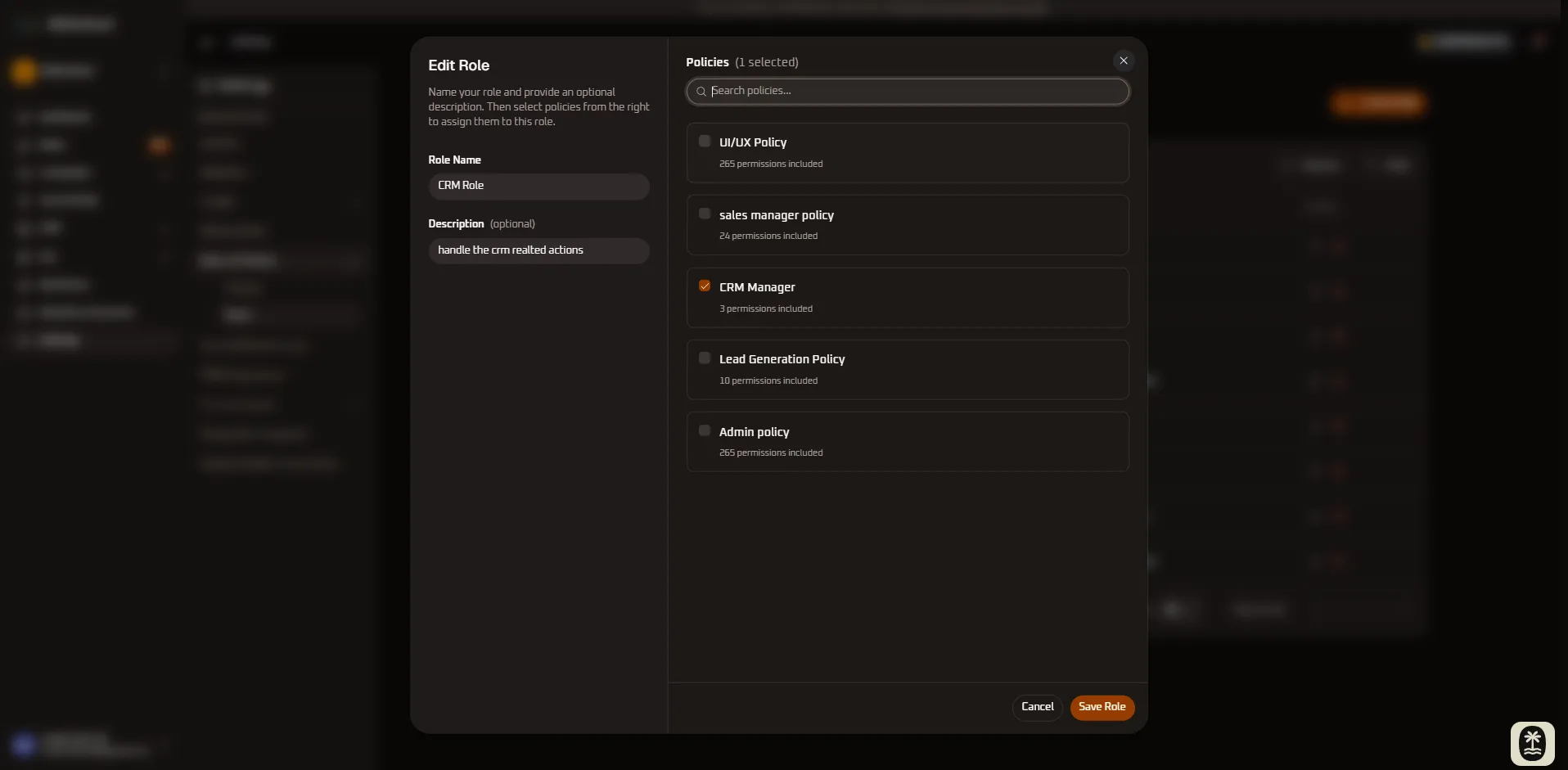
- Locate the role in the directory and click Edit Role (or click the row settings icon).
- Add or remove attached policies by toggling their checkboxes.
- Click Save Changes to commit updates.
5. Quick Reference Summary
Section titled “5. Quick Reference Summary”| Control / Action | UI Component Type | Operational Status | Primary Purpose |
|---|---|---|---|
| + Create Policy | Primary Button | Interactive Modal | Opens the form to define a new granular permission set. |
| Search Permissions | Text Input | Search Filter | Quickly filters specific privileges across all entity groups. |
| Entity Accordion | Expandable List | Interactive | Displays granular capabilities for System Admin, Messaging, Social, Customer & Org, System Tools, and Workflows. |
| + Create Role | Primary Button | Interactive Modal | Bundles multiple policies into a single assignable role. |
| Attach Policies | Checkbox List | Editable | Selects which policies are granted to members assigned to a role. |
| Member Count | Counter Badge | Read-Only | Displays how many organization users hold the specified role. |
Actions Menu (•••) |
Dropdown Menu | Interactive Action | Edit configuration parameters or delete custom roles/policies. |
6. Step-by-Step Instructions
Section titled “6. Step-by-Step Instructions”1. How to Create a System Admin & Live Inbox Policy
Section titled “1. How to Create a System Admin & Live Inbox Policy”- Navigate to Settings ➔ Roles & Policies.
- Under the Policies section, click + Create Policy.
- Enter a clear Policy Name (e.g.,
Live Support Team Lead) and an optional Description. - In the Permissions panel on the right, click the chevron (
˅) next to System Admin to expand its privileges. - Check specific desired capabilities (e.g.,
Can view customer,Can add Agent Chat Session,Can change Agent Chat Session, andCan view Agent Chat Session). - Click Create Policy to register the policy.
2. How to Create an RCS Messaging & Campaign Policy
Section titled “2. How to Create an RCS Messaging & Campaign Policy”- Under the Policies section, click + Create Policy.
- Enter Policy Name (e.g.,
RCS Broadcast Specialist) and a descriptive summary. - In the Permissions panel, expand the Messaging: RCS accordion group.
- Select the necessary capabilities:
- For campaign managers: Check
Can add rcs campaign,Can change rcs campaign,Can view rcs campaign, andCan add rcs campaign messages. - For gateway administrators: Check
Can add jioCX RCS AccountorCan add SmartPing RCS Account. - For template designers: Check
Can add jio rcs templateorCan add smart ping rcs template.
- For campaign managers: Check
- Click Create Policy to save.
3. How to Create an SMS Broadcast & DLT Gateway Policy
Section titled “3. How to Create an SMS Broadcast & DLT Gateway Policy”- Under the Policies section, click + Create Policy.
- Enter a Policy Name (e.g.,
SMS Operations Specialist) and an operational description. - In the Permissions panel, expand the Messaging: SMS accordion group.
- Select the specific required permissions:
- For campaign managers: Check
Can add sms campaign,Can change sms campaign,Can view sms campaign, andCan add sms campaign messages. - For gateway administrators: Check
Can add JioCX SMS Account,Can add MSG91 Account, orCan add SmartPing SMS Account. - For DLT template managers: Check
Can add jio sms template,Can add smart ping sms template, orCan add SMS Template.
- For campaign managers: Check
- Click Create Policy to save.
4. How to Create a Voice & IVR Broadcast Policy
Section titled “4. How to Create a Voice & IVR Broadcast Policy”- Under the Policies section, click + Create Policy.
- Enter a Policy Name (e.g.,
Voice & Telephony Lead) and an operational description. - In the Permissions panel, expand the Messaging: Voice and IVR accordion group.
- Select the appropriate operational permissions:
- For outbound dialer campaigns: Check
Can add voice campaign,Can change voice campaign,Can view voice campaign, andCan add voice campaign message. - For interactive DTMF IVR flows: Check
Can add ivr campaign,Can change ivr campaign,Can view ivr campaign, andCan add ivr template. - For SIP carrier accounts: Check
Can add JioCX Voice AccountorCan add SmartPing Voice Account. - For audio prompt libraries: Check
Can add voice templateorCan add JioCX Voice Template.
- For outbound dialer campaigns: Check
- Click Create Policy to save.
5. How to Create a WhatsApp Operations & Chatbot Policy
Section titled “5. How to Create a WhatsApp Operations & Chatbot Policy”- Under the Policies section, click + Create Policy.
- Enter a Policy Name (e.g.,
WhatsApp Lead Specialist) and an operational description. - In the Permissions panel, expand the Messaging: WhatsApp accordion group.
- Select the specific required permissions:
- For live agents: Check
Can add whats app conversation,Can change whats app conversation,Can view whats app conversation, andCan add whats app message. - For marketing broadcast managers: Check
Can add whats app campaign,Can change whats app campaign,Can view whats app campaign, andCan add whats app campaign message. - For template administrators: Check
Can add whats app template,Can change whats app template, andCan view whats app template. - For automation engineers: Check
Can add whats app flow,Can add whats app bot flow, andCan view bot flow submission. - For WABA gateway administrators: Check
Can add WhatsApp Business AccountandCan view WhatsApp Business Account.
- For live agents: Check
- Click Create Policy to save.
6. How to Create an Email Broadcast & SMTP Gateway Policy
Section titled “6. How to Create an Email Broadcast & SMTP Gateway Policy”- Under the Policies section, click + Create Policy.
- Enter a Policy Name (e.g.,
Email Marketing Specialist) and an operational description. - In the Permissions panel, expand the Messaging: Email accordion group.
- Select the specific required capabilities:
- For newsletter & campaign managers: Check
Can add email campaign,Can change email campaign,Can view email campaign, andCan add email template. - For SMTP gateway administrators: Check
Can add Email Account,Can change Email Account, andCan view Email Account. - For media & collateral coordinators: Check
Can add template attachmentandCan change template attachment.
- For newsletter & campaign managers: Check
- Click Create Policy to register the permission set.
7. How to Create a Facebook Page & Messenger Policy
Section titled “7. How to Create a Facebook Page & Messenger Policy”- Under the Policies section, click + Create Policy.
- Enter a Policy Name (e.g.,
Facebook Community Manager) and an operational description. - In the Permissions panel, expand the Social: Facebook accordion group.
- Select the specific required capabilities:
- For social media managers: Check
Can add facebook post setting,Can change facebook post setting, andCan view facebook post setting. - For performance marketers: Check
Can add facebook boost setting,Can add Facebook Ad Insight, andCan add Meta Lead Form Mapping. - For customer support agents: Check
Can add Facebook Conversation,Can change Facebook Conversation, andCan add Facebook Message.
- For social media managers: Check
- Click Create Policy to register the permission set.
8. How to Create an Instagram Publishing & DM Policy
Section titled “8. How to Create an Instagram Publishing & DM Policy”- Navigate to Settings ➔ Roles & Policies.
- Under the Policies section, click + Create Policy.
- Enter a Policy Name (e.g.,
Instagram Engagement Specialist) and an operational description. - In the Permissions panel on the right, expand the Social: Instagram accordion group.
- Select the specific required capabilities:
- For content creators & social managers: Check
Can add instagram post setting,Can change instagram post setting, andCan view instagram post setting. - For paid media & growth marketers: Check
Can add instagram boost settingandCan add Instagram Ad Insight. - For customer support agents: Check
Can add Instagram Conversation,Can change Instagram Conversation, andCan add Instagram Message.
- For content creators & social managers: Check
- Click Create Policy to save.
9. How to Create an X (Twitter) Publishing & Promotion Policy
Section titled “9. How to Create an X (Twitter) Publishing & Promotion Policy”- Under the Policies section, click + Create Policy.
- Enter a Policy Name (e.g.,
X Social Media Specialist) and an operational description. - In the Permissions panel, expand the Social: X (Twitter) accordion group.
- Select the specific required capabilities:
- For tweet creators & community leads: Check
Can add twitter post setting,Can change twitter post setting, andCan view twitter post setting. - For promoted tweet campaigns: Check
Can add twitter boost settingandCan view twitter boost setting. - For security & developer app administrators: Check
Can add twitter o auth session,Can change twitter o auth session, andCan view twitter o auth session.
- For tweet creators & community leads: Check
- Click Create Policy to register the permission set.
10. How to Create a YouTube Video & Promotion Policy
Section titled “10. How to Create a YouTube Video & Promotion Policy”- Under the Policies section, click + Create Policy.
- Enter a Policy Name (e.g.,
YouTube Channel Specialist) and an operational description. - In the Permissions panel, expand the Social: YouTube accordion group.
- Select the specific required capabilities:
- For video producers & channel managers: Check
Can add you tube post setting,Can change you tube post setting, andCan view you tube post setting. - For video advertising specialists: Check
Can add you tube boost settingandCan change you tube boost setting. - For analytics specialists: Check
Can add YouTube Ad InsightandCan view YouTube Ad Insight.
- For video producers & channel managers: Check
- Click Create Policy to save.
11. How to Create a LinkedIn B2B Marketing Policy
Section titled “11. How to Create a LinkedIn B2B Marketing Policy”- Under the Policies section, click + Create Policy.
- Enter a Policy Name (e.g.,
LinkedIn Corporate Lead) and an operational description. - In the Permissions panel, expand the Social: LinkedIn accordion group.
- Select the required capabilities:
- For organic publishing: Check
Can add linked in post setting,Can change linked in post setting, andCan view linked in post setting. - For sponsored updates & advertising: Check
Can add linked in boost setting,Can change linked in boost setting, andCan view linked in boost setting. - For B2B analytics: Check
Can add LinkedIn Ad InsightandCan view LinkedIn Ad Insight.
- For organic publishing: Check
- Click Create Policy to save.
12. How to Create a Threads Social Growth Policy
Section titled “12. How to Create a Threads Social Growth Policy”- Under the Policies section, click + Create Policy.
- Enter a Policy Name (e.g.,
Threads Community Specialist) and an operational description. - In the Permissions panel, expand the Social: Threads accordion group.
- Select the required capabilities:
- For organic thread posting: Check
Can add Thread Post Setting,Can change Thread Post Setting, andCan view Thread Post Setting. - For promoted threads: Check
Can add thread boost setting,Can change thread boost setting, andCan view thread boost setting.
- For organic thread posting: Check
- Click Create Policy to register the permission set.
13. How to Create a Centralized Media & Ad Accounts Policy (Social: General)
Section titled “13. How to Create a Centralized Media & Ad Accounts Policy (Social: General)”- Under the Policies section, click + Create Policy.
- Enter a Policy Name (e.g.,
Social Media Director) and an operational description. - In the Permissions panel, expand the Social: General accordion group.
- Select the appropriate operational permissions:
- For cross-channel post authoring: Check
Can add post,Can change post,Can view post, andCan add post media. - For asset management: Check
Can add media,Can change media, andCan view media. - For advertising & OAuth accounts: Check
Can add ads account,Can view ads account,Can add connected account, andCan view connected account.
- For cross-channel post authoring: Check
- Click Create Policy to commit.
14. How to Create a Customer & Organization Governance Policy
Section titled “14. How to Create a Customer & Organization Governance Policy”- Under the Policies section, click + Create Policy.
- Enter a Policy Name (e.g.,
CRM & Workspace Administrator) and an operational description. - In the Permissions panel, expand the Customer and Organization accordion group.
- Select the specific required permissions:
- For CRM record operations: Check
Can add customer,Can change customer,Can view customer, andCan add customer note. - For custom schema & data ingestion: Check
Can add customer field definition,Can view customer field definition,Can add customer import, andCan add Google Sheet Sync Mapping. - For team administration: Check
Can add Organization Member,Can change Organization Member,Can add organization invitation, andCan view Organization Member. - For credit & billing governance: Check
Can view organization credit balance,Can add user credit balance,Can view organization subscription, andCan view payment transaction.
- For CRM record operations: Check
- Click Create Policy to save.
15. How to Create a Dynamic Forms & Bot Automation Policy (System Tools)
Section titled “15. How to Create a Dynamic Forms & Bot Automation Policy (System Tools)”- Under the Policies section, click + Create Policy.
- Enter a Policy Name (e.g.,
Inbound Lead & Bot Specialist) and an operational description. - In the Permissions panel, expand the System Tools accordion group.
- Select the required privileges:
- For website forms: Check
Can add form,Can change form,Can view form, andCan add form element. - For conversational bot triggers: Check
Can add bot trigger,Can change bot trigger,Can view bot trigger, andCan view bot session. - For AI copywriting: Check
Can add ai contentandCan change ai content.
- For website forms: Check
- Click Create Policy to save.
16. How to Create a Workflow Automation & Versioning Policy
Section titled “16. How to Create a Workflow Automation & Versioning Policy”- Under the Policies section, click + Create Policy.
- Enter a Policy Name (e.g.,
Marketing Automation Engineer) and an operational description. - In the Permissions panel, expand the Work Flows accordion group.
- Select the required privileges:
- For workflow orchestration: Check
Can add Work Flow,Can change Work Flow, andCan view Work Flow. - For release management & version control: Check
Can add workflow version,Can change workflow version, andCan view workflow version.
- For workflow orchestration: Check
- Click Create Policy to save.
17. How to Create and Assign a Composite Role
Section titled “17. How to Create and Assign a Composite Role”- Under the Roles section, click + Create Role.
- Enter the Role Name for the job position (e.g.,
Omnichannel Marketing & Operations Director). - Check the boxes next to the policies you want attached to this role (e.g.,
Live Support Team Lead,RCS Broadcast Specialist,WhatsApp Lead Specialist,Facebook Community Manager,Instagram Engagement Specialist,LinkedIn Corporate Lead,Social Media Director,CRM & Workspace Administrator, andMarketing Automation Engineer). - Click Save Changes.
- Navigate to Members to assign the new composite role to specific team members.
18. How to Modify an Existing Role’s Permissions
Section titled “18. How to Modify an Existing Role’s Permissions”- Locate the target role under the Roles directory.
- Click the three dots (
•••) and select Edit Role. - Toggle policy checkboxes to grant or revoke specific permission sets.
- Click Save Changes. All users holding this role inherit the updated permissions instantly across all active sessions.