
Meta Campaigns - Objectives, Advantage+ Budget & Bidding
Meta Campaigns: Strategic Objectives & Advantage+ Budgeting
Section titled “Meta Campaigns: Strategic Objectives & Advantage+ Budgeting”The Campaigns tier in WhiteStart serves as the macro-level governance layer for your advertising operations across Facebook and Instagram. At this level, marketing teams define the primary business objective, select bidding structures, allocate budgets, and monitor aggregated performance.
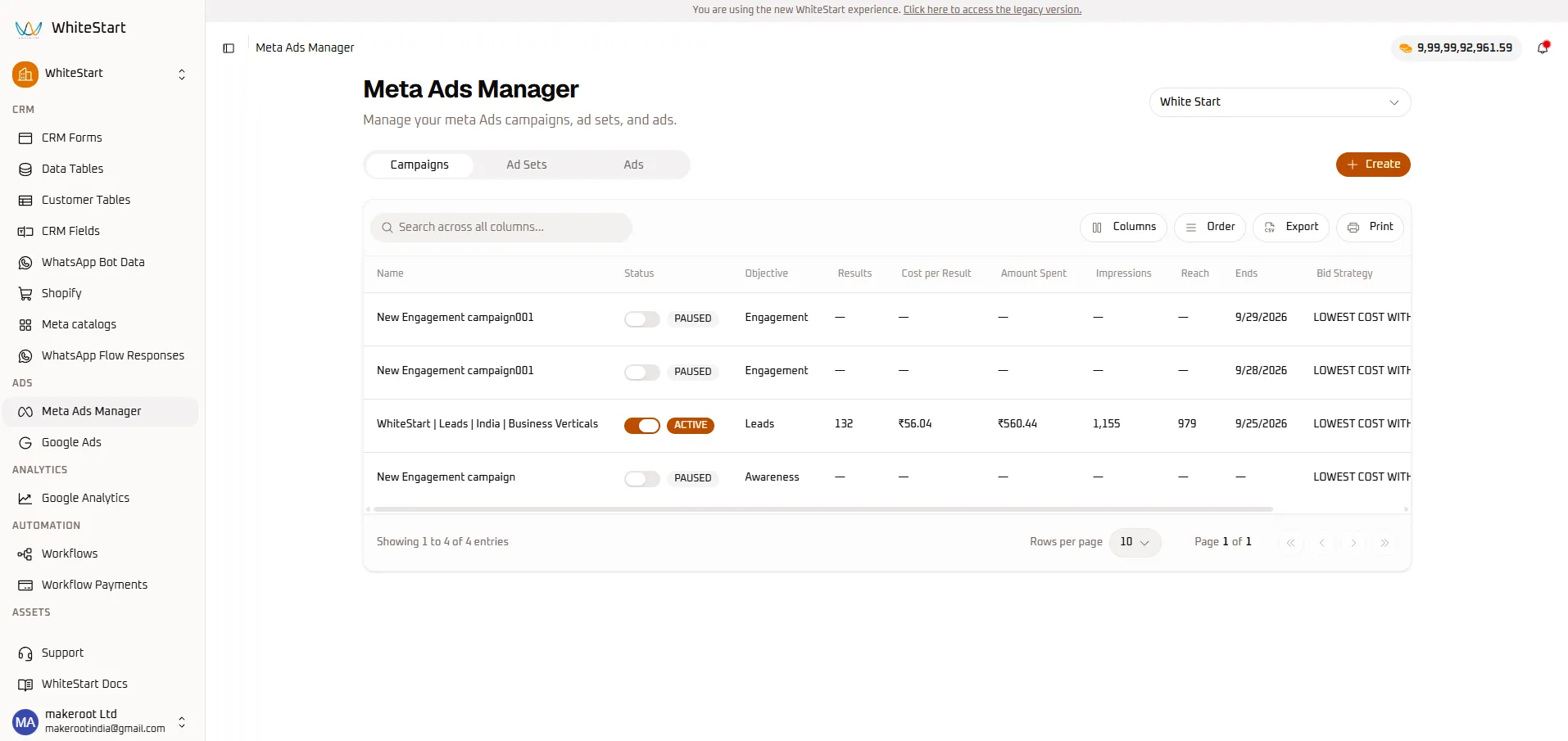
1. Campaigns Directory & Grid Overview
Section titled “1. Campaigns Directory & Grid Overview”To access your campaigns, navigate to:
Main Sidebar ➔ ADS ➔ Meta Ads Manager ➔ [ Campaigns ] TabThe Campaigns data table provides a high-density operational view of all active, paused, and completed advertising initiatives under the selected ad account.
Campaigns Table Field Reference
Section titled “Campaigns Table Field Reference”| Column Header | Data Type | Description | Operational Purpose |
|---|---|---|---|
| Name | Text Link | Title of the campaign (e.g., WhiteStart | Leads | India | Business Verticals). |
Primary campaign identifier. Click to drill into child ad sets. |
| Status | Toggle Switch | Delivery state: ACTIVE (orange) or PAUSED (gray). |
Single-click spend control. Instantly pause or resume campaign delivery. |
| Objective | Categorical | The strategic goal configured in Meta (e.g., Engagement, Leads, Awareness). |
Determines how Meta’s machine-learning algorithm distributes impressions. |
| Results | Numeric Counter | Total primary conversion actions achieved. | Quantifies goal attainment (e.g., 132 leads generated). |
| Cost per Result | Currency Metric | Average acquisition cost per conversion event. | Primary metric for acquisition efficiency (e.g., ₹56.04 per lead). |
| Amount Spent | Currency Metric | Cumulative ad spend consumed by this campaign. | Displays total financial expenditure (e.g., ₹560.44). |
| Impressions | Numeric Counter | Total number of times ad creatives were displayed. | Measures overall market reach and exposure volume (e.g., 1,155). |
| Reach | Numeric Counter | Unique individual user accounts exposed to the campaign. | Quantifies unique audience size (e.g., 979 people). |
| Ends | Date Timestamp | Scheduled completion date of the campaign. | Displays the cutoff timestamp (e.g., 9/25/2026) or — for ongoing. |
| Bid Strategy | Strategy Label | Bidding model active in the Meta ad auction. | Optimization model (e.g., LOWEST COST WITHOUT CAP). |
2. Real-Time Delivery Controls
Section titled “2. Real-Time Delivery Controls”WhiteStart communicates with Meta’s Graph API in real time. Account managers can control ad spend without leaving the dashboard:
[O] PAUSED ──(Click Toggle)──► [X] ACTIVESpend Halted Spend Active & Serving Impressions- To Pause Spend: Click an active orange toggle switch. The badge immediately updates to gray
PAUSED, and Meta stops entering auctions for this campaign. - To Resume Spend: Click a paused gray toggle. The switch moves to orange
ACTIVE, resuming delivery according to your schedule.
3. Creating a New Meta Campaign (Step-by-Step)
Section titled “3. Creating a New Meta Campaign (Step-by-Step)”To launch a new advertising campaign, click the primary orange + Create button in the upper-right corner of the console.
Meta Ads Manager ➔ [ Campaigns ] Tab ➔ [+ Create] ➔ Create Meta Campaign WizardStep 1: Account Selection & Campaign Score
Section titled “Step 1: Account Selection & Campaign Score”Connect the campaign to your authenticated Facebook profile, designate the target Ad Account, and review your initial setup score.
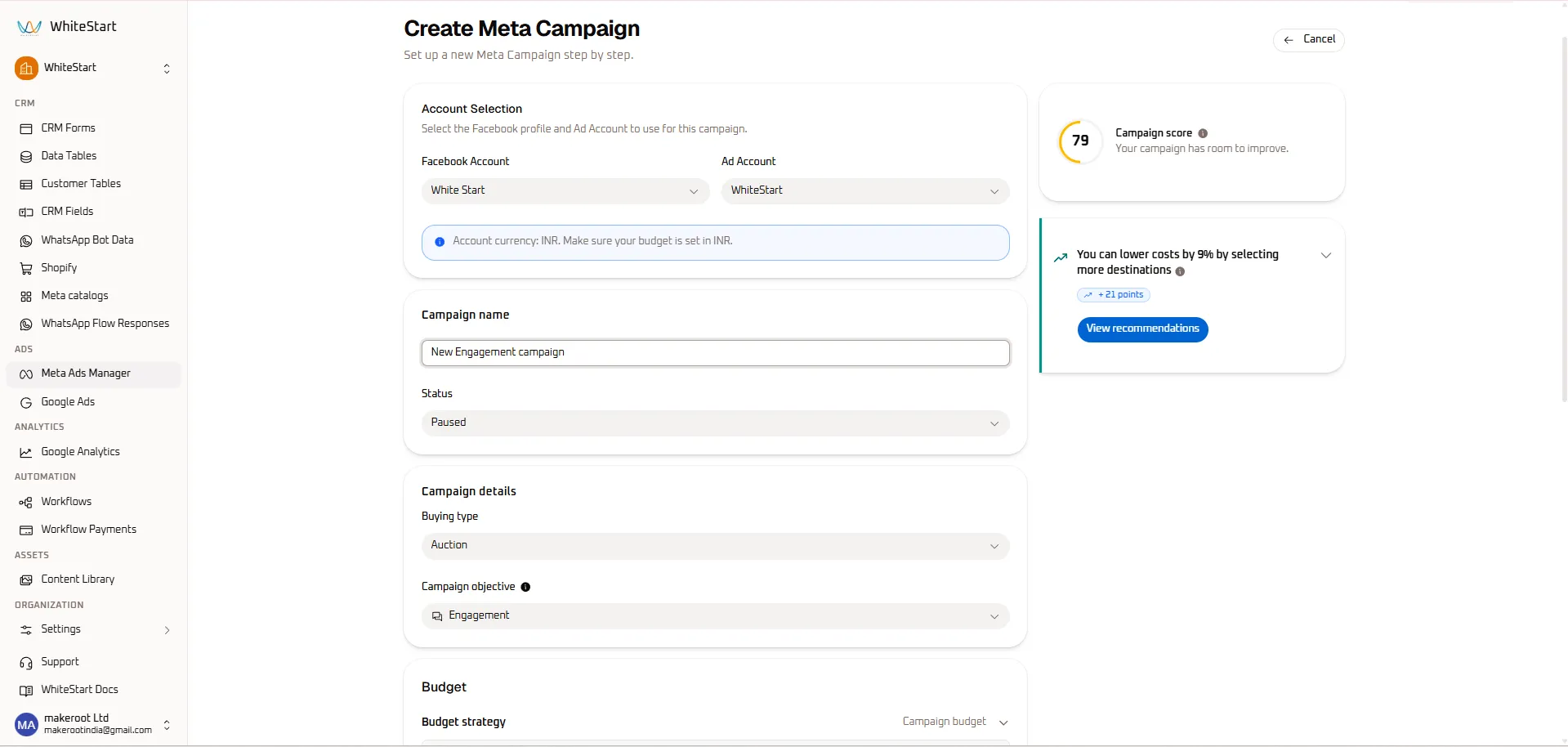
- Facebook Account Dropdown: Select the authenticated Facebook Profile or Business Portfolio (e.g.,
White Start). - Ad Account Dropdown: Select the specific ad account provisioned for this brand (e.g.,
WhiteStart). - Currency Validation Notice: WhiteStart displays an informative banner confirming your account’s native currency (e.g., “Account currency: INR. Make sure your budget is set in INR.”).
- Campaign Name: Enter a clear, structured campaign title (e.g.,
New Engagement campaign). - Initial Delivery Status: Choose the starting state from the dropdown (
Pausedis recommended during setup to prevent accidental spend before final review). - Campaign Score Inspection:
- The circular score gauge on the right monitors configuration quality (79 / 100).
- Recommendations Card: Review automated advice (e.g., “You can lower costs by 9% by selecting more destinations (+21 points)”). Click View recommendations to optimize your setup before publishing.
Step 2: Buying Type, Objectives & Budget Architecture
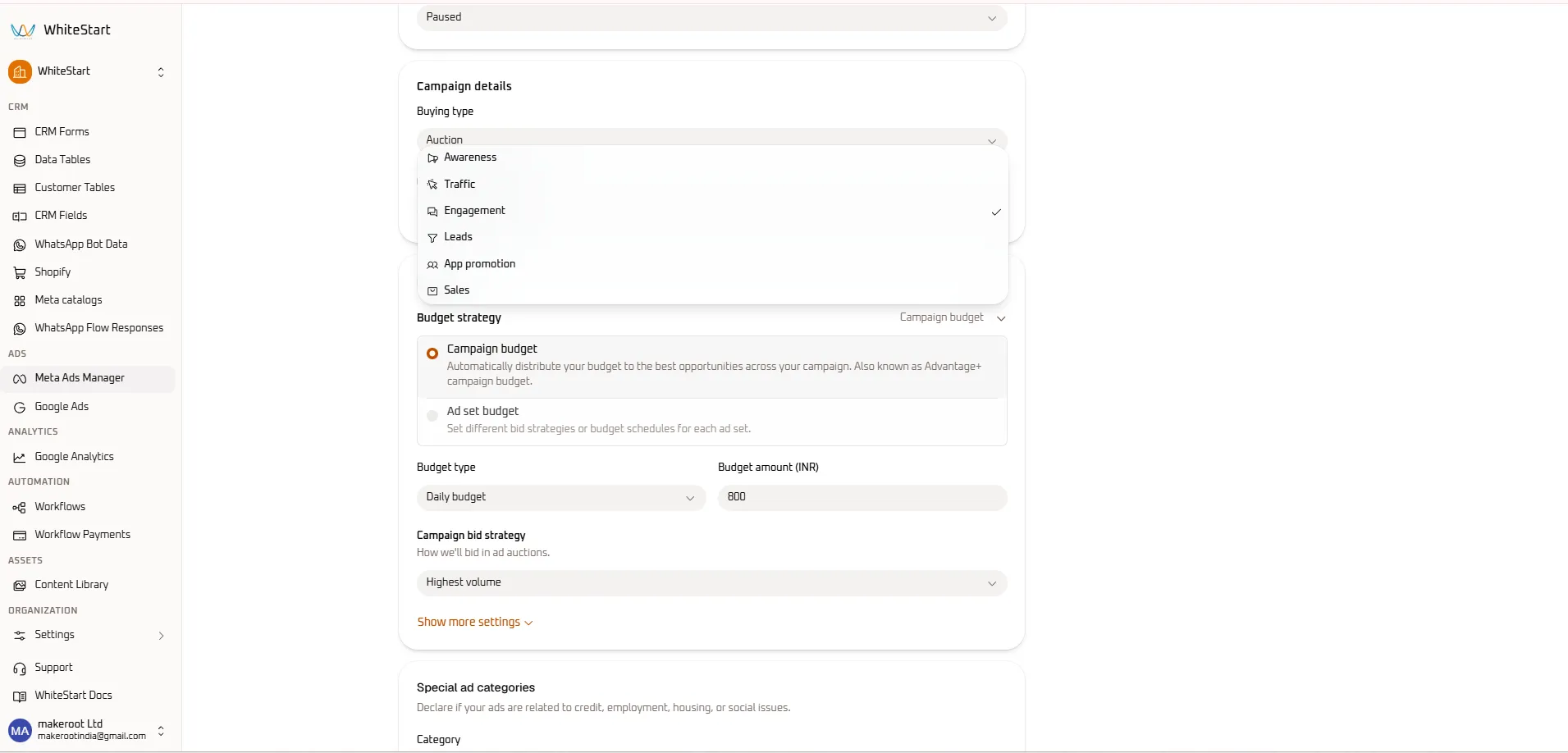
Section titled “Step 2: Buying Type, Objectives & Budget Architecture”Define how Meta’s auction bids for impressions and how media budget is distributed across child ad sets.
-
Buying Type: Defaults to
Auction, utilizing Meta’s real-time algorithmic bidding marketplace. -
Campaign Objective Selection: Choose from the 6 standardized Meta advertising objectives:
- Awareness (
📣): Maximize brand impressions and ad recall among broad audiences. - Traffic (
🖱️): Drive visits to a specific website landing page, blog, or app store listing. - Engagement (
💬): Maximize post comments, shares, video views, event responses, or chat conversations. - Leads (
🎯): Collect contact information via Instant Forms, Messenger, or WhatsApp. - App promotion (
📱): Drive mobile app downloads and high-value in-app activities. - Sales (
🛍️): Optimize for e-commerce checkouts, add-to-cart actions, and catalog conversions.
- Awareness (
-
Budget Strategy:
- Campaign budget (Advantage+ Campaign Budget): Meta automatically shifts budget in real time to the highest-performing ad sets and creatives.
- Ad set budget: Allows manual budget allocation and individual pacing schedules per ad set.
-
Budget Type & Amount:
- Select
Daily budgetorLifetime budget. - Enter your allocation in native currency (e.g.,
800INR).
- Select
-
Campaign Bid Strategy: Select your auction approach (e.g.,
Highest volume).
Step 3: Special Ad Categories & Campaign Schedule
Section titled “Step 3: Special Ad Categories & Campaign Schedule”Declare regulated advertising categories and define operational launch timelines.
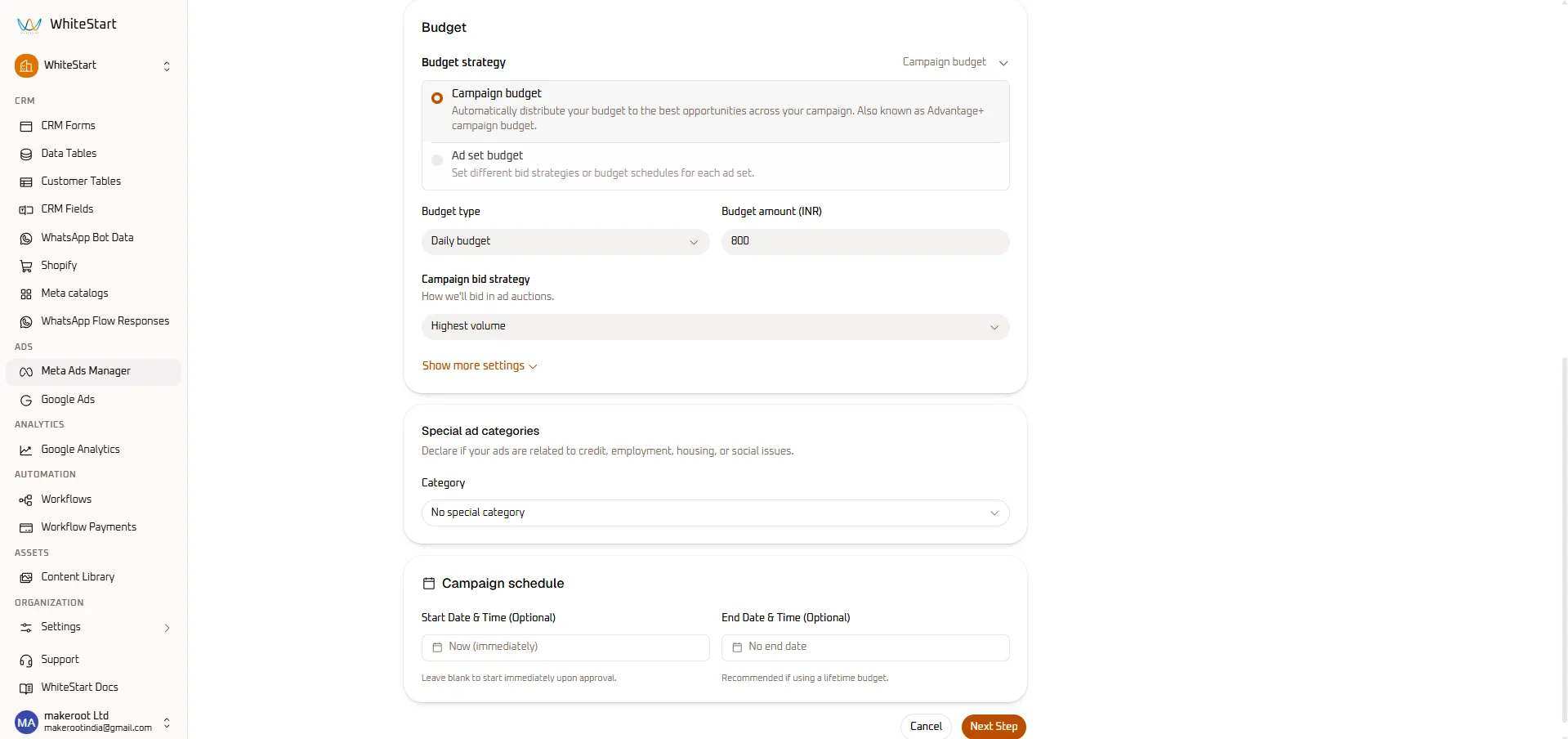
- Special Ad Categories:
- If your ads relate to Credit / Financial services, Employment, Housing / Real Estate, or Social Issues / Elections, declare the category to maintain compliance with Meta’s advertising policies.
- For standard commercial products or services, select
No special category.
- Campaign Schedule (Optional):
- Start Date & Time: Select
Now (immediately)or enter a future scheduled launch date. - End Date & Time: Keep as
No end datefor continuous ongoing delivery, or enter an end timestamp if using a lifetime budget.
- Start Date & Time: Select
- Advance to Ad Set: Click the orange
Next Stepbutton in the bottom right corner to proceed directly into the Create Meta Ad Set configuration console.
4. Next Steps
Section titled “4. Next Steps”- Continue to the Ad Sets Guide to configure audience demographics, map radius targeting, and placement destinations.
- Once ad sets are created, review the Ads Guide to upload creative assets and configure dynamic copy.