
How to Create Meta Ads - Dynamic Media, Copy & Previews
How to Create Meta Ads: Dynamic Media, Copy & Previews
Section titled “How to Create Meta Ads: Dynamic Media, Copy & Previews”The Ads tier in WhiteStart governs the visual and textual assets presented to your target audience across Facebook and Instagram. Here, marketers configure single-image, video, or carousel ads, set up multivariate copywriting hooks, and verify multi-channel previews across mobile and desktop feeds.
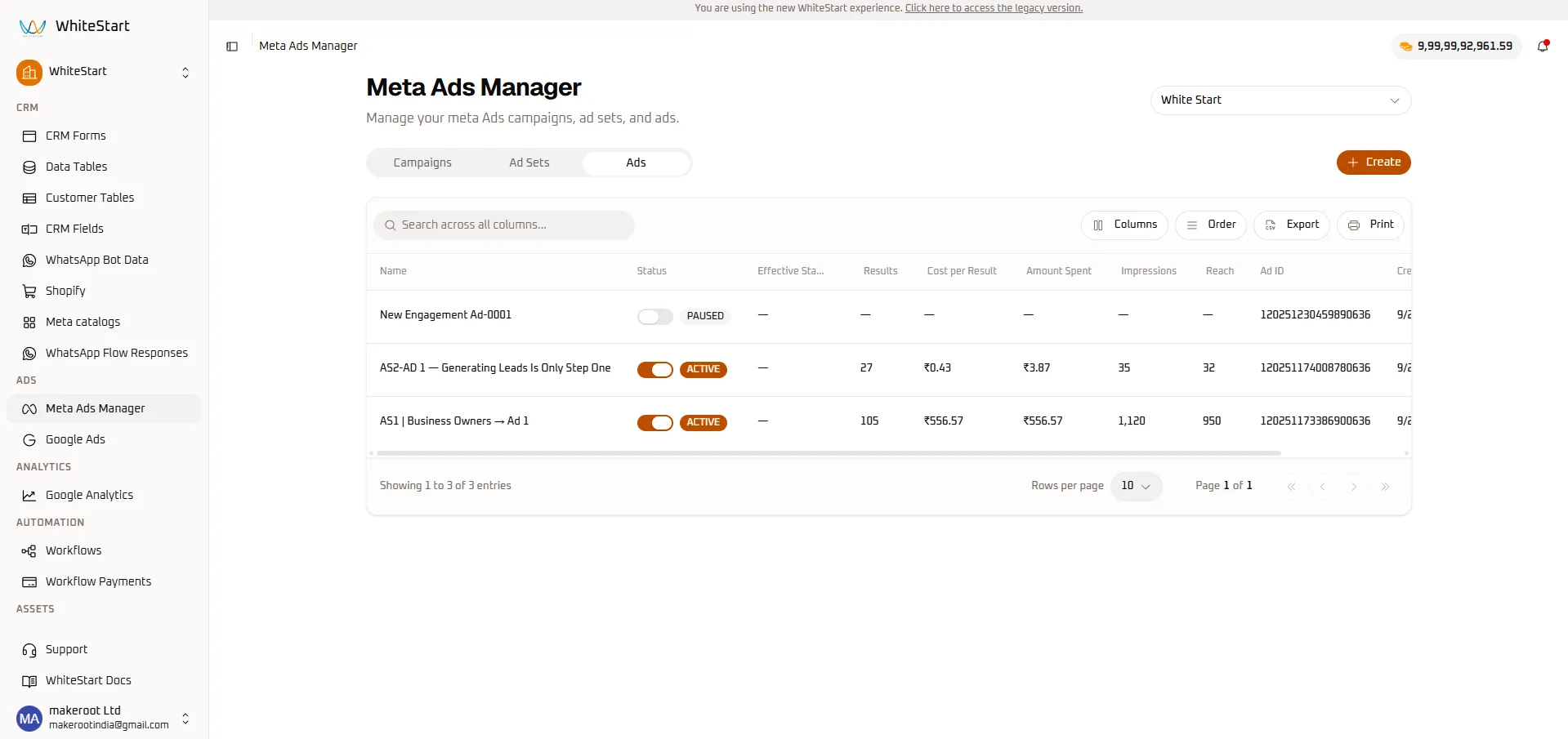
1. Ads Directory & Grid Overview
Section titled “1. Ads Directory & Grid Overview”To access your individual ads, navigate to:
Main Sidebar ➔ ADS ➔ Meta Ads Manager ➔ [ Ads ] TabAds Table Field Reference
Section titled “Ads Table Field Reference”| Column Header | Data Type | Description | Operational Purpose |
|---|---|---|---|
| Name | Text | Creative or variant identifier (e.g., AS2-AD 1 — Generating Leads Is Only Step One). |
Distinguishes visual and copy variants. |
| Status | Toggle Switch | Delivery state (ACTIVE / PAUSED). |
Instantly stop budget allocation to fatigued or underperforming creatives. |
| Effective Status | Status Label | Meta API evaluated operational status. | Confirms delivery health, review approvals, or policy notices. |
| Results | Numeric Counter | Conversions attributed directly to this creative. | Pinpoints which ad copy or visual drives actual conversions. |
| Cost per Result | Currency Metric | Cost per result generated by this ad asset. | Identifies winning creatives for scaling. |
| Amount Spent | Currency Metric | Media spend consumed by this individual creative. | Prevents runaway spend on unproven ad variations. |
| Impressions | Numeric Counter | Total creative impressions served. | Measures creative exposure and fatigue potential. |
| Reach | Numeric Counter | Unique individuals who viewed this ad creative. | Assesses unique exposure per creative. |
| Ad ID | Numeric String | Unique 18-digit Meta Ad Identifier (e.g., 120251174008780636). |
Used for API logging, conversion tracking, and Meta Business support tickets. |
2. Creative Fatigue & Frequency Monitoring
Section titled “2. Creative Fatigue & Frequency Monitoring”In the Ads tab, media buyers monitor the ratio between impressions and unique reach to identify ad fatigue:
$$\text{Frequency} = \frac{\text{Impressions}}{\text{Reach}}$$
- Healthy Delivery (1.0 – 2.5): The audience is seeing the ad at an optimal rate without feeling overwhelmed.
- Fatigue Warning (3.5+): When frequency climbs above 3.5 and Cost per Result starts increasing, the audience is developing ad blindness.
- Corrective Action: Toggle the fatigued creative to PAUSED and introduce a fresh variation using the wizard below.
3. Creating a New Meta Ad Creative (Step-by-Step)
Section titled “3. Creating a New Meta Ad Creative (Step-by-Step)”To create a new visual advertisement, navigate to Meta Ads Manager ➔ Ads and click the orange + Create button.
Meta Ads Manager ➔ [ Ads ] Tab ➔ [+ Create] ➔ Create Meta Ad ConsoleStep 1: Parent Ad Set Linking & Feed Previews
Section titled “Step 1: Parent Ad Set Linking & Feed Previews”Connect the creative to its parent ad set and initialize multi-channel feed rendering.
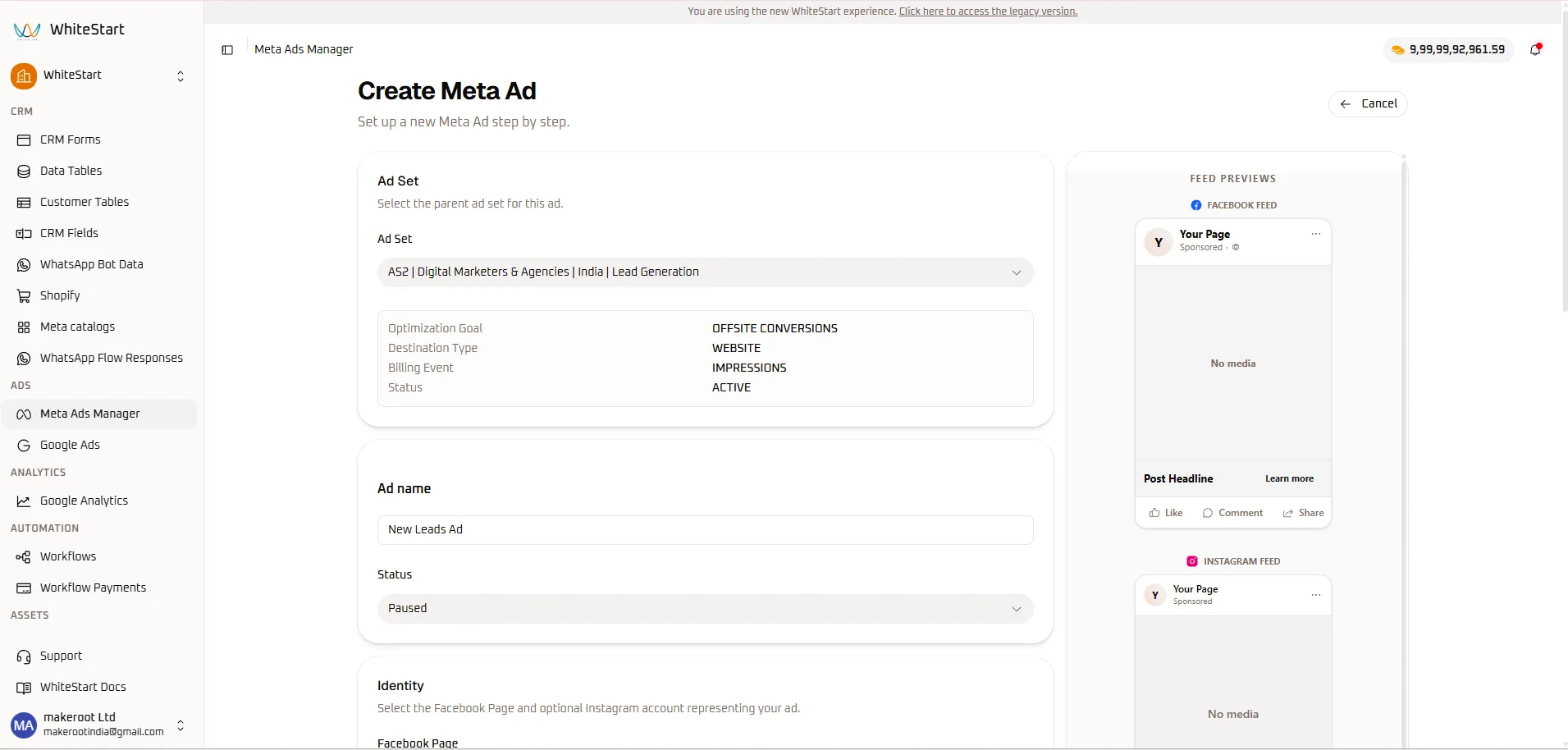
- Select Parent Ad Set: Choose the target ad set from the dropdown (e.g.,
AS2 | Digital Marketers & Agencies | India | Lead Generation). - Review Ad Set Metadata: WhiteStart automatically surfaces the parent ad set settings for validation:
- Optimization Goal:
OFFSITE CONVERSIONS - Destination Type:
WEBSITE - Billing Event:
IMPRESSIONS - Status:
ACTIVE
- Optimization Goal:
- Ad Name: Enter an identifier for the creative (e.g.,
New Leads Ad 001). - Status: Select initial status (
Paused). - Feed Previews Panel: The persistent right-hand column initializes live mockup previews for Facebook Feed and Instagram Feed.
Step 2: Social Identity & Ad Format Setup
Section titled “Step 2: Social Identity & Ad Format Setup”Specify the official brand identity and presentation format of the advertisement.
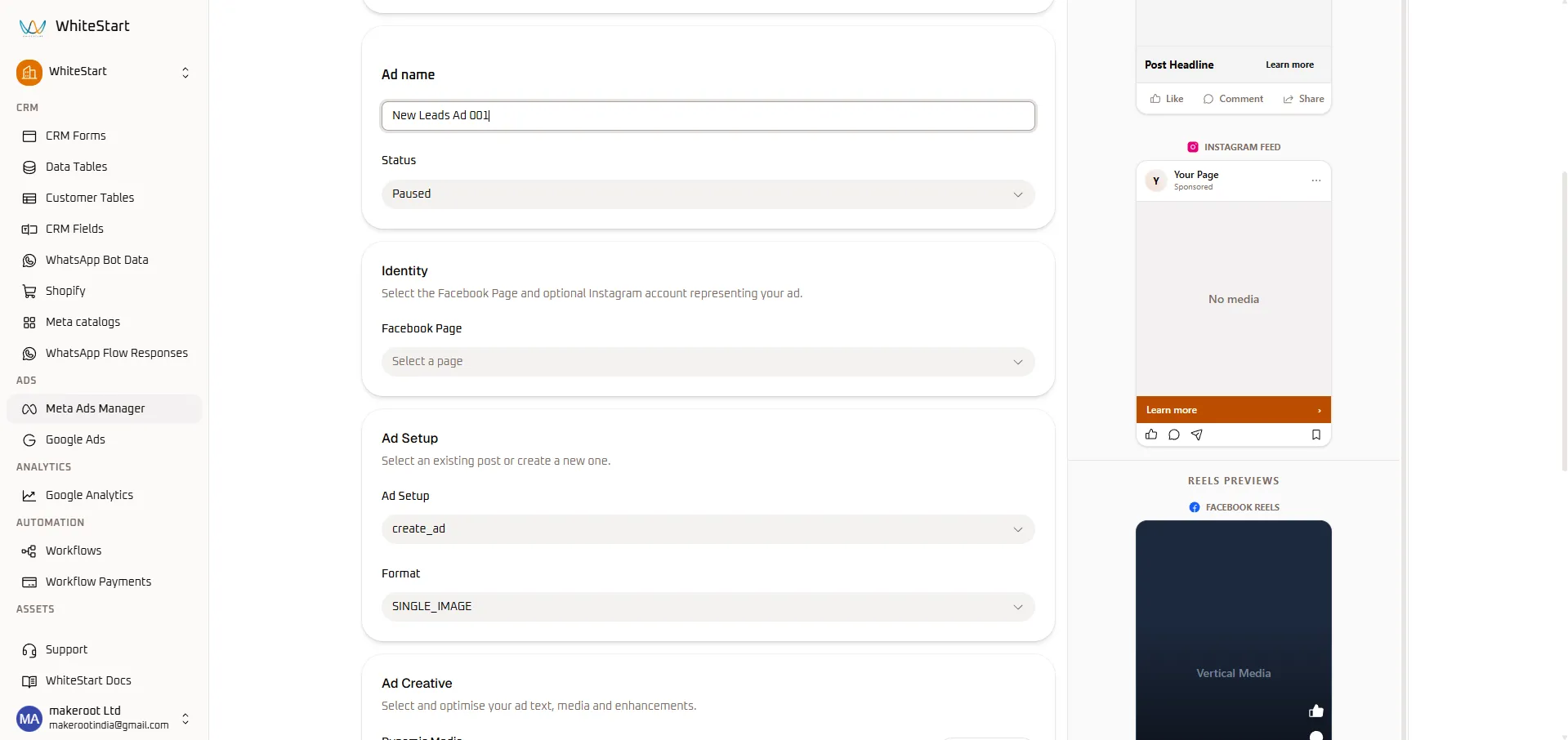
- Identity Selection:
- Click Facebook Page and select your authenticated company page (e.g.,
Your Page). - If an Instagram account is connected to the page, it is automatically paired.
- Click Facebook Page and select your authenticated company page (e.g.,
- Ad Setup Mode: Choose
create_adto build a new ad from scratch. - Format Selection: Select your preferred creative format from the dropdown:
SINGLE_IMAGE/ Video- Carousel (multi-card scroll)
- Reels Previews Initialized: The right-hand preview panel automatically expands to display a vertical container for Facebook Reels.
Step 3: Media Upload, Multivariate Copy & CTA
Section titled “Step 3: Media Upload, Multivariate Copy & CTA”Upload high-resolution media assets and take advantage of multivariate text options to empower Meta’s dynamic machine-learning delivery.
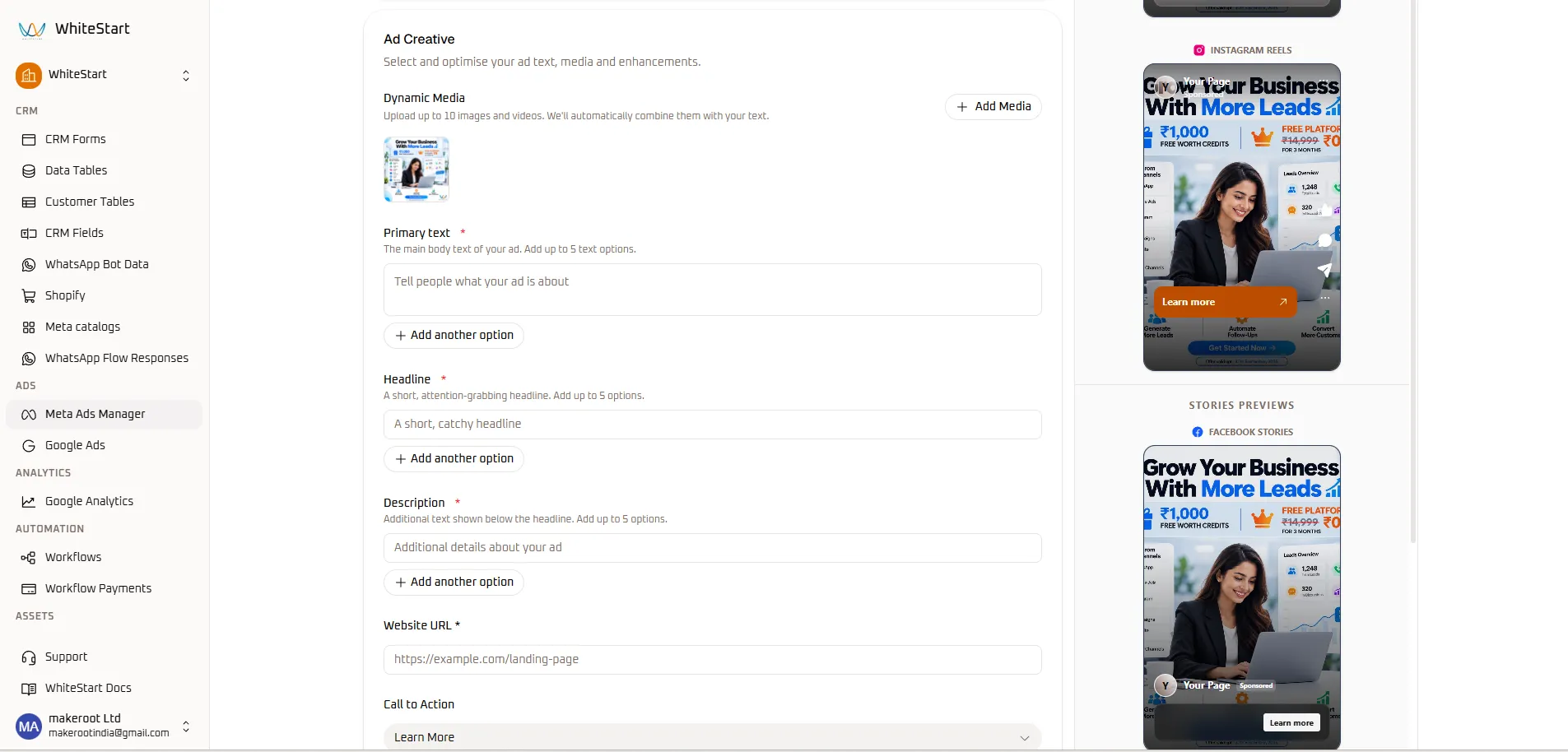
- Dynamic Media Upload:
- Click the
+ Add Mediabutton. - Upload up to 10 images or videos from your computer or WhiteStart Content Library.
- Active media thumbnails appear in the gallery (e.g., “Grow Your Business With More Leads”).
- Click the
- Primary Text (Up to 5 options):
- Enter your primary promotional body copy into the text input.
- Click
+ Add another optionto supply up to 5 alternative copy hooks for automated A/B testing.
- Headline (Up to 5 options):
- Enter a punchy headline (e.g., “Generate More Qualified Leads”).
- Click
+ Add another optionto provide headline variations.
- Description (Up to 5 options):
- Add supporting secondary text displayed beneath the headline.
- Website URL: Enter your secure landing page destination (e.g.,
https://example.com/landing-page). - Call to Action (CTA): Select the action button prompt from the dropdown (e.g.,
Learn More,Sign Up,Get Quote,Contact Us). - Live Preview Inspection: The right column renders your uploaded image and primary copy across Instagram Reels and Facebook Stories in real time.
Step 4: Multi-Channel Story Previews & Publishing
Section titled “Step 4: Multi-Channel Story Previews & Publishing”Perform final visual verification across all mobile and desktop surfaces before pushing the ad live.
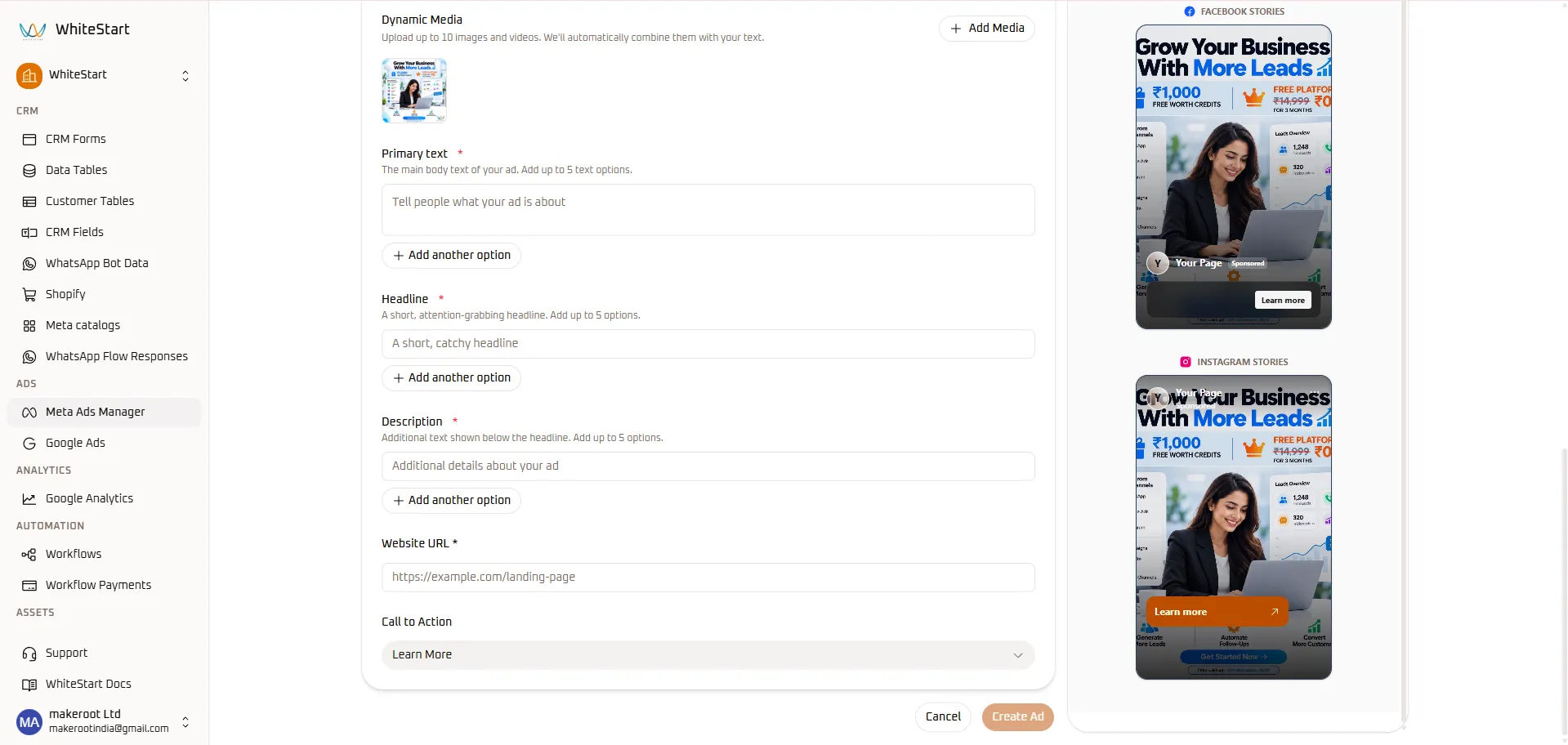
- Inspect Instagram Stories & Facebook Stories:
- Verify that primary text, branding logos, and CTA buttons do not overlap with platform navigation or profile headers.
- Confirm that the orange Learn more > action bar displays prominently.
- Final Submission:
- Review all fields for grammatical precision and policy compliance.
- Click the orange
Create Adbutton in the bottom right corner.
- Meta Policy Review: The new creative is securely dispatched to Meta’s Graph API. Its initial status will display in the Ads table as
PENDING REVIEWbefore switching toACTIVE.
4. Next Steps
Section titled “4. Next Steps”- Review Meta Ads Overview for global toolbar controls, CSV exports, and CRM attribution.
- Visit the Campaigns Guide to track macro ROI and budget allocation.