
Meta Ad Sets - Audience Targeting, Geo-Radius Maps & Placements
Meta Ad Sets: Audience Targeting, Geo-Radius Maps & Placements
Section titled “Meta Ad Sets: Audience Targeting, Geo-Radius Maps & Placements”The Ad Sets tier in WhiteStart defines who sees your ads, where user actions occur, and how ad delivery is prioritized across Meta platforms. By segmenting audiences into distinct ad sets, growth teams can test demographic cohorts, isolate cost efficiencies, and optimize return on ad spend (ROAS).
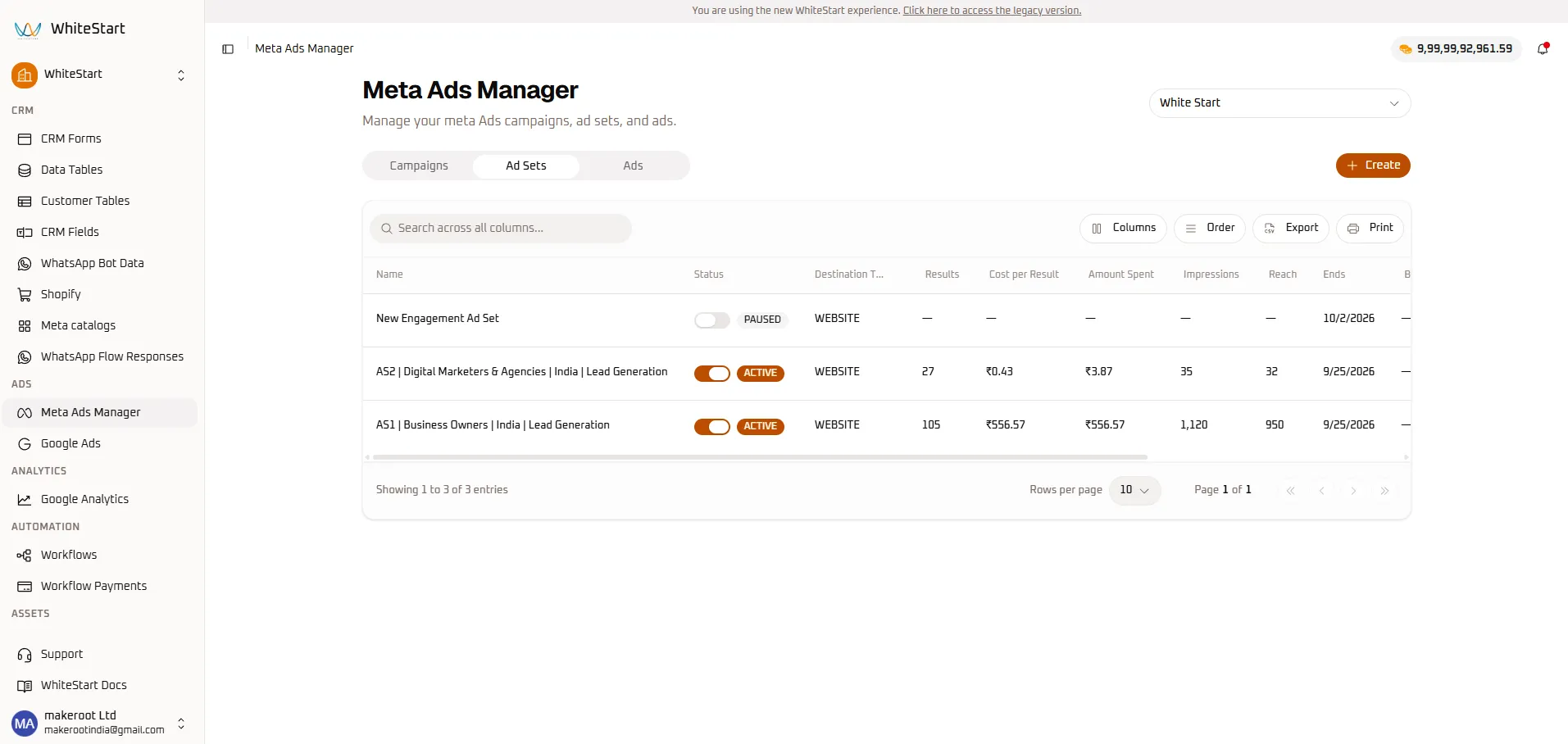
1. Ad Sets Directory & Grid Overview
Section titled “1. Ad Sets Directory & Grid Overview”To access your ad sets, navigate to:
Main Sidebar ➔ ADS ➔ Meta Ads Manager ➔ [ Ad Sets ] TabAd Sets Table Field Reference
Section titled “Ad Sets Table Field Reference”| Column Header | Data Type | Description | Operational Purpose |
|---|---|---|---|
| Name | Text | Identifying title of the audience ad set. | Distinguishes target cohorts (e.g., AS1 | Business Owners vs. AS2 | Digital Marketers & Agencies). |
| Status | Toggle Switch | Delivery state of the individual ad set (ACTIVE / PAUSED). |
Allows pausing underperforming audiences without shutting down the entire campaign. |
| Destination Type | Badge | Conversion target (e.g., WEBSITE, Instant Form, WhatsApp). |
Directs user traffic upon clicking the ad creative. |
| Results | Numeric Counter | Volume of desired actions generated by this ad set. | Compares conversion volume across demographic segments (e.g., 105 vs 27). |
| Cost per Result | Currency Metric | Unit acquisition cost specific to this audience segment. | Primary efficiency metric (e.g., ₹0.43 vs ₹556.57). |
| Amount Spent | Currency Metric | Media budget consumed specifically by this ad set. | Tracks segment-level budget pacing. |
| Impressions | Numeric Counter | Total display volume delivered to this audience. | Assesses ad exposure volume per segment. |
| Reach | Numeric Counter | Unique individuals exposed within this demographic. | Tracks audience saturation and fatigue risk. |
| Ends | Date Timestamp | Scheduled completion timestamp for this ad set. | Controls promotional deadlines. |
2. Segment Auditing & Budget Optimization
Section titled “2. Segment Auditing & Budget Optimization”The Ad Sets table enables side-by-side comparison of targeting cohorts to prevent wasted ad spend:
+─────────────────────────────────────────────────────────────────────────────+| AUDIENCE SEGMENT RESULTS COST / RESULT ACTION || || AS2 | Digital Marketers 27 ₹0.43 KEEP ACTIVE (Scale)|| AS1 | Business Owners 105 ₹556.57 PAUSE (Drain) |+─────────────────────────────────────────────────────────────────────────────+- In the example above,
AS2generates conversions at just ₹0.43 per result, whereasAS1costs ₹556.57 per result. - By toggling
AS1to PAUSED, media buyers immediately stop budget drain and concentrate capital on the winning audience.
3. Creating a New Meta Ad Set (Step-by-Step)
Section titled “3. Creating a New Meta Ad Set (Step-by-Step)”To create an ad set, click + Create from the Ad Sets tab, or arrive directly from Step 3 of the Campaign creation wizard.
Meta Ads Manager ➔ [ Ad Sets ] Tab ➔ [+ Create] ➔ Create Meta Ad Set ConsoleStep 1: Parent Campaign Verification & Ad Set Score
Section titled “Step 1: Parent Campaign Verification & Ad Set Score”Connect the ad set to its parent campaign and review baseline optimization feedback.
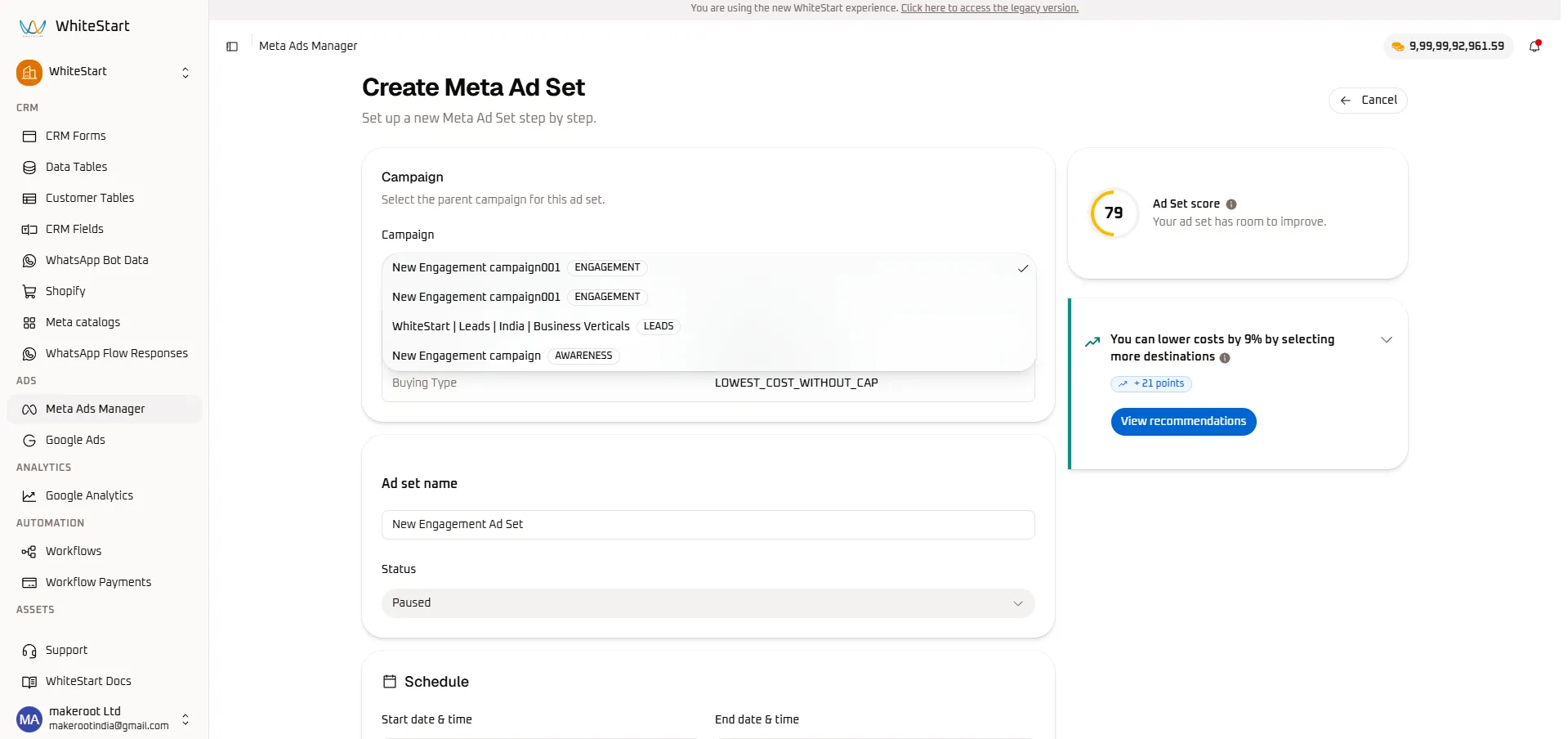
- Select Parent Campaign: Open the Campaign dropdown to choose the parent initiative (e.g.,
New Engagement campaign001 [ENGAGEMENT]). - Review Buying Type: Confirms the auction model (e.g.,
LOWEST_COST_WITHOUT_CAP). - Ad Set Score Inspection:
- The live gauge displays your ad set optimization rating (e.g., 79 / 100).
- Recommendations Card: Suggestions such as “You can lower costs by 9% by selecting more destinations (+21 points)” help improve algorithmic delivery. Click View recommendations to apply.
Step 2: Naming, Schedule & Value Rules
Section titled “Step 2: Naming, Schedule & Value Rules”Define the ad set title, execution timeline, and value models.
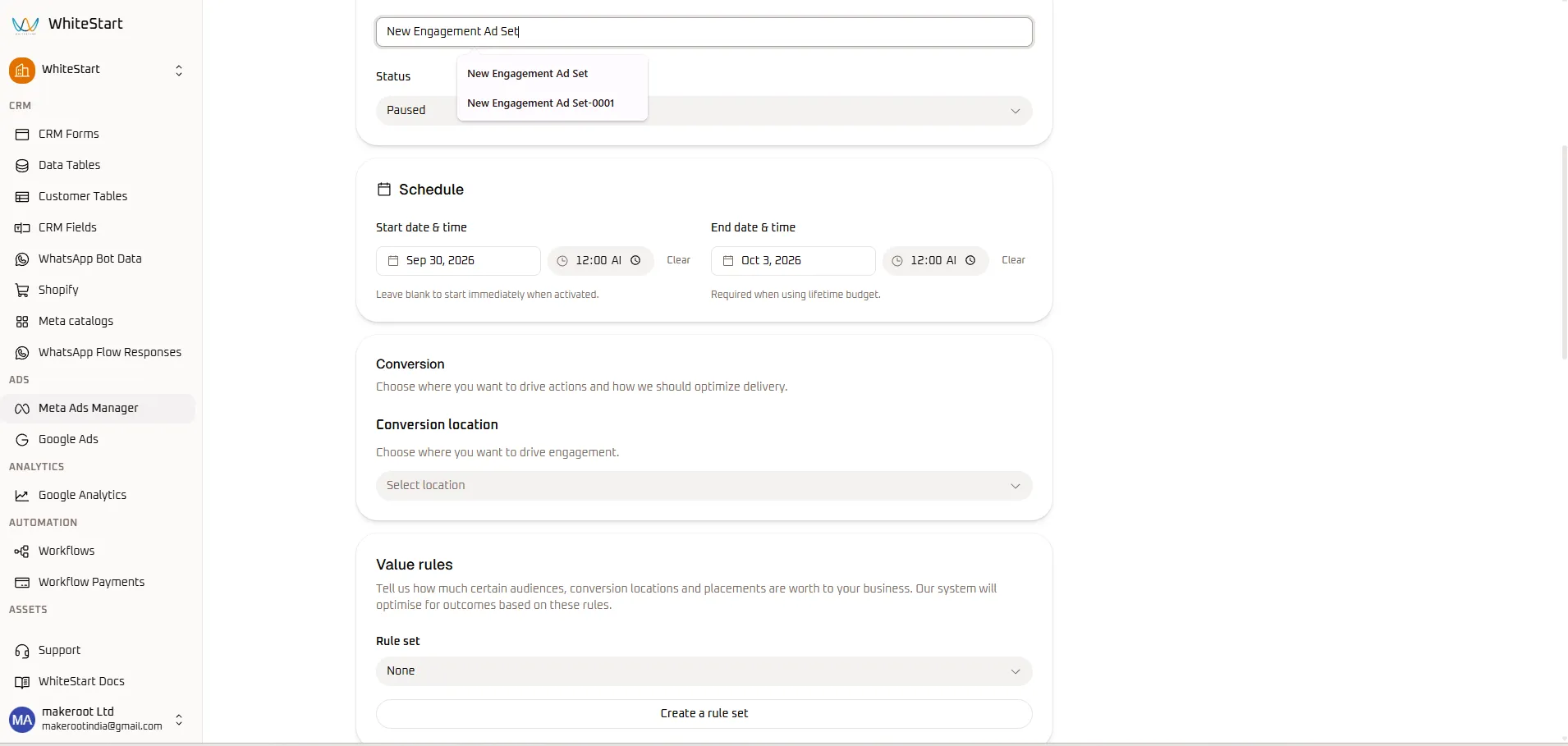
- Ad Set Name: Enter an audience title (e.g.,
New Engagement Ad Set). Auto-complete suggestions appear to assist with standard organizational naming conventions. - Initial Status: Set to
Pausedwhile drafting. - Schedule Configuration:
- Start date & time: Select launch date (
Sep 30, 2026) and time (12:00 AM). Leave blank to begin immediately upon activation. - End date & time: Select completion date (
Oct 3, 2026) and time (12:00 AM). Mandatory when using a lifetime budget.
- Start date & time: Select launch date (
- Value Rules: To weight certain customer demographics or placements with higher bids, select an existing rule set or click Create a rule set.
Step 3: Conversion Location & Demographic Targeting
Section titled “Step 3: Conversion Location & Demographic Targeting”Select where customer interactions should occur and set basic demographic filters.
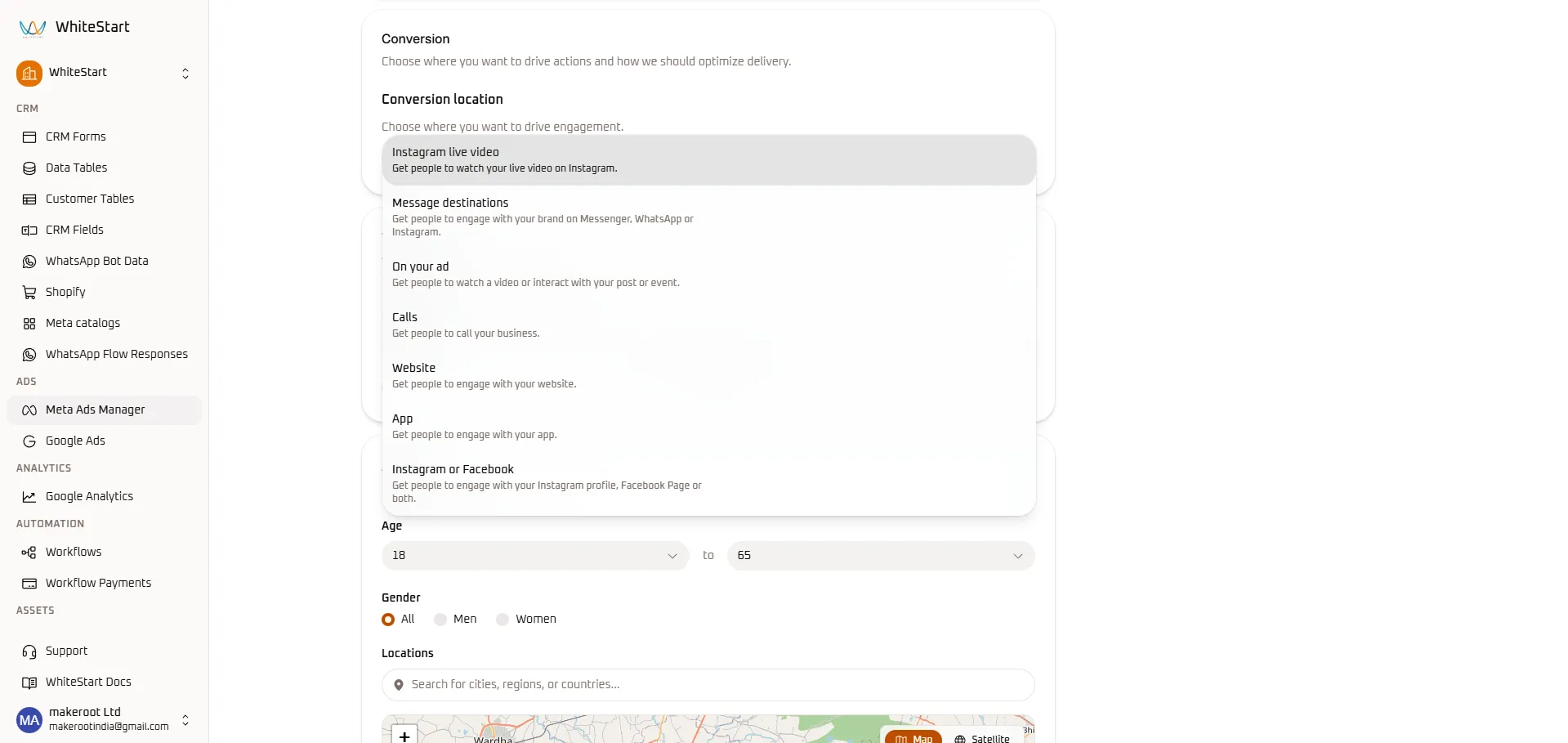
- Conversion Location Selection: Choose the destination where actions occur:
- Message destinations: Direct users into Messenger, WhatsApp, or Instagram DM (ideal for conversational lead qualification in WhiteStart Inbox).
- Website: Direct visitors to external landing pages or online checkout funnels.
- Calls: Prompt mobile users to place immediate phone calls to your sales team.
- On your ad: Optimize for on-platform engagement, video views, or event responses.
- App: Drive mobile application installs and in-app actions.
- Instagram or Facebook: Grow social followers and profile engagement.
- Instagram live video: Maximize live stream viewership.
- Age Thresholds: Set minimum and maximum age brackets (e.g.,
18to65). - Gender: Select All, Men, or Women.
Step 4: Geographic Map Targeting & Detailed Interests
Section titled “Step 4: Geographic Map Targeting & Detailed Interests”Pinpoint your target audience using WhiteStart’s interactive geographical map and granular behavioral interest modeling.
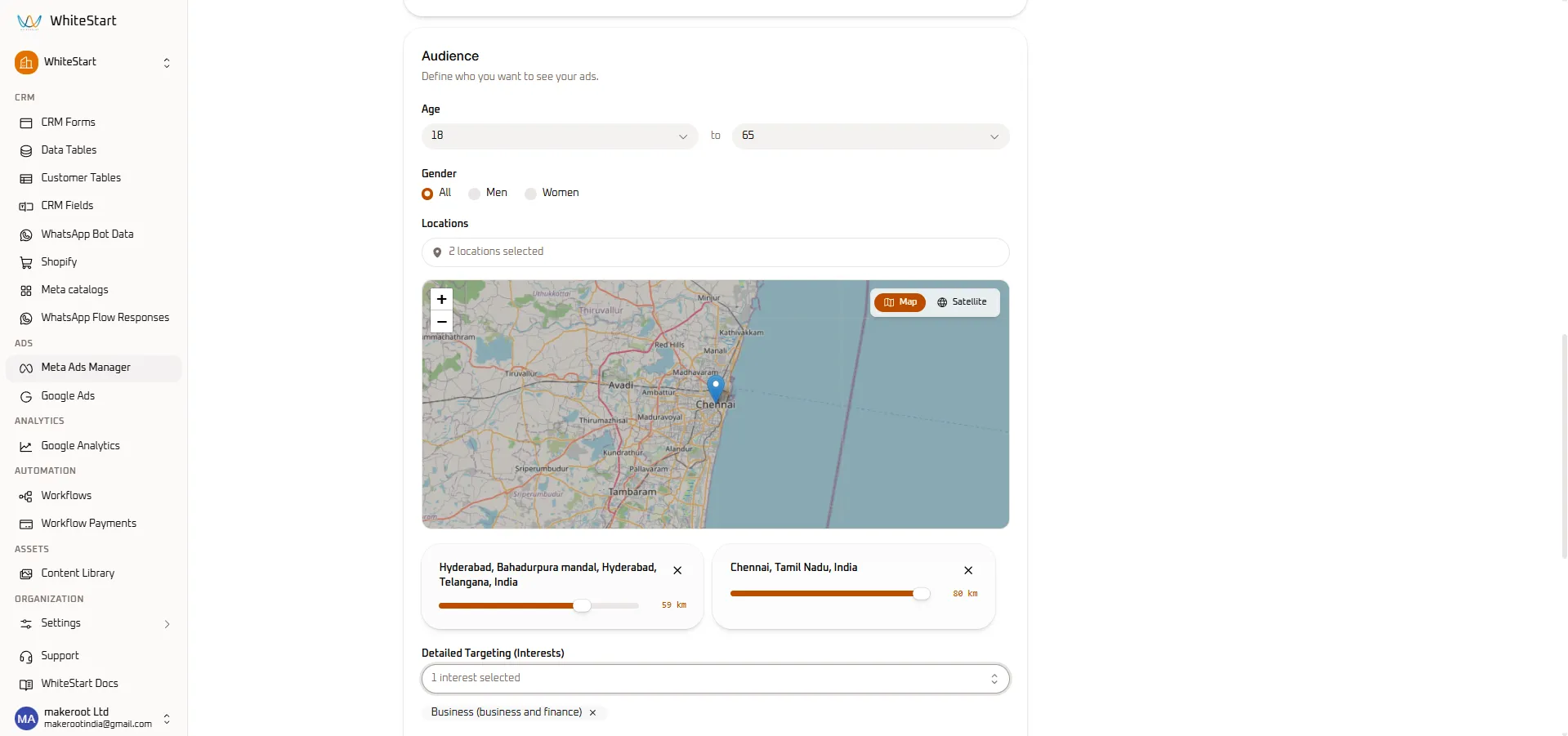
- Interactive Geographic Map & Radius Sliders:
- Search for target cities or regions in the Locations search bar.
- WhiteStart renders an interactive visual map with location pins.
- Adjust the kilometer slider on each location card to fine-tune the broadcast radius:
- Location 1:
Hyderabad, Telangana, India➔ Slider set to 59 km. - Location 2:
Chennai, Tamil Nadu, India➔ Slider set to 80 km.
- Location 1:
- Detailed Targeting (Interests):
- Search for customer affinities, job titles, or industries.
- Selected tags appear as removable chips (e.g.,
Business (business and finance) [x]).
Step 5: Placements & Dynamic Creative Optimization
Section titled “Step 5: Placements & Dynamic Creative Optimization”Complete your ad set configuration by selecting delivery placements and automated creative optimization.
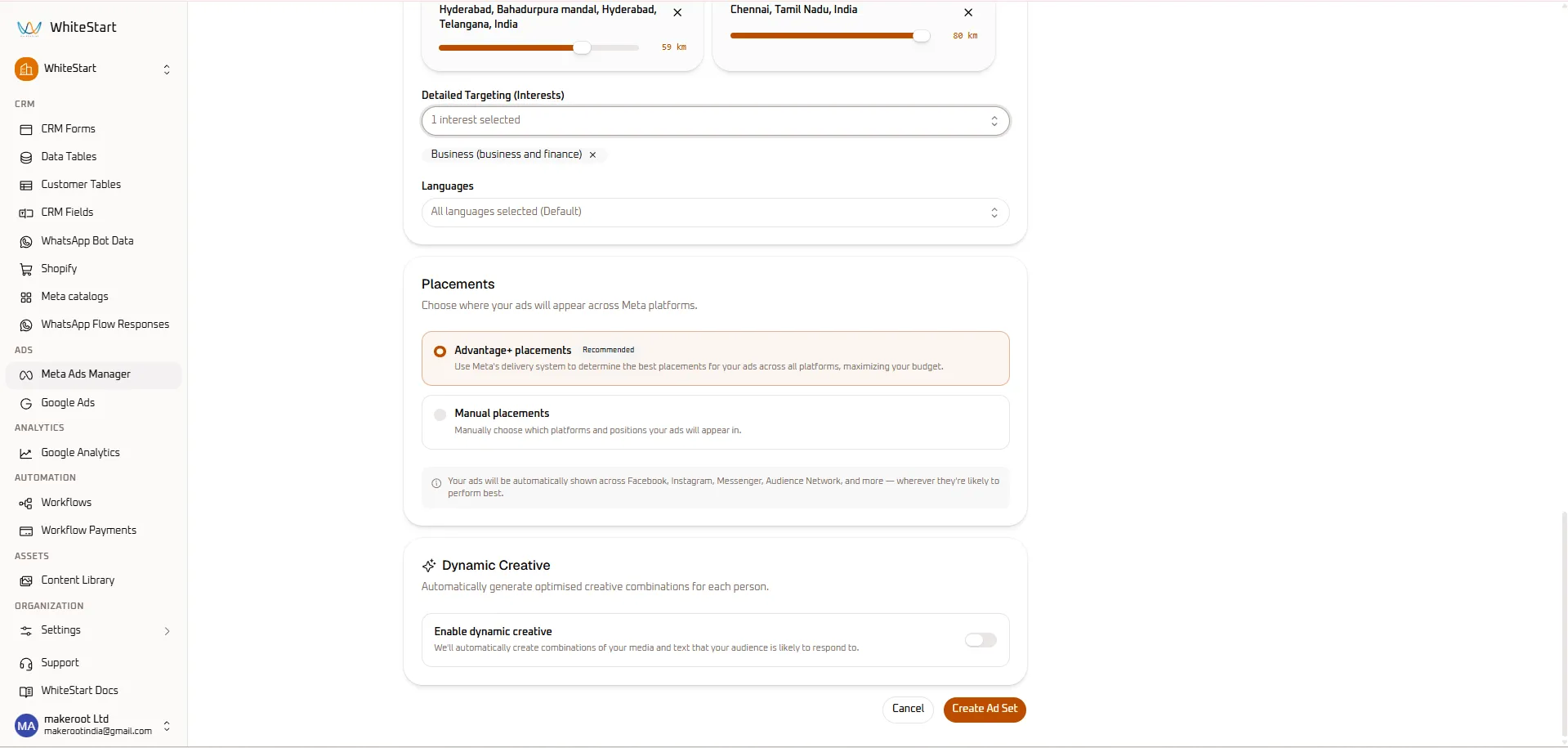
- Languages: Keep
All languages selected (Default)or specify localized dialects. - Placements Selection:
- Advantage+ placements (Recommended): Meta automatically optimizes delivery across Facebook, Instagram, Messenger, and Audience Network based on conversion likelihood.
- Manual placements: Hand-pick specific platforms, feeds, stories, or reels.
- Dynamic Creative:
- Toggle Enable dynamic creative on to let Meta automatically test and combine different headlines, copy, and media assets for each unique user.
- Finalizing Ad Set: Click the orange
Create Ad Setbutton.
4. Next Steps
Section titled “4. Next Steps”- Proceed to the Ads Guide to build visual creatives, attach copywriting variations, and inspect cross-placement previews.
- Return to the Campaigns Guide to adjust macro budget allocation.