
The Live Inbox provides a unified communication and lead management interface for Instagram Direct Messages (DMs). It enables sales, support, and marketing teams to chat with Instagram users, manage incoming inbound inquiries, collaborate with team notes, qualify leads, and synchronize customer data directly with the CRM in real time.
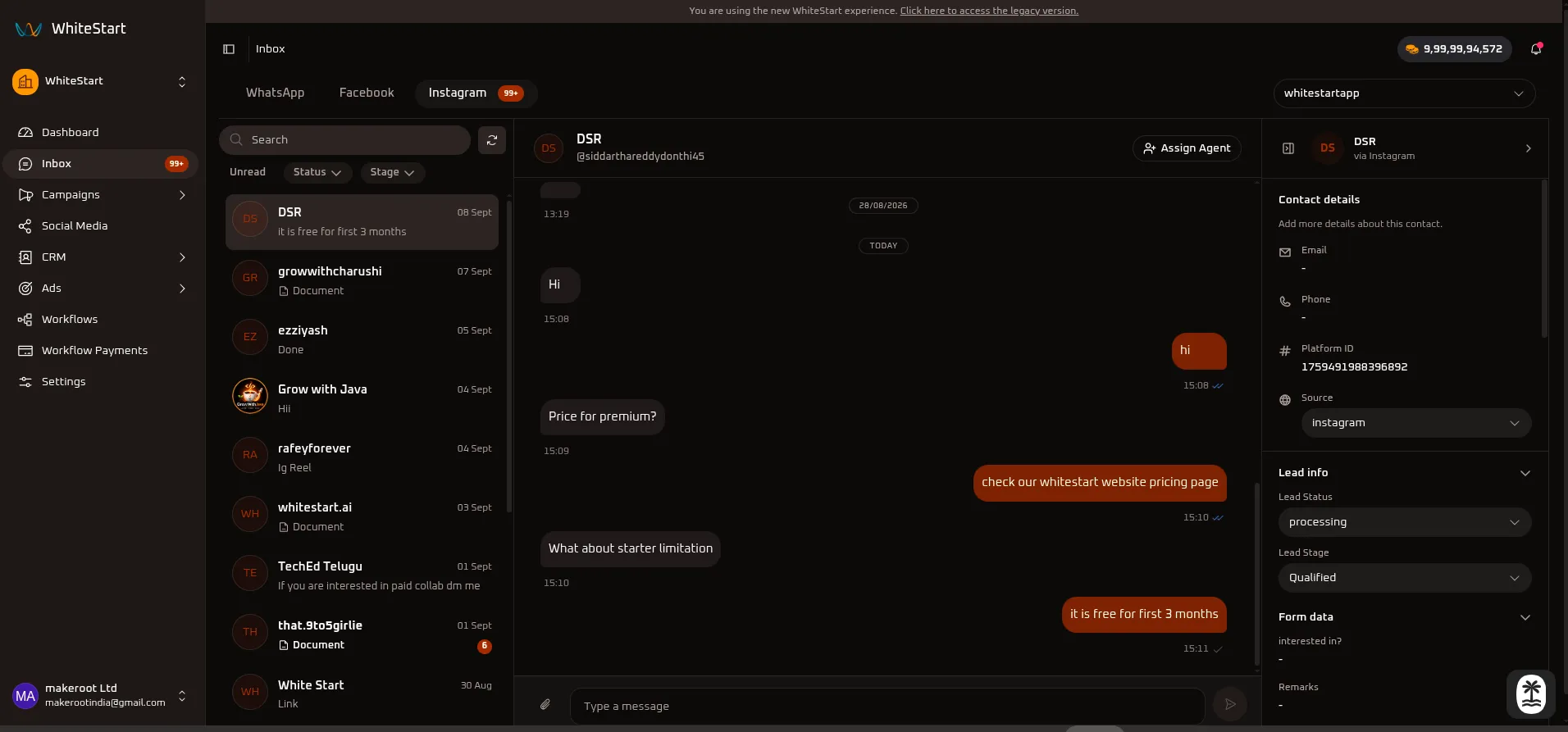
Main Sidebar ➔ Inbox ➔ Channels (Top Bar) ➔ InstagramWorkspace Layout
Section titled “Workspace Layout”The Live Inbox for Instagram is organized into three connected operational sections:
┌─────────────────────────┬──────────────────────────────────────────┬─────────────────────────┐│ INBOX FEED │ MESSAGE CENTER │ CRM DETAILS PANEL ││ (Left Panel) │ (Center Panel) │ (Right Panel) │├─────────────────────────┼──────────────────────────────────────────┼─────────────────────────┤│ • Channel Selector │ • Contact Header & Instagram Handle │ • Contact Details ││ • Live Contact Search │ • Multi-Agent Assignment (👤+ Assign) │ • Lead Status Dropdown ││ • Quick Status Filters │ • Two-Way DM Conversation History │ • Lead Stage Pipeline ││ • Quick Stage Filters │ • Read/Delivery State Receipts (✓✓) │ • Dynamic Form Data ││ • Manual Refresh (🔄) │ • Message Composer & Media Upload (📎) │ • Team Internal Notes ││ • Instagram Chat Cards │ • Instant Response Dispatcher (➤) │ • Activity Audit Trail │└─────────────────────────┴──────────────────────────────────────────┴─────────────────────────┘Accessing Instagram in Live Inbox
Section titled “Accessing Instagram in Live Inbox”- Open the Inbox: In the primary navigation sidebar on the left, click Inbox (displays an unread counter badge when new customer inquiries arrive).
- Select Channel: On the top channel selection bar, click the Instagram tab (shows an unread indicator when pending DMs require attention).
- Select Account (Optional): If you manage multiple Instagram professional profiles, select your target account from the top-right workspace profile dropdown (e.g.,
whitestartapp). - Select a Conversation: Click any contact thread in the Inbox Feed to open the chat in the Message Center and load CRM parameters in the CRM Details Panel.
1. Left Section: Inbox Feed
Section titled “1. Left Section: Inbox Feed”The Inbox Feed displays your incoming Instagram Direct Message threads, search utilities, and quick filters.
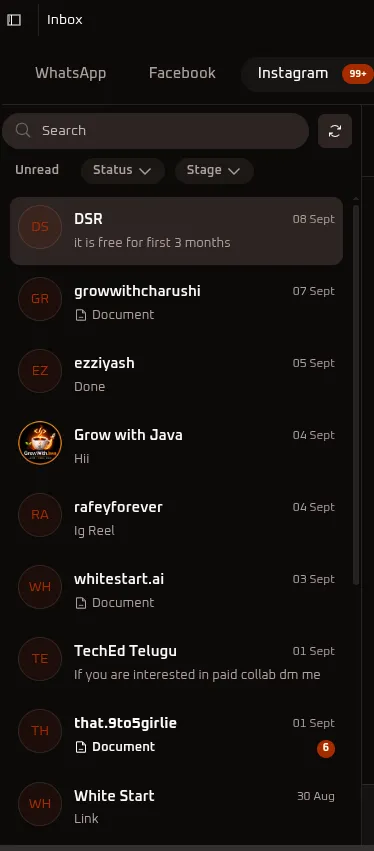
Controls & Options Reference
Section titled “Controls & Options Reference”1. Search Bar (Search)
Section titled “1. Search Bar (Search)”- What it does: Allows you to find specific Instagram conversations quickly.
- How to use it: Type a contact’s display name or Instagram username (e.g.,
DSR,growwithcharushi,that.9to5girlie). The feed filters dynamically as you type.
2. Refresh Button (🔄)
Section titled “2. Refresh Button (🔄)”- What it does: Manually syncs and reloads the conversation list.
- How to use it: Click the Refresh icon (
🔄) next to the search bar to immediately pull in the latest incoming Direct Messages, new comment inquiries, or agent assignment updates without reloading the entire browser window.
3. Unread Filter (Unread)
Section titled “3. Unread Filter (Unread)”- What it does: Isolates conversations that contain unread customer messages.
- How to use it: Click on Unread to focus on active inquiries that need immediate response. Unread counts also appear directly on the contact preview card (e.g., circular badge with
6).
4. Status Filter (Status ▾)
Section titled “4. Status Filter (Status ▾)”- What it does: Filters conversations based on their qualification or engagement status in the CRM.
- How to use it: Click the Status ▾ dropdown and select one or more lead statuses (e.g., New, Interested, Exploring, processing, Onboarded). Only contacts matching the selected status will appear in the feed.
5. Stage Filter (Stage ▾)
Section titled “5. Stage Filter (Stage ▾)”- What it does: Filters contacts according to their milestone in the sales pipeline.
- How to use it: Click the Stage ▾ dropdown to filter by pipeline stages such as New Lead, Contacted, Discovery / Requirement Gathering, Qualified, Meeting Scheduled, Demo Completed, Proposal Sent, Negotiation, Closed Won, or Closed Lost.
Quick Reference Summary
Section titled “Quick Reference Summary”| Control / Filter | Type | Primary Purpose |
|---|---|---|
| Search | Text Input | Search Instagram conversations by contact name or username. |
Refresh (🔄) |
Action Button | Manually sync the latest messages and conversation states. |
| Unread | Quick Filter Pill | View only conversations with pending, unread messages. |
Status (Status ▾) |
Dropdown Filter | Filter contacts by lead qualification status (e.g., Interested, processing). |
Stage (Stage ▾) |
Dropdown Filter | Filter contacts by sales pipeline stage (e.g., Qualified, Closed Won). |
2. Center Section: Message Center
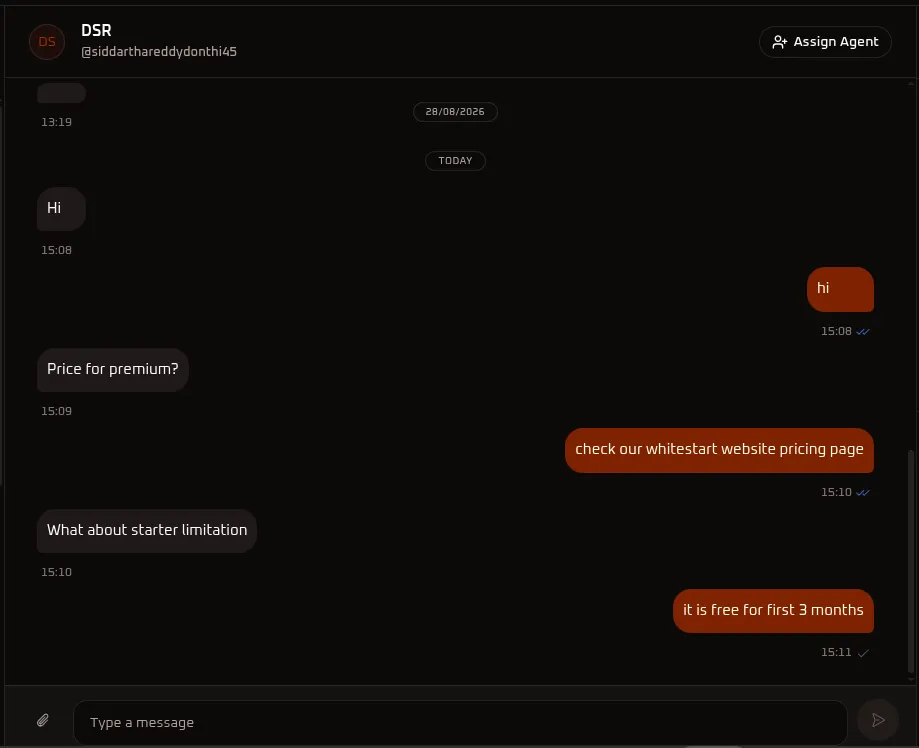
Section titled “2. Center Section: Message Center”The Message Center is your primary active workspace for chatting with Instagram users in real time.
A. Contact Header & Action Bar
Section titled “A. Contact Header & Action Bar”- Contact Identity: Displays the contact’s name (
DSR) and Instagram username (@siddarthareddydonthi45). - Assign Agent (
👤+ Assign Agent): Opens the agent management modal to assign team members to handle the conversation.
B. Assigning Team Agents
Section titled “B. Assigning Team Agents”Clicking Assign Agent opens the team directory:
- Review the customer identifier and profile details at the top of the modal.
- Select one or more agents from your team directory.
- Click
+ Assignto link the conversation.
C. Conversation History & Composer
Section titled “C. Conversation History & Composer”- Message Thread:
- Inbound customer messages appear on the left (grey bubbles) with arrival timestamps (e.g.,
Price for premium?,What about starter limitation). - Outbound replies sent by your agents or automated AI agents appear on the right (orange bubbles) with delivery receipts (
✓✓). - System time dividers (e.g.,
28/08/2026,TODAY) keep conversational context clear.
- Inbound customer messages appear on the left (grey bubbles) with arrival timestamps (e.g.,
- Message Composer: Enter your custom response in the text field at the bottom.
- Media Attachment (
📎): Send supported images, documents, product catalogs, or media assets directly into the chat. - Send Button (
➤): Instantly dispatches your response to the user’s Instagram Direct Inbox.
3. Right Section: CRM Details Panel
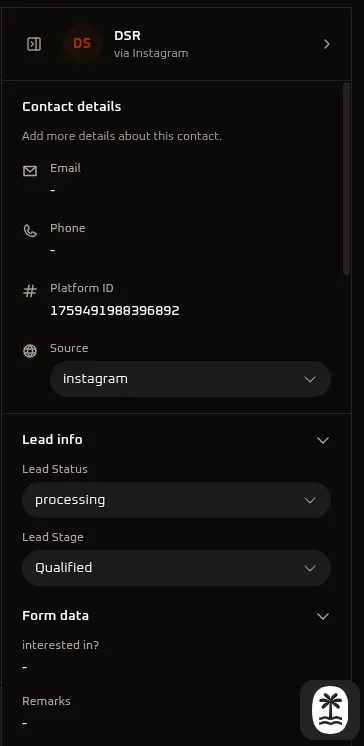
Section titled “3. Right Section: CRM Details Panel”The CRM Details Panel gives you complete customer context, lead qualification parameters, and internal collaboration tools alongside the active conversation. All changes saved here automatically synchronize with your CRM records.
A. Contact Details
Section titled “A. Contact Details”- Profile Header: Displays avatar initials, contact name, and channel origin (
DSR via Instagram). - Email: Shows the customer’s email address (displays
-if not yet captured). - Phone: The contact’s phone number (displays
-if not yet provided). - Platform ID: The unique Instagram Scoped User ID (
1759491988396892) assigned by Meta for tracking and API identification. - Source: Identifies lead acquisition origin (set to
instagram).
B. Lead Qualification: Status
Section titled “B. Lead Qualification: Status”The Lead Status dropdown categorizes the contact’s current interest level and engagement state:
| Status Option | Operational Meaning & When to Use |
|---|---|
| New | Newly captured lead; initial outreach has not yet occurred. |
| Interested | Contact responded positively, asked questions, or expressed purchase intent. |
| Exploring | Prospect is reviewing information, comparing options, or evaluating pricing. |
| Not Interested | Contact explicitly stated they do not need the service or product. |
| No Response | Messages have been sent, but the contact has not replied. |
| Already Using Other | Contact is currently committed to a competitor or alternative platform. |
| Spam | Irrelevant, fraudulent, or abusive contact. |
| processing | Contact is currently undergoing background verification or qualification (as shown in the screenshot). |
| Onboarded | Deal concluded; customer moved to active account onboarding. |
C. Lead Qualification: Stage
Section titled “C. Lead Qualification: Stage”The Lead Stage dropdown maps the contact’s progression through your sales pipeline:
| Stage Option | Pipeline Milestone |
|---|---|
| New Lead | Contact entered the CRM system. |
| Contacted | Initial outreach completed via chat, call, or email. |
| Discovery / Requirement Gathering | Identifying customer requirements, budget, and business needs. |
| Qualified | Prospect meets qualification criteria (BANT) (as shown in the screenshot). |
| Meeting Scheduled | Consultation, sales call, or demo has been booked. |
| Demo Completed | Product demo or presentation has finished. |
| Proposal Sent | Commercial quote or proposal shared with the prospect. |
| Negotiation | Terms, pricing, or contract details are under discussion. |
| Verbal Commitment | Prospect has verbally agreed to proceed; awaiting signatures. |
| Contract Sent | Formal contract or agreement dispatched. |
| Payment Pending | Invoice sent; awaiting payment confirmation. |
| Closed Won | Deal completed and revenue secured. |
| Closed Lost | Opportunity closed without conversion. |
D. Dynamic Form Data
Section titled “D. Dynamic Form Data”Displays structured responses submitted by the contact through website forms, chatbots, or interactive Instagram Flows:
- interested in?: Specific product, service tier, or plan chosen by the customer.
- Remarks: Special customer notes, requirements, or submitted details.
E. Comments & Activity Audit Trail
Section titled “E. Comments & Activity Audit Trail”Maintain internal communication and an immutable historical log of all changes made to the contact record.
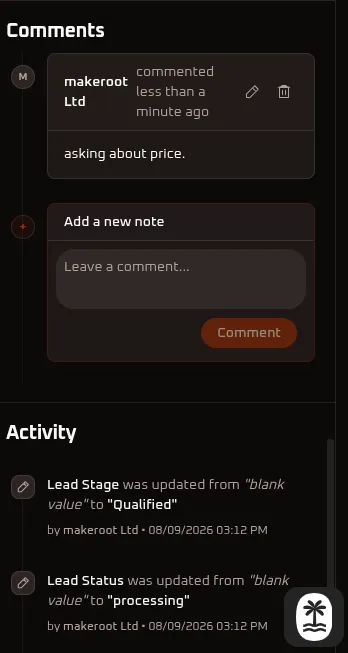
Internal Team Notes (Comments)
Section titled “Internal Team Notes (Comments)”Collaborate internally with teammates directly inside the contact record without sending messages to the customer:
- View Past Notes: Displays previous notes with the author’s name, timestamp, and content (e.g.,
makeroot Ltd commented less than a minute ago: "asking about price."). - Edit / Delete: Click the pencil icon (
✏️) to modify your note or the trash icon (🗑️) to remove it. - Add a Note: Click into the Leave a comment… text area, write your message, and click the orange Comment button.
Activity Audit Trail
Section titled “Activity Audit Trail”Maintains a chronological, tamper-proof audit trail of system and agent actions on the record:
- Field Updates: Automatically logs when fields change (e.g., Lead Stage was updated from “blank value” to “Qualified” by makeroot Ltd • 08/09/2026 03:12 PM and Lead Status was updated from “blank value” to “processing” by makeroot Ltd • 08/09/2026 03:12 PM).
- Accountability: Provides complete visibility into which agent modified contact records, updated stages, or added notes.